Humble Bundle’s New Website Dropped Two-Factor Login, Leaving Only Your Password

Humble Bundle’s new website has no two-factor login. Anyone who has your password gets into your account, and into every game key you haven’t redeemed yet.
I checked my own account this morning, 12 November. The site asked for my password and nothing else, and nothing in the account settings lets you add a second step any more.
Humble relaunched its website this month. Ziff Davis, the company that owns Humble Bundle, told investors last week that the relaunch was “days away”. On 11 November, the Pirate Software account on X, run by game developer Jason Hall, warned that 2FA was gone from the login flow and “doesn’t appear anywhere in your settings”. Threads on ResetEra, SpaceBattles and Hacker News followed. Humble hasn’t commented publicly, and no major outlet had covered it when we published.
A Password, and Nothing Else
Until the relaunch, Humble offered what it calls Two-Step Verification: after your password, the site asked for a code from Google Authenticator. Accounts without it still had Humble Guard, a code sent by email whenever you logged in from a new browser or device.
On the new site, “Security” is a small heading at the very bottom of the settings page. It holds one item.

The Security section of my Humble Bundle account settings on 12 November 2026 (screenshot: Miklos Zoltan).
The sign-in page offers three ways in: your password, a one-time code sent to your email, or a Google account. The emailed code is an alternative, not a second step. The password alone still gets you in, and nothing on the site lets you make it ask for both. So anyone who has your password, or who gets into your inbox, can sign in.
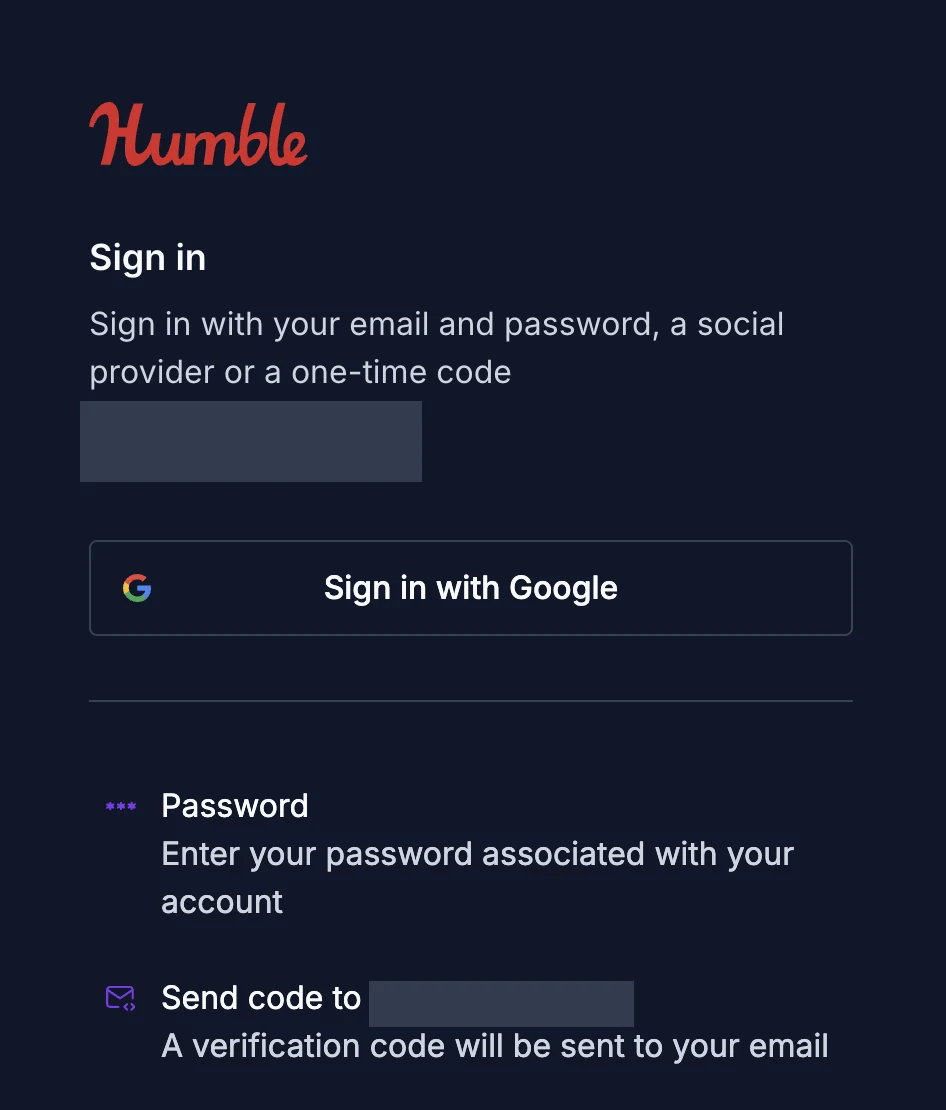
Humble Bundle’s new sign-in page on 12 November 2026: password, emailed code or Google, and no second step (screenshot: Miklos Zoltan; email address hidden).
The Update button lets you change the password. When I did, the site emailed me a code to confirm the change, and after that my new password alone got me in again.
Humble’s help centre hasn’t caught up. Its article on hacked accounts still tells you to enable two-factor authentication. Good advice. The site just doesn’t offer it.
What a Stolen Password Gets Someone
Many Humble customers buy a bundle for one or two games and leave the other keys sitting in their library for years. Those keys are what a thief is after: a Steam or GOG key works on whichever account redeems it first.
Humble’s own rules make that loss stick. Support can replace keys from purchases made in the last 14 days, but, in Humble’s words, “we’re unable to replace keys for older purchases.” An account can also hold saved cards or PayPal for checkout and a Humble Choice subscription.
Nobody needs to break Humble’s site for this. Email and password pairs leaked from other services get tried on every big store, and a second login step is what stops a reused password from working. Without it, a password you also used on a site that got breached is enough.
Switched Off, or Left Out?
The new sign-in runs on auth.humblebundle.com, and the site’s public code shows it uses Ory, a third-party login service. Ory’s documentation lists authenticator apps, security keys and SMS or email codes as second factors, and treats 2FA as something a site enables in its project. The system Humble moved to can do two-factor login. It isn’t turned on.
The settings page’s code also still carries text for a “Two-Step Verification” section, with “Google Authenticator” and “SMS (Authy)” options, that the page never shows. That looks like a feature planned for the new site and left out of the launch rather than one dropped for good. Only Humble can say which, and when it comes back.
Posters on ResetEra and SpaceBattles blame “vibecoding”, meaning code written by AI tools. Nothing public shows that, and Humble hasn’t said how the site was built. Ziff Davis has said why it rebuilt it: on its third-quarter earnings call, CEO Vivek Shah said the old platform had elements that “interfered with conversions and customer experience”.
What to Do Until 2FA Comes Back
- Give Humble a password you use nowhere else. Long and random, from a password manager. If your current one is reused, change it now under Settings, Security.
- Lock down the email account. Anyone who gets into your inbox can sign in to Humble with an emailed login code, no password needed. Turn on two-factor login there.
- Redeem the keys you’ve been saving. A game in your Steam, GOG or Epic library is protected by that store’s login and its own two-factor options (Steam Guard on Steam), not by your Humble password. Keys you plan to give away are the exception: keep a list, so you notice if one goes missing.
- Remove saved cards you don’t need for checkout or a Humble Choice subscription.
- Ignore emails that offer to “restore” or “re-enable” two-factor login. A change like this is exactly what phishers write about. Open the site yourself instead of clicking a link (how phishing works).
- Act fast if something looks wrong. Purchases you didn’t make or keys that were revealed without you: contact Humble support straight away. The 14-day replacement window is short.
Our Mission
We believe security online security matters and its our mission to make it a safer place.