Review
 FreeVPN.me Review

Score Breakdown:
Price from: $0/mo
Available on:


2.2
total score
Things To Like
Things Not To Like
FreeVPN.me is a free VPN with no apps and no sign-up. You copy a username and password from its website, the same ones every other user gets, and connect to its only server, in Amsterdam, through your device’s own VPN settings or an OpenVPN app. It is not the “Free VPN by Free VPN .org” app, which comes from a different company.
Updated 3 November 2026: server, login details, protocols, the OpenVPN download, privacy policy and terms rechecked on FreeVPN.me’s website. The speed tests are from our 2021 review.
Is FreeVPN.me safe?
No. We’d stay away from it.
Nobody knows who runs it. The website names no company and no person, only “a group of privacy minded individuals”, and its privacy policy (2015) covers visitors to the website, not people using the VPN. The “No Logging” promise on the homepage is one sentence with nothing behind it.
The setup is worse. Everyone logs in with the same username and password, published on the accounts page. With PPTP, the encryption keys are derived from the password, so anyone who captures your connection and knows that password can read it, and everybody knows it. The L2TP option has the same problem in a different place: its shared secret, “freevpn.me”, is printed on the same page, and that secret is what tells your device it has reached the real server.
OpenVPN, the safest of the three, may not work at all. The OpenVPN download dates from July 2020, and the client certificate inside it expired on 25 July 2025. Unless the server has been set to ignore expiry dates, it should refuse connections made with it.
If it has to be free, use Proton VPN Free: no data limit, no ads, independently audited open-source apps and a no-logs policy, on one device (we don’t earn anything from that link). Better still, pay for a VPN. ExpressVPN has apps for all major devices, a kill switch and a no-logs policy checked by independent auditors.
Summary
FreeVPN.me offers one server in Amsterdam and three ways to connect: PPTP, L2TP/IPsec and OpenVPN over TCP ports 80 and 443 or UDP ports 53 and 40000. There’s no account, so you don’t hand over an email address or payment details. The website says the service is paid for by donations and advertising.
That’s where the good news ends. The operator is anonymous, there’s no privacy policy for the VPN, the login and the L2TP secret are public, and the OpenVPN package carries an expired certificate. The homepage promises “Free Double VPN” with a single server to its name. Support is a contact form, and in our 2021 test speeds were low over TCP and uneven over UDP.
What’s new since our previous review:
- The OpenVPN package is still the July 2020 one, and its client certificate expired on 25 July 2025.
- The accounts page says the passwords were last changed on June 27, 2023.
- freevpn.se, freevpn.im and freevpn.co.uk now redirect to freevpn.me, so whichever of them you found, it’s the same service.
- Still one server, and the homepage still promises “Blazing Fast” speeds, “Free Double VPN” and servers in “off-shore locations”.
Key facts:
- Free, no sign-up; funded by donations and website ads
- One server, in Amsterdam
- PPTP, L2TP/IPsec and OpenVPN; no apps
- One username and password for all users
- No named operator; terms under Maltese law
- No privacy policy for the VPN, no audit
 Speed
2.0
Note (3 November 2026): the speed tests below are from our 2021 review.
FreeVPN.me calls its service “Blazing Fast”, with “Over 10Gbit/s of dedicated network cloud capacity” and no bandwidth limits. It publishes no speed figures, and every user shares the one server it lists.
Our 2021 test
We measured the speed with speedtest.net, connected through OpenVPN to server1 in Amsterdam. FreeVPN.me offers two TCP connections to this server (ports 80 and 443) and two UDP connections (ports 53 and 40000). TCP is usually slower than UDP, so we tested both.
This was our normal connection speed before connecting to the VPN:
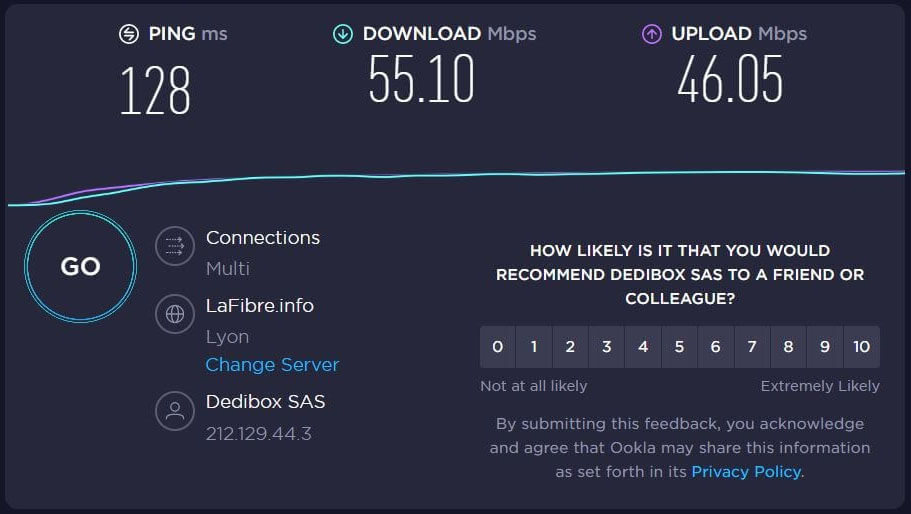
- Ping – 128 ms
- Download speed – 55.10 Mbps
- Upload speed – 46.05 Mbps
After connecting to the VPN with server1 on TCP port 443
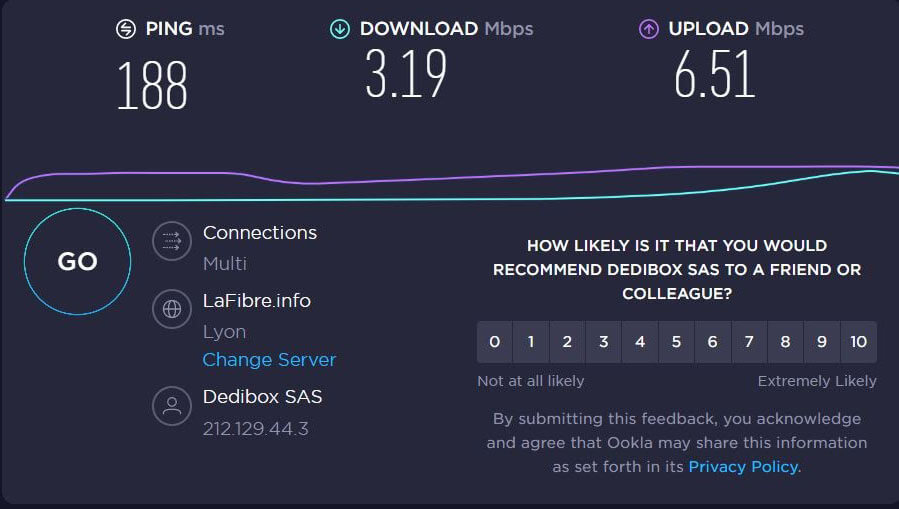
- Ping – 188 ms
- Download speed – 3.19 Mbps
- Upload speed – 6.51 Mbps
After connecting to the VPN with server1 on TCP port 80:
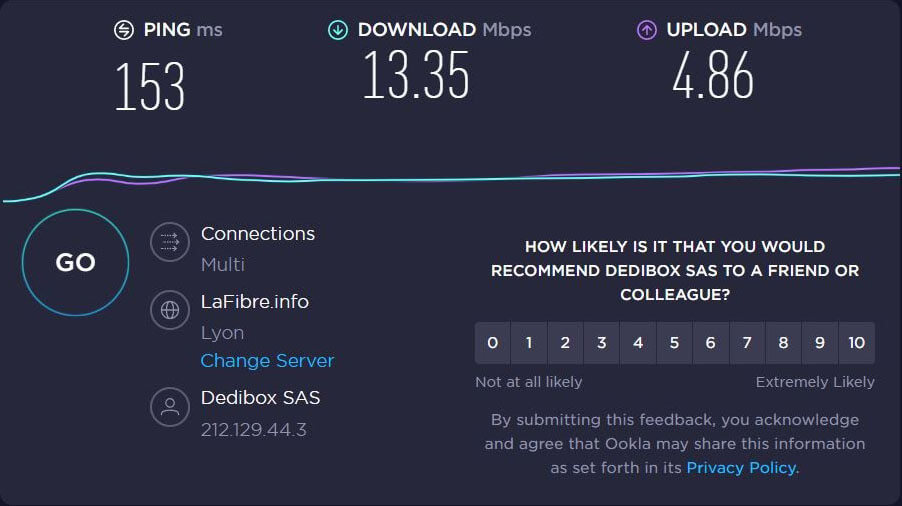
- Ping – 153 ms
- Download speed – 13.35 Mbps
- Upload speed – 4.86 Mbps
After connecting to the VPN with server1 on UDP port 53:
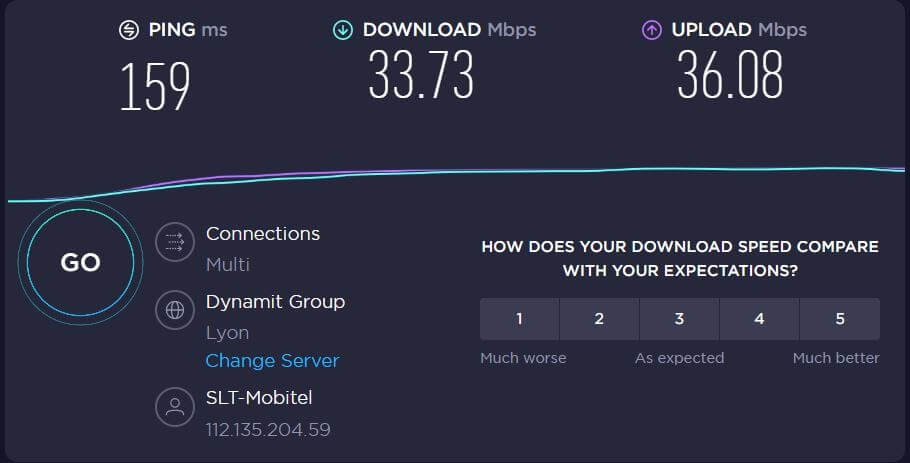
- Ping – 153 ms
- Download speed – 33.73 Mbps
- Upload speed – 36.08 Mbps
After connecting to the VPN with server1 on UDP port 40000:
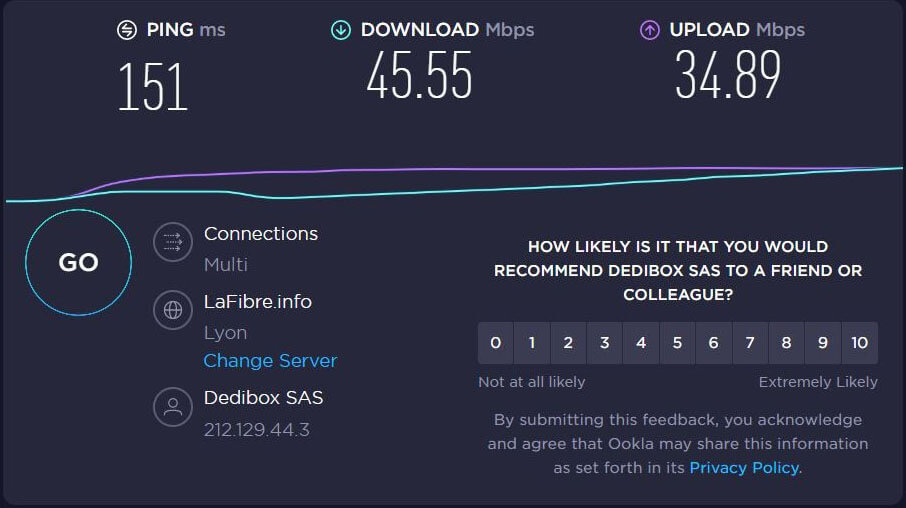
- Ping – 151 ms
- Download speed – 45.55 Mbps
- Upload speed – 34.89 Mbps
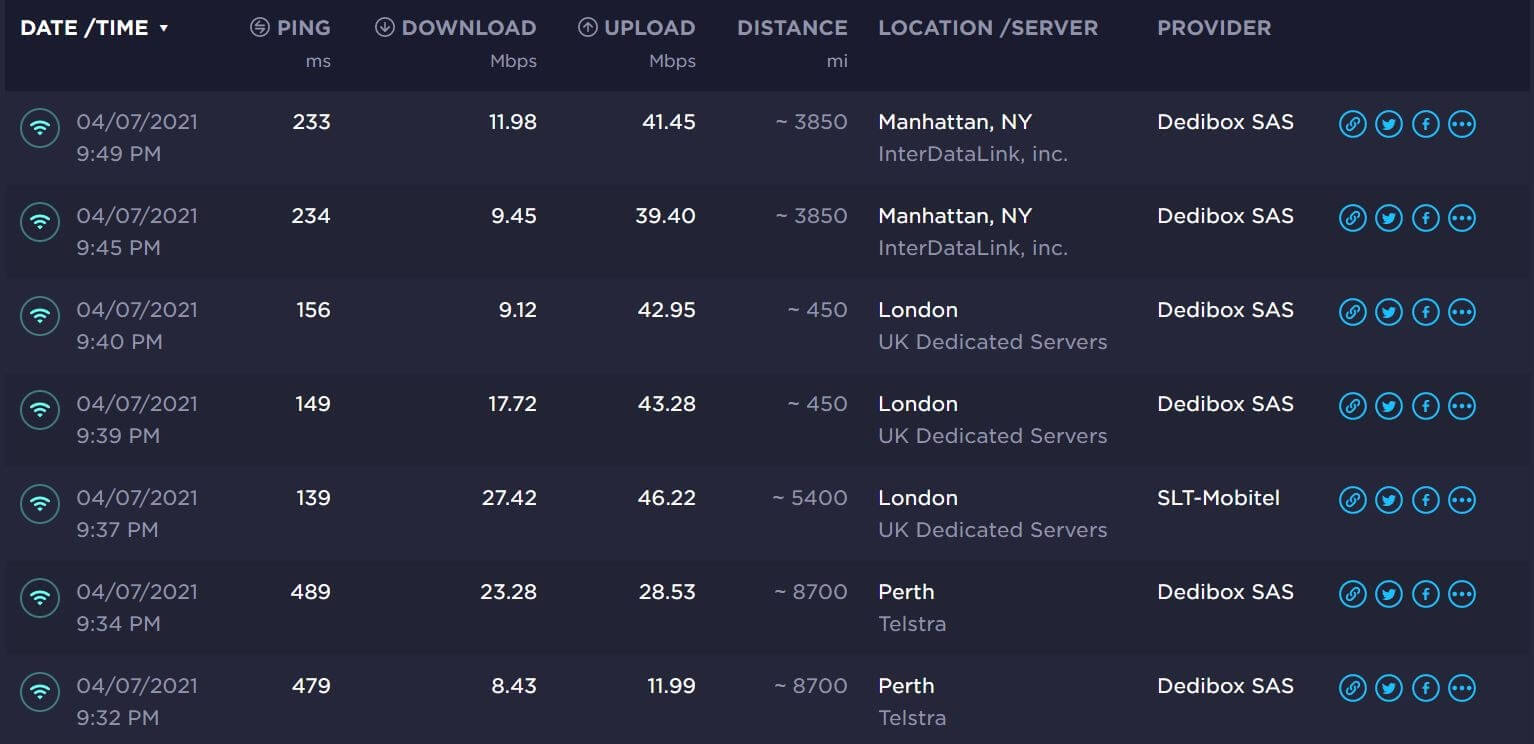
Over TCP, speeds dropped drastically compared with our normal connection. UDP was much better, especially on port 40000. We then ran speedtest.net against test servers in these locations, connected to the VPN over UDP:
- USA
- UK
- Australia
Even over UDP, speeds varied widely from one test to the next, download speeds most of all:
 Locations
1.0
FreeVPN.me has one server: Server 1 in Amsterdam, the Netherlands. The homepage lists it with OpenVPN, L2TP/IPsec and torrent support, and there’s no other location to pick.
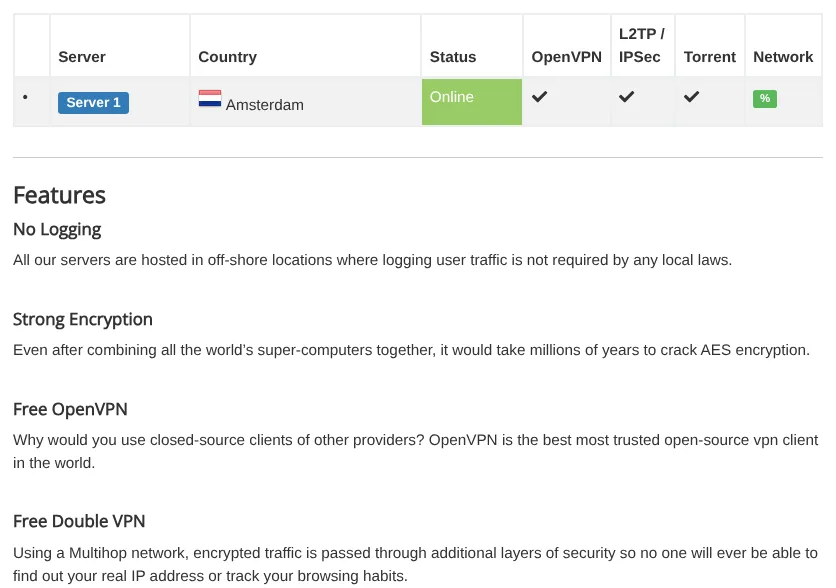
One server means one country. You get a Dutch IP address and nothing else, so FreeVPN.me can’t make you appear in the US, the UK or anywhere outside the Netherlands.
The homepage still advertises “Free Double VPN”, a multi-hop network that passes your traffic “through additional layers of security”. With one server listed, there’s nothing to hop to, and FreeVPN.me doesn’t explain how it would work.
It also says that “All our servers are hosted in off-shore locations”. The only server it lists is in Amsterdam, inside the EU.
 Privacy
2.0
Who runs FreeVPN.me
The website doesn’t say. The About Us page describes “a group of privacy minded individuals, strong supporters of net-neutrality” running “a donor and advertising supported service”. No company, address or person is named anywhere, and the only way to reach them is a contact form. The terms of use say claims are “governed by the laws of the State of Malta”, the only hint of a location.
That matters more for a VPN than for most services. A VPN operator can see every connection you make. With FreeVPN.me you can’t find out who that is, which country’s laws apply to them or what they would hand over if asked.
Logging
This is the whole no-logs promise, from the homepage: “All our servers are hosted in off-shore locations where logging user traffic is not required by any local laws.” It doesn’t say what is or isn’t recorded.
The privacy policy, last changed in July 2015, is about the website. It says the site’s log files record visitors’ IP addresses, browser type, internet provider and the pages they visit, and that Google uses its DoubleClick cookie to show ads on the site. It never mentions the VPN, and no audit has checked what the server keeps.
Shared login, shared secret
Every user connects with the same username and password from the accounts page, and the OpenVPN package gives everyone the same client certificate and key. For two of the three protocols, that public login undoes the protection:
- PPTP logs you in with MS-CHAP v2, and the keys that encrypt your traffic are derived from the password. Microsoft’s 2012 security advisory already warned that attackers can recover MS-CHAP v2 credentials. Here nobody needs to: the password is on the website, so anyone who records your PPTP connection, on public Wi-Fi for example, can work out the keys. Apple removed PPTP from iOS 10 and macOS Sierra in 2016 and doesn’t recommend it “for secure, private communication”. FreeVPN.me’s FAQ still suggests it “if you want a quick way to unblock a website”.
- L2TP/IPsec checks the server with a pre-shared key, and FreeVPN.me’s is “freevpn.me”, printed next to the password. strongSwan, the open-source IPsec project, says pre-shared keys are fine only when they are random and strong, and that weak ones leave connections open to man-in-the-middle attacks. A key published on a web page lets anyone who can intercept your traffic pose as the server.
- OpenVPN is the best of the three. Its configuration checks the server’s own certificate and encrypts with AES-256-CBC, so a public password doesn’t let others read your traffic. But this is the package with the certificate that expired in July 2025.
Microsoft announced in October 2024 that PPTP and L2TP will be removed from future versions of Windows Server because they no longer meet today’s security standards. Windows itself can still connect to them.
Leaks and kill switch
There’s no app, so there’s no kill switch: if the VPN connection drops, nothing stops your traffic from going out over your normal connection. The FAQ tells you to check for DNS leaks yourself on DNSLeaktest.com. The OpenVPN files include a setting that blocks DNS requests outside the tunnel, which only works on Windows.
 Ease of use
2.0
FreeVPN.me has no apps. You set it up by hand: either add a PPTP or L2TP connection in your device’s VPN settings, or download the OpenVPN package, import one of its four configuration files into an OpenVPN app and type in the shared login.
The homepage says it “Works on all PC, Linux, Apple and Android devices”. That was truer a few years ago. iPhones and Macs lost PPTP in 2016 and still offer L2TP. According to QNAP, Android 12 and later have neither PPTP nor L2TP built in, which leaves OpenVPN on a current Android phone, the package with the expired certificate. Windows still connects over all three.
Instructions are scarce. The FAQ, last updated in 2017, covers what a VPN is, PPTP versus OpenVPN and two troubleshooting tips. There are no setup guides for individual devices.
 Support
1.0
Support is a contact form that asks for your name, email address, subject and message. There’s no email address, live chat or phone number, and the website doesn’t say how soon anyone replies. When we used the form for our 2021 review, we got no answer.
The FAQ and blog pages were last updated in 2017. They explain what a VPN is, not what to do when FreeVPN.me won’t connect, and there’s no notice about the expired OpenVPN certificate or a newer package.
 Pricing
5.0
FreeVPN.me is free. There are no plans, no trial and no payment; the accounts page asks you to donate to “help keep this service free”. The About Us page says the service is funded by donors and advertising. The ads run on the website (the privacy policy names Google’s DoubleClick), not inside the VPN, since there’s no app to put them in.
You pay in risk instead: an operator you can’t identify, a login and an L2TP key anyone can read, and a server nobody has checked. Our guide to the dark side of free VPNs explains how free VPNs pay their bills and what to look for in a safe one.
Final Thoughts
FreeVPN.me is a free VPN of the old school: one server, a password on a web page and a promise not to log. Nobody stands behind that promise by name, the PPTP and L2TP options don’t protect you from anyone who knows the published login, and the OpenVPN files carry a certificate that expired in July 2025. We’d stay away.
If it has to be free, use Proton VPN Free: no data limit, no ads, independently audited open-source apps and a no-logs policy, on one device (we don’t earn anything from that link). Better still, pay for a VPN. ExpressVPN has apps for all major devices, a kill switch and a no-logs policy checked by independent auditors.