VPN Router vs. VPN on Device – Which is Better?
Published Updated

For most people, a VPN app on each device is the better choice. A VPN on the router earns its place when you need to cover devices that can’t run an app, like smart TVs and game consoles.
Apps are faster on most hardware, change servers with one tap and keep working when you take your phone or laptop out of the house. A router VPN stays at home. In return, it covers everything connected to it and never forgets to switch on.
You also don’t have to choose. Many routers can send only some devices through the VPN, so the TV uses the router’s tunnel while your laptop keeps its own app.
VPN router vs. VPN app at a glance
Two of those rows decide it for most households. If the devices you care about are phones and laptops, apps cover them wherever you are. If the list includes a TV or console without a VPN app, or people who will never open one, the router is the only way to reach them.
Router, VPN and VPN router: what's the difference?
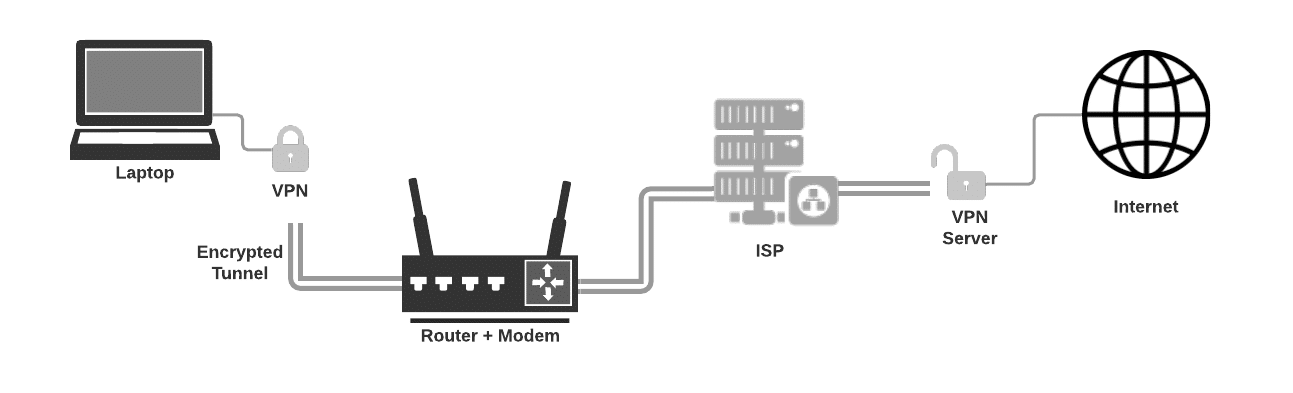
A router links your devices to each other and to the internet. A VPN is an encrypted tunnel from your device to a server run by the VPN company. Websites see that server’s IP address instead of yours, and your internet provider sees only scrambled traffic going to it.
With a VPN app, the tunnel starts on the device itself.
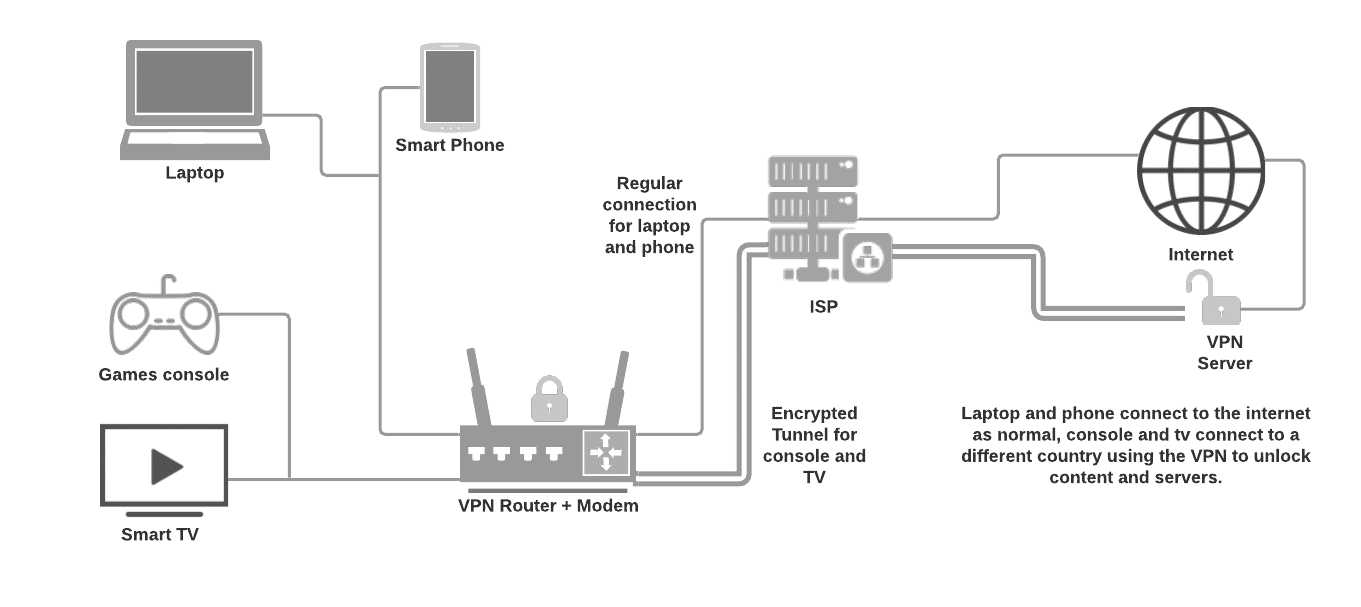
A VPN router runs the VPN client itself. The tunnel starts at the router, so whatever connects to it goes through the VPN without an app of its own. Good firmware lets you pick which devices use the tunnel, as in this set-up where only the console and the TV do.
In offices, “VPN router” often means something else: a router that lets staff reach the company network from outside, or links two offices. That’s the server side of a VPN, covered in our guides to VPN concentrators and VPN passthrough.
How much a router slows the VPN down
On a laptop or phone, encrypting traffic is a small job for the processor. A router does it on a chip designed to move packets cheaply, and that chip’s limit becomes the limit for every device behind it.
GL.iNet, which builds routers for VPN use, publishes VPN speeds for each model. The spread is wide.
The cheapest router in the table would turn a 500 Mbps fibre line into a 45 Mbps one, shared by the whole house. If you buy a router for this job, look at its VPN speed, not its Wi-Fi speed.
The protocol matters as much as the chip. On the two older models, WireGuard is two to four times faster than OpenVPN, so use it if your router and your VPN both support it. The two newer ones run OpenVPN with DCO (data channel offload), and there the gap is much smaller.
When a router VPN is the better choice
Put the VPN on the router if one of these fits you:
- Devices without VPN apps. Most smart TVs, game consoles and smart-home gadgets can’t run one. Proton VPN names TVs and consoles as the main reason to use its router set-up.
- Everyone, always. Family members and guests are covered without installing or remembering anything.
- More devices than your plan allows. NordVPN counts a router as one of its 10 slots, however many devices sit behind it.
- Systems that can’t run a VPN app. Tails blocks VPN apps, for example, but a VPN on the router can sit in front of it.
Apps are the better fit if you mostly want protection on public Wi-Fi or while travelling, if you switch countries often, or if your line is faster than your router can encrypt. They also leave everyone else at home on the normal connection, which matters when a local streaming service or a bank won’t work over a VPN.
Using both without doubling up
If a laptop with its own VPN app sits behind a VPN router, its traffic runs through two tunnels, the app’s inside the router’s. That usually works, but you pay for both in speed, and websites only ever see the app’s server.
The cleaner set-up decides per device. ASUS’s VPN Fusion lets you assign devices to each VPN profile, and GL.iNet’s firmware has a policy mode for the same job. Put the TV and the console on the router’s tunnel and leave phones and laptops to their apps, as in the second diagram above.
Then check what happens when the tunnel drops. GL.iNet’s kill switch cuts internet access for every device on the router to prevent DNS leaks, and on firmware 4.8 and later it’s on by default for each tunnel. Without a kill switch, devices can quietly fall back to your normal connection.
Once it runs, open a DNS leak test on a device behind the router. It should show the VPN’s DNS servers, not your internet provider’s.
What you need for a VPN router
The router needs a VPN client, the part that connects out to a VPN service. Some routers only offer a VPN server, which lets you reach your home network from outside but doesn’t hide your traffic.
If yours has no client, these are the options:
- A router with one built in. ASUS routers have VPN Fusion, with WireGuard on firmware newer than 3.0.0.4.388.23000. GL.iNet’s routers, including the four in the table above, have WireGuard and OpenVPN clients, and its small travel models let you take the router VPN on trips.
- New firmware on your current router. Open-source OpenWrt and FreshTomato can both run a WireGuard client. Installing either replaces the maker’s software, so check the project’s list of supported routers first.
- A firewall box. pfSense and OPNsense turn a small PC into a router that runs WireGuard. More work, more control.
- A second router. If the router from your internet provider has no VPN client, connect one that has behind it and join the devices you want protected to that one.
How to set up a VPN on your router
- Find the VPN client in your router’s admin page. ASUS calls it VPN Fusion, GL.iNet the VPN Dashboard.
- Get a WireGuard or OpenVPN configuration from your VPN provider for the server location you want. Most providers have router guides; Proton VPN’s covers both protocols.
- Upload the file in the router’s VPN client and connect.
- Turn on the kill switch and choose which devices use the tunnel.
- On a device behind the router, check your IP address and run a DNS leak test.
To change country later, you repeat steps 2 and 3. That’s why a router VPN suits a location you keep, while hopping between countries is a job for apps.
Frequently Asked Questions
Some people found answers to these questions helpful
Do I still need a VPN subscription with a VPN router?
Yes. The router only runs the VPN client; the servers come from a VPN service, or from a VPN server you run yourself. Proton VPN even allows its free plan on a router, where it counts as one connection.
Does a VPN router slow down my internet?
Usually, and for every device at once. The router's processor sets the ceiling: GL.iNet's own figures range from 45 Mbps over WireGuard on its cheapest model in our table to 900 Mbps on the Flint 2. A modern laptop or phone has far more processing power for the job than most routers.
Does a router count as one device on my VPN plan?
It does with the three providers we checked. NordVPN says a router uses one of its 10 slots, and Proton VPN counts it as one connection on the free plan. ExpressVPN, which allows 10 to 14 devices depending on the plan, says you can connect as many devices to a VPN router as you wish.
Can I use a VPN router with Tor or Tails?
Yes, and with Tails it's the only way to use a VPN at all. The router's VPN carries Tails' Tor traffic like any other, so your internet provider sees the VPN instead of Tor, while the VPN company sees your real IP address and that you use Tor. Our guide to using a VPN with Tails has the details.
Can I put a VPN on the router my internet provider gave me?
Only if it has a VPN client. Look for one in its admin page or manual. If there isn't one, connect a second router that has a VPN client behind it, or stick with apps.
34 Comments
KRel
September 13, 2022 3:10 pm
All of this tech talk has my head spinning; I have McAfee VPN app on my laptop; I also connect to my company’s VPN when working; based on your article the VPN router is the best option to cover my home. Is there a router you recommend?
Rick
September 1, 2022 7:24 pm
I just bought an Asus RT-AX88U router…took me 3 days to get it set up and link all my 22 devices to it. Yesterday, I flashed my router with DD-WRT (quite proud of myself)….Im with Nord…and in the setup under “Custom Configuration” it says to load specific text. The custom configuration already has text in it…does this mean Im to erase the existing text and load what Nord wants me to lad, or in ADDITION to the existing text…other than this, this is whats holding me back from using a VPN on my router for the time being.
PS…This is the best article for explaining VPN’S…Thank you
Miklos Zoltan
September 7, 2022 11:03 am
Hi Rick, thanks for your feedback. 🙂 Yes, you can overwrite the custom text.
Chaosa
May 21, 2022 8:58 pm
Hi
I want to travel to see my fiancee in portugal and I workkgn in te UK. My job doesn’t knlw. The laptop they gave me as a global vpn client. How do I disguise my ip address? My phone as vpn exprww if I link my laptop to my phone data would that work? Or if I use a vpn router in portugal?
Mike Waves
April 21, 2022 5:29 am
I could really use your knowledge and it seems, this article is the only relevant I can find.
I’m currently working in UK and my Employer doesn’t allow employes to work out of UK jurisdiction.
How can I go back to Germany but actually “stay in UK”?
We already use a VPN and no software can be installed on our workstations.
I was thinking to set up a VPN server right in my appartment and then connect my modem in Germany, to a VPN router, to my VPN home server.
Any thoughts on that? Can it be done without ever showing that I connected somewhere else?
+note: If I get fired, the worst thing that can happen, I will do the best vacations of my life.
GPTDesign
March 7, 2022 9:40 pm
Really good article. Many thanks for providing it. The questions and answers have cleared up dozens of questions for me that I did not see clearly answered after spending 4 or more hours on specific VPN vendor websites. They should all provide a link to your article since they don’t answer so many good questions themselves.
Bob
December 22, 2021 11:47 pm
Hi. Nice article!
I have one question I have not seen addressed anywhere. (It might be that, as a raw VPN newbie, the question is too stupid a to ask!)
I have Nord VPN set up on my Asus Router. I followed the instructions on Nord’s website, and I think I have it set up properly. My question is about my cell phone. Nord had a QR code to put a VPN client on my cell phone, and I did that. The question is, is that needed?
When accessing the internet via the router it seems redundant.
But, when away from home and using public wi-fi hotspots it or the phone’s date service (AT&T) it seems a good idea to have the VPN on the phone. But I don’t want to enable/disable the VPN as I wander from place to place
Miklos Zoltan
December 24, 2021 12:37 pm
There are no stupid questions! 🙂
You are spot on If you are connected to your VPN router with your phone, then you don’t need to enable your VPN app connection as well. That’s indeed redundant.
The app is needed for when you are not at home or connected to a different network, such as cellular network and public WiFi (or any WiFi that’s not yours).
rayD8r
December 17, 2021 12:14 am
Are there answers to any of these questions? If so, How can I see them? If not, what’s the point of having a comments section? I have an Asus AX3000(AX58U) with Merlin firmware and Nord VPN. Plenty of configuration, fairly simple to use, it’s my first experience with a VPN of any kind and I got iy setup. I have only done a basic seyup though, there are a lot of things it can do that I just don’t know enough about to use and when I try things I often mess up my wifi connection and either have to try to undo what I did or reset the router. The router cost me $179 on sale and Nord VPN is $79 for 2 years. I’m happy with my setup. One thing not mentioned here is the fact that this is only discussing your privacy at home on your private wifi network. If you use public networks or work/school networks, you’ll want a VPN on any devices you use in this way so if this is your situation, make dure to select a XPN which allows you to use it both at home on your router and on your devices.
Miklos Zoltan
December 24, 2021 12:35 pm
Hey. Sorry, things didn’t update for a while due to some website caching issues. It’s fixed now.
Regarding the rest of your comment, yes, you are correct! Thanks for your feedback.
Igor
December 11, 2021 5:21 pm
If I install VPN on my laptop which gets the internet via wifi from a router, will I be safe downloading torrents? Or I would need to install VPN on the router?
Miklos Zoltan
December 24, 2021 12:33 pm
VPN on a laptop should be enough.
Make sure to never accidentally access your torrenting app while the VPN is not active.
MaxiR
November 18, 2021 5:43 pm
Guys,
Imagine I live in place A and have a VPN set up on a router that is connecting me to somewhere in place B I turn my laptop on and connect to an app which is a remote access VPN to another place C.
If I go check my IP on all that, in principle which place would that IP reveal? C ?
And the company providing me the on laptop-app remote access VPN would see me being in B.
Right ?
Miklos Zoltan
December 24, 2021 12:32 pm
> If I go check my IP on all that, in principle which place would that IP reveal? C ?
> And the company providing me the on laptop-app remote access VPN would see me being in B.
Yes. Both of these are correct.
Ben Dover
November 16, 2021 6:29 am
Question: This is the setup I’m trying to create
1) I will run TAILS OS from a laptop
2) I will get a prepaid 5G mobile hotspot subscription and device (No identifiable information will be used and it will be prepaid)
Now I want to be able to still use a VPN as a failsafe while using TAILS OS with this mobile hotspot since I will be using this while traveling and I don’t want anything linked to my home network. (Everything I do will be outside of my home and nothing be linked to my house etc.)
So my question is can I still use a VPN router using the 5G mobile hotspot device?
Thanks for the very informative articles! Really appreciate what you’re doing for the community!
Miklos Zoltan
December 24, 2021 12:31 pm
> I will get a prepaid 5G mobile hotspot subscription and device
I wouldn’t really recommend this.
Mobile traffic is worst security wise.
Also I’m unsure if you would be able to connect your mobile device to your router (having the mobile device as the source of the internet traffic).
My recommendation is you should get a VPN router and install a VPN on that router and use your normal internet.
This way you will cloak your network and everything else even before it reaches any Tor node.
Steven
November 10, 2021 4:14 pm
I have ExpressVPN but it doesn’t work on my laptop unfortunately (it’s very old) so I’m thinking about a Netgear Nighthawk VPN gaming router. Will I still need a subscription to expressvpn and then configure that to my new router? If so, will I always need to have a PC/Laptop running in order for the vpn router to work?
anon
November 13, 2021 9:01 am
Try NordVPN instead
Niles
July 9, 2021 3:56 pm
Thank you brother. This is very informative. My situation is a little unique as my landlord works for our ISP. I wanted to know if there’s a way to customize the router settings so that my PC is the only thing using the VPN. But I don’t want to cause any issues for my landlord at work so I’m hesitant to do anything. But all these streaming sites are expensive and I was just reading about Hotstar and all the perks of using it. It’s kind of you to take the time to write this article. I really appreciate it and I know everyone else does too. Peace and good health! 🙏🙂
Miklos Zoltan
December 24, 2021 12:27 pm
It’s perfectly fine to use a VPN or a VPN router. You or your landlord should never get into any problems because of that.
If someone happens to ask you can always say you need it to access your work network.
Bolo
July 3, 2021 1:27 pm
Just wondering can you have a second router as a VPN router, with all chosen devices linked to this router. And the main router handling the data going in/out of the house can be left without a VPN?
Miklos Zoltan
July 7, 2021 9:06 am
You can definitely use a secondary router as your VPN router and you can leave the main router without a VPN. This is the current setup I myself have at the moment.
Ron
April 11, 2021 5:46 pm
So two basic questions don’t seem to be answered in your post.
1) If we don’t want to put a VPN on a router (we disabled wifi and only have wired modem), does a VPN need to be installed in each device or can it be modem-based somehow?
2) can a VPN installed on a laptop be used anywhere?
Miklos Zoltan
July 7, 2021 9:07 am
Thanks for your feedback, Ron!
1) You will need to install a VPN on every device that’s connected to the modem.
2) Sure. It encrypts all your internet traffic whether that’s from a browser or any other app installed on the laptop/computer.
Barry
February 4, 2021 11:19 pm
I travel and use phone data as router do all my other devices need to be connected to the same vpn source
Miklos Zoltan
July 7, 2021 9:08 am
You should be able to install a VPN on your phone and enable it when you are using your phone data. You can install and use the same VPN app on multiple devices.
Cody
November 15, 2020 7:38 am
I want to only put my LG smart TVs on the VPN connection, but keep the rest of my devices off the VPN connection. Can anyone provide a resource that can help me achieve this?
Miklos Zoltan
July 7, 2021 9:10 am
The current way I myself are doing this right now is to connect my VPN router to my regular router. I then use the VPN router only with devices that need a VPN connection. Then any other device I connect to the regular router.
Rob
January 22, 2022 9:58 pm
What is the benefit of having 2 different routers?
Miklos Zoltan
February 8, 2022 11:44 am
One is your normal router that connects to the internet. The other a VPN router that has a VPN installed directly in the router. This router will be between your normal router and devices.
The idea is you only use the VPN router for when you visit things that require a VPN connection.
You shouldn’t use the VPN router for everything, like accessing Google, Gmail, Facebook etc, with your regular accounts. That kinda eliminates your stealth.
richard
August 23, 2020 8:25 am
Tried all 3 VPN suppliers none of which I found very fast. Surfshark was the worst-can’t even connect to Sky News. Having tested many I found if you don’t use a VPN Router NordVPN wired is very fast, efficient and well priced. Having used a VPN router for 2 years I’ve found in general they reduce the download speeds quite substantially whereas if you wire your device (in my case Android box) to your principal router/supplier of internet, there is very little reduction is speed and if i’m correct security remains excellent.
Miklos Zoltan
July 7, 2021 9:11 am
At the moment I’m using ProtonVPN with a VPN router and honestly I am not seeing any decrease in speed at all.
You may need to test a few VPN servers first before you find a fast one.
Toby
March 5, 2020 3:15 am
Any chance of discussing the advantage of having firewall VPN at home instead of purchasing a VPN service online?
Example Zyxel hardware
Roger
February 12, 2020 11:03 pm
My ISP provides PPOE connection, which is incompatible with VPN configured router. So do I need two routers – Primary for PPOE connection and secondary for VPN? How do I configure DHCP on these two routers?