Best VPN for Netflix in 2026: My Experience and Recommendations

Unlocking the World of Netflix Through the Best VPNs.
As a frequent Netflix user and VPN aficionado, I’ve put numerous VPNs to the test, trying to find the perfect solution to unlock the vast Netflix library of content available across the globe.
After countless hours of testing, I’ve narrowed down the list to the five best VPNs for Netflix: ExpressVPN, NordVPN, Surfshark, Private Internet Access (PIA), and CyberGhost.
Each VPN offers unique features, making it a strong choice for streaming Netflix content without restrictions.
Updated October 2026: the prices, plans, server numbers, and features on this page come from our reviews of these five VPNs, updated on 30 October 2026. We have not re-tested each VPN with Netflix for this update – Netflix blocks VPN addresses from time to time, so results can change.
The Best VPNs for Netflix: A Quick Snapshot
- ExpressVPN – A fast VPN with servers in 113 countries and apps for almost every streaming device.
- NordVPN – More than 7,200 servers in 150 countries, plus SmartPlay for streaming abroad.
- Surfshark – A budget-friendly option with unlimited device connections.
- Private Internet Access – Unlimited devices, streaming-optimized locations, and prices that stay the same at renewal.
- CyberGhost – Known for its user-friendly apps, dedicated streaming servers, and a 45-day money-back guarantee.

ExpressVPN: The Speed Demon for Netflix Streaming
Price from: $2.99/mo
Available on:


pros
Cons
From my firsthand experience using ExpressVPN, I can confidently say that it is a top-tier VPN for Netflix streaming.
In my tests, it not only unblocked multiple Netflix libraries from different countries but also provided a hassle-free and smooth streaming experience. We have not repeated these tests for this update, and results change often.
ExpressVPN’s Lightning-Fast Speeds: A Game-Changer
One of the key highlights of ExpressVPN is its speed. When I put it to the test, content loaded quickly, with virtually no buffering or lag. Its own Lightway protocol, the default, now uses post-quantum encryption, and its servers run on 10 Gbps connections.
ExpressVPN has servers in 214 locations in 113 countries, including all 50 US states, so you can usually find a server close to you or in the country whose Netflix library you want. For a few countries, the servers are virtual – physically located elsewhere – and ExpressVPN discloses this on its server list.
Netflix on Almost Every Screen
Ease of use is another strong point for ExpressVPN. Its apps have one large connect button and a “Smart Location” option that picks a fast server for you.
There are apps for Windows, macOS, Linux, iPhone and iPad, Android, Apple TV, Amazon Fire TV and Fire Stick, Android TV, and routers. For smart TVs and game consoles without VPN support, ExpressVPN’s MediaStreamer (smart DNS) can change your streaming location, but without VPN encryption.
Depending on the plan, you can use ExpressVPN on 10, 12, or 14 devices at the same time.
Prioritizing Security and Privacy: The ExpressVPN Way
ExpressVPN places a strong emphasis on security and privacy, with AES-256 encryption, a kill switch (Network Lock), RAM-only servers, and a no-logs policy that has been checked in independent audits.
Plans and Prices
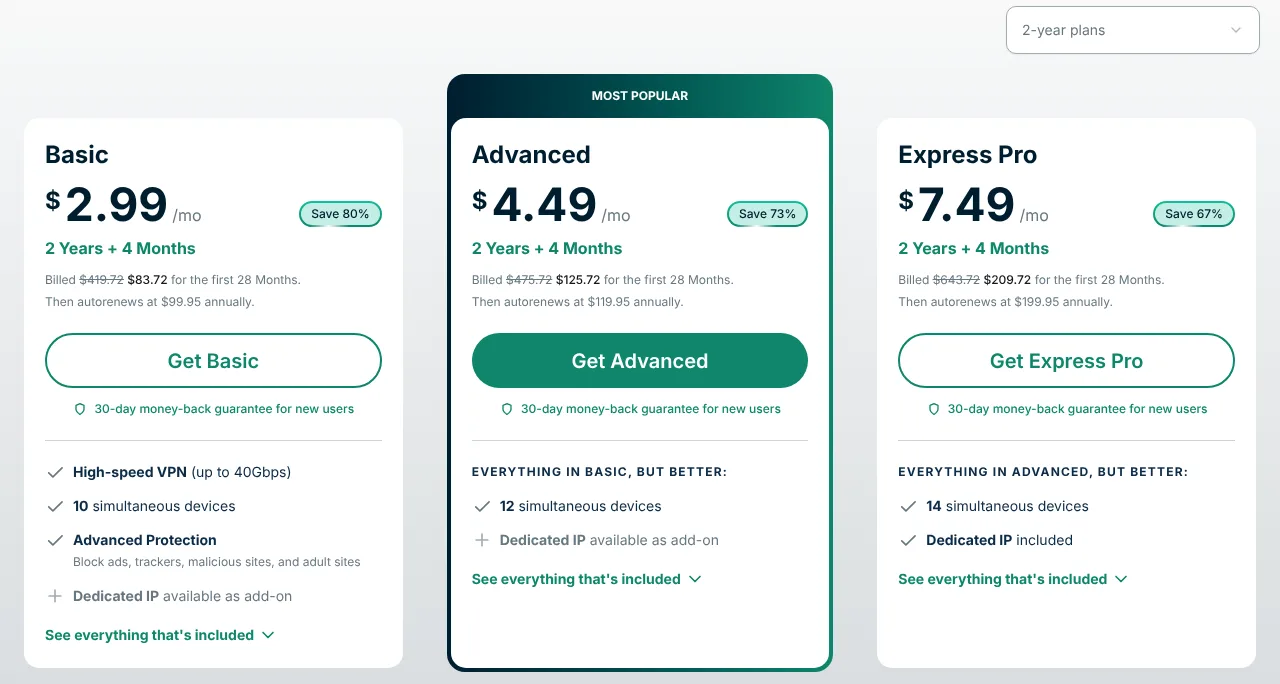
ExpressVPN offers three plans – Basic, Advanced, and Pro – and all of them include the full VPN. Here are the prices of the Basic plan (as of 30 October 2026):
- 1 month: $14.99
- 12 months (plus 3 free months): $4.99 per month, $74.85 for 15 months
- 2 years (plus 4 free months): $2.99 per month, $83.72 for 28 months
After the first term, Basic renews at $99.95 per year. New customers who subscribe on ExpressVPN’s website get a 30-day money-back guarantee, and the iOS and Android apps offer a 3-day free trial.
ExpressVPN: A Premium Option for Uncompromised Streaming
For those seeking a premium streaming experience without compromises, ExpressVPN is well worth considering.
In summary, ExpressVPN is a fantastic choice for Netflix streaming, thanks to its unblocking record, fast speeds, large server network, apps for almost every device, and strong security features. Just keep the higher renewal price in mind.
NordVPN: A Huge Server Network for a Binge-Worthy Netflix Marathon
Price from: $3.49/mo
Available on:
pros
Cons
When testing NordVPN as a Netflix VPN, the outcomes were truly impressive. In my tests, the VPN consistently got past Netflix’s geo-restrictions. We have not repeated these tests for this update, and results change often.
NordVPN’s Server Network: Plenty of Netflix Regions to Choose From
NordVPN has more than 7,200 servers in 150 countries and 225 locations, including servers in 55 US cities. Some locations are virtual – the server stands in another country, but you get an IP address of the country you chose – and NordVPN’s server list shows which ones.
For streaming, NordVPN’s apps include SmartPlay, which combines the VPN with Smart DNS so that streaming services work while you are abroad. For devices without a VPN app, such as some smart TVs and game consoles, NordVPN also offers Smart DNS on its own. It changes your location for streaming, but it does not encrypt your traffic.
Speed for HD and 4K Streams
Speed is a pivotal element when it comes to streaming. NordVPN’s default protocol, NordLynx, is built on WireGuard, and bandwidth is unlimited, so streaming in 4K is not capped.
In my tests, the streams were fluid, and I was able to enjoy my favorite shows without any disruptions.
NordVPN’s Robust Security Profile: Safe Streaming Across Netflix Regions
NordVPN’s no-logs policy has been checked six times by outside auditors, its servers run from RAM only, and NordLynx offers optional post-quantum encryption.
This means you can stream your preferred Netflix content without fretting over potential data leaks or privacy intrusions. There are apps for all major platforms, and you can use NordVPN on up to 10 devices at the same time.
Plans and Prices
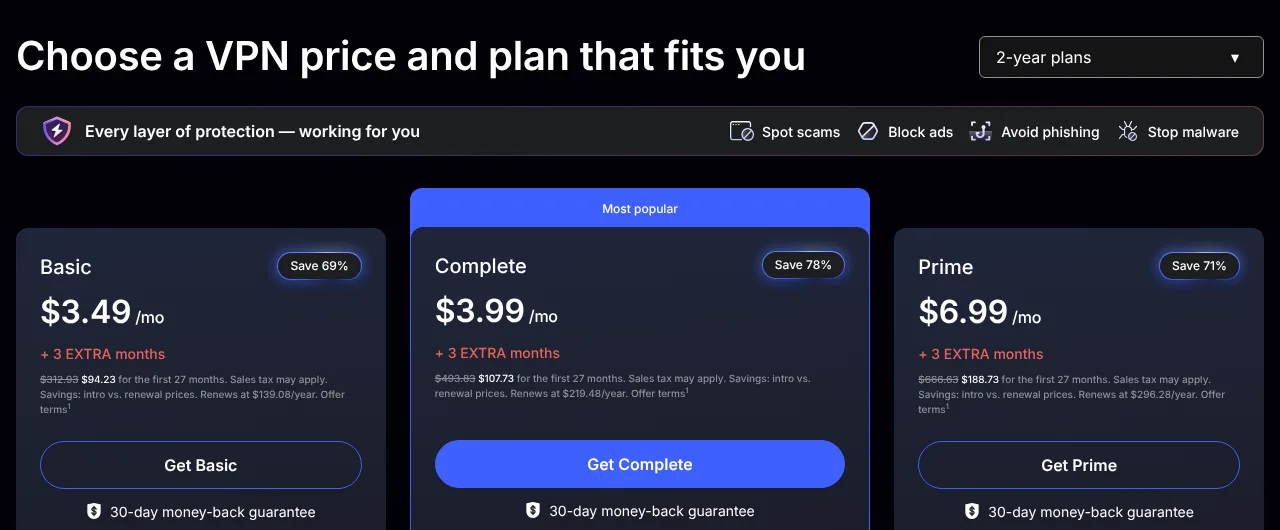
NordVPN is sold in three plans – Basic, Complete, and Prime – with the same VPN and servers in each. Here are the prices of the Basic plan (as of 30 October 2026):
- 1 month: $14.99
- 1 year (plus 3 months): $4.99 per month, $74.85 for 15 months
- 2 years (plus 3 months): $3.49 per month, $94.23 for 27 months
The 3 extra months are part of NordVPN’s Black Friday offer at the time of writing. After the first term, Basic renews at $139.08 per year. All plans come with a 30-day money-back guarantee.
In Conclusion: NordVPN as a Leading Choice for Netflix Marathons
Specifically for streaming Netflix, NordVPN more than meets the standards. It offers a huge server network, fast speeds, SmartPlay, and strong security.
The main downside is the much higher price after the first term. Still, it stands out as one of the leading VPNs for a satisfying Netflix marathon.
Surfshark: Affordable and Reliable Netflix VPN
Price from: $2.49/mo
Available on:
pros
Cons
When our team tested Surfshark, a popular Netflix VPN, we found that it was a superb budget-friendly option for Netflix devotees. We have not re-tested streaming for this update, and results change often.
Quality on a Budget: Surfshark’s Value Proposition
Despite being a more wallet-friendly choice, it doesn’t skimp on quality, which makes it great value for money.
Its unlimited device connections let you stream on as many devices as you like at the same time – perfect for households with several Netflix viewers.
In our tests, it not only performed well as a VPN for Netflix but also worked with other platforms like Amazon Prime Video.
Unlocking Global Content: Surfshark’s Unblocking Capabilities
In our evaluations, Surfshark got past the Netflix VPN ban and gave us access to different Netflix regions, which broadened our choice of movies and TV shows from all over the globe.
Surfshark’s network has grown to more than 4,500 servers in 100 countries and over 130 locations, all with 10 Gbps ports. Some locations are virtual: the server stands in another country, but you get an IP address of the country you chose.
There are apps for Windows, macOS, Linux, Android, iOS, Apple TV, Android TV, and Amazon Fire TV, and you can set up Surfshark manually on routers, game consoles, and smart TVs without an app.
Privacy and Security: The Surfshark Commitment
Surfshark upholds a staunch commitment to privacy and security. It keeps no logs – Deloitte checked its no-logs policy in 2023 and again in 2025 – and its servers run in RAM only.
It also offers a kill switch, the CleanWeb ad and malware blocker in every plan, and the WireGuard protocol, with post-quantum encryption in several apps.
Plans and Prices
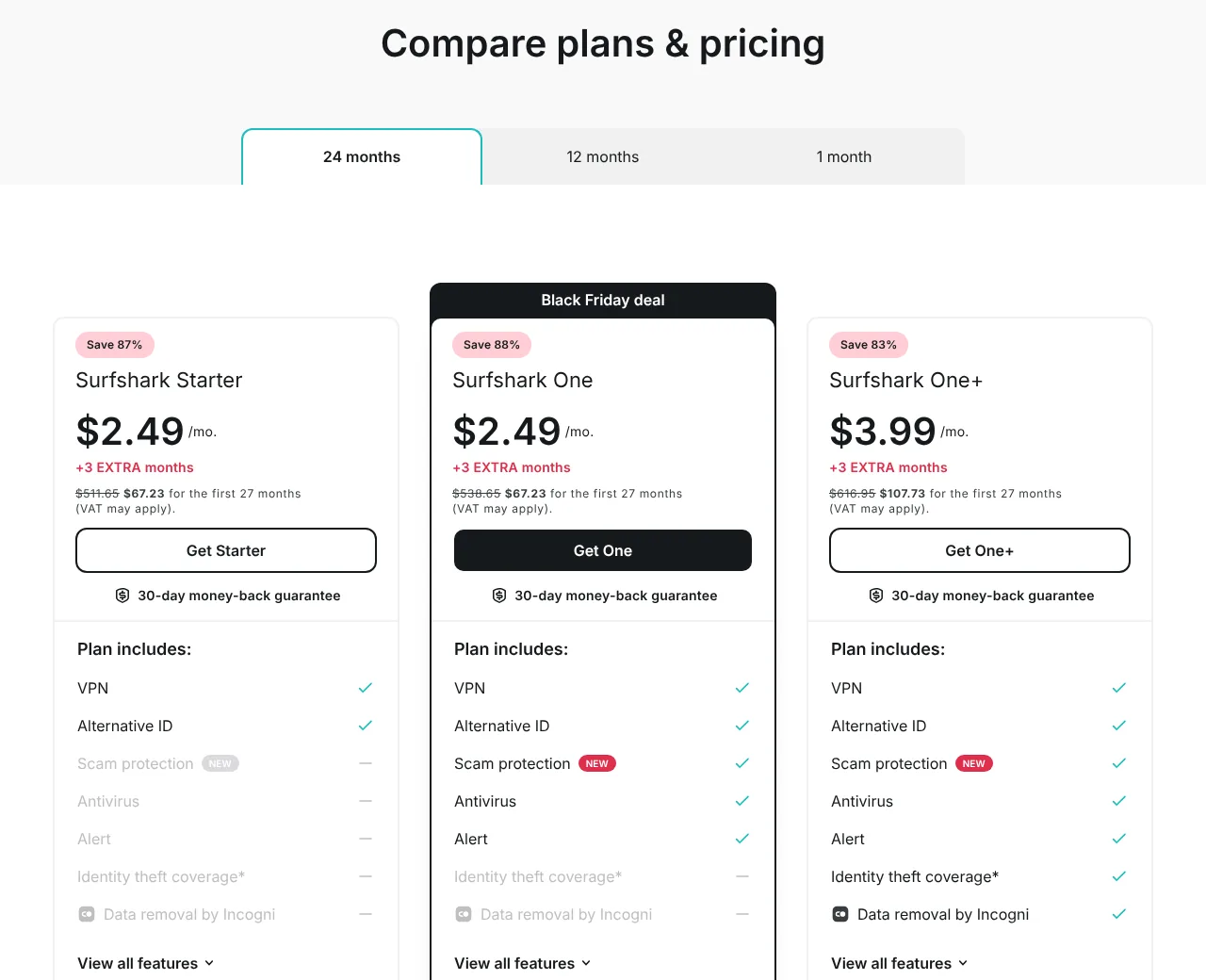
Surfshark offers three plans – Starter, One, and One+. All three include the same VPN with all servers and unlimited devices. Here are the prices of the Starter plan (as of 30 October 2026):
- 1 month: $18.95
- 1 year (plus 3 extra months): $2.99 per month, $44.85 for 15 months
- 2 years (plus 3 extra months): $2.49 per month, $67.23 for 27 months
The 3 extra months are part of Surfshark’s Black Friday offer at the time of writing. After the first term, Starter renews at $79 per year.
New users can try Surfshark for free for 7 days with a 1-year or 2-year plan, but you have to enter payment details, and the plan is charged automatically unless you cancel. The 30-day money-back guarantee applies to your first purchase.
Final Verdict: Is Surfshark a Reliable VPN for Netflix Streaming?
In conclusion, Surfshark is an affordable and reliable VPN option for Netflix streaming.
With unlimited devices, a network that now spans 100 countries, and a low price on the long-term plans, it covers a whole household’s streaming needs. Avoid the expensive monthly plan.
Private Internet Access: A Solid Entry Among the Best VPNs for Netflix
Price from: $2.03/mo
Available on:
pros
Cons
Drawing from my firsthand experience with Private Internet Access (PIA), I can confidently vouch for its place among the best VPNs for Netflix.
In my tests, PIA not only unblocked various Netflix libraries from multiple countries but also offered a smooth and enjoyable streaming experience. We have not repeated these tests for this update, and results change often.
Streaming-Optimized Locations and Unlimited Devices
PIA has servers in 180 locations in 113 countries, including all 50 US states. Many of these locations are virtual: in about 60 of the 113 countries, PIA has only virtual locations, and it marks them on its server page and in its apps.
PIA also has 35 streaming-optimized locations, which it says it monitors and tests against streaming services such as Netflix.
One subscription covers an unlimited number of devices. The apps are available for Windows, macOS, Linux, Android (including Android TV), iOS and iPadOS, and Apple TV, and you can set up PIA on compatible routers.
Speed
PIA runs its servers on a 10 Gbps network with unlimited bandwidth, and since October 2026, WireGuard has been the default protocol in all its apps.
We have not measured PIA’s speeds ourselves, and independent results are mixed: TechRadar reported a notable drop in PIA’s speeds in July 2026, before the October update. For the best speeds, use WireGuard and connect to a nearby location.
Security and Privacy: At the Heart of Private Internet Access
Private Internet Access backs its no-logs policy with evidence: in two US criminal cases, in 2016 and 2018, it had no logs to hand over, and Deloitte has audited its no-logs setup three times. Its apps are 100% open source, and all servers run in RAM only.
Every plan includes a kill switch, split tunneling, and the MACE ad blocker; the iOS app has neither split tunneling nor MACE. Keep in mind that PIA is based in the US, a member of the Five Eyes intelligence alliance.
Plans and Prices
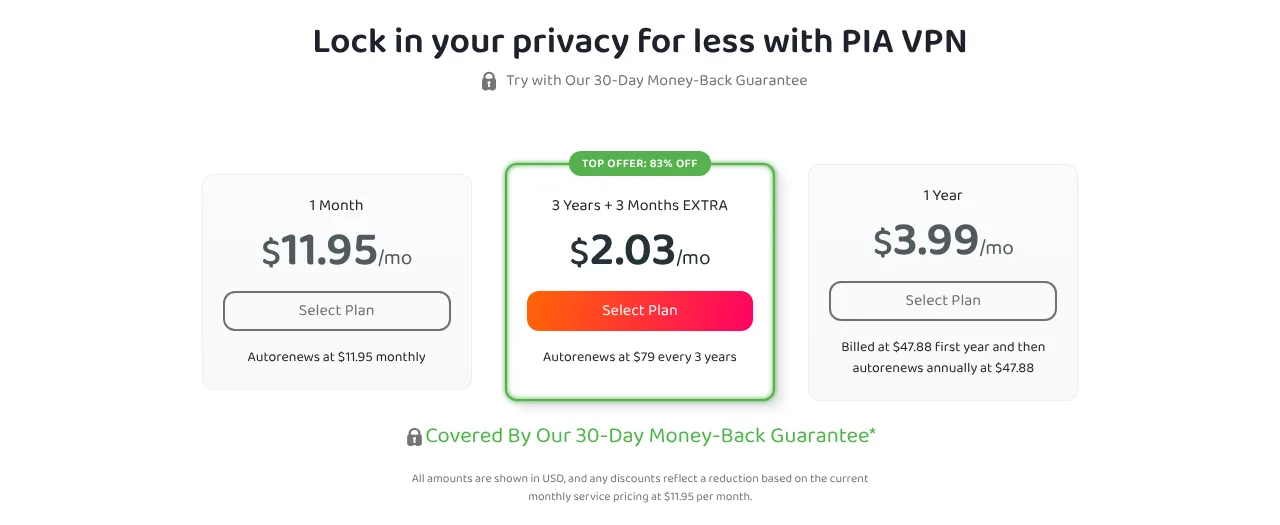
Unlike most rivals, PIA renews at the price of the first term. Here are the subscription plans (as of 30 October 2026):
- 1 month: $11.95
- 1 year: $3.99 per month, $47.88 per year
- 3 years (plus 3 extra months): $2.03 per month, $79 for 39 months, renewing at $79 every 3 years
The 30-day money-back guarantee applies to new users who buy directly from PIA.
Private Internet Access: A Top Choice for Seamless Netflix Streaming
In essence, Private Internet Access makes a strong case as one of the best Netflix VPNs, thanks to its unlimited devices, streaming-optimized locations, open-source apps, and robust security measures.
It is also one of the cheapest big VPNs, and its prices stay the same at renewal.
CyberGhost: A User-Friendly Netflix VPN with Dedicated Streaming Servers
Price from: $2.19/mo
Available on:
pros
Cons
During my comprehensive review of CyberGhost, I found it to be an exemplary Netflix VPN, particularly well-suited for those who prioritize ease of use in their VPN services.
One of the standout features of CyberGhost is its dedicated streaming servers. These servers are optimized for specific streaming services, such as Netflix and BBC iPlayer, and the apps list them by service.
In my tests, they consistently unblocked Netflix libraries from different regions, including the extensive US Netflix library. We have not re-tested streaming for this update, and results change often.
A Large Server Network
Moreover, CyberGhost has a large network of about 9,600 servers in 125 locations in 100 countries.
This lets you switch between server locations to unblock Netflix content from various countries, and it also helps you bypass region locks on other streaming platforms, like BBC iPlayer. However, CyberGhost marks 56 of its 100 countries as virtual: the server is in another country, but you get an IP address of the country you chose.
Speed
CyberGhost says its server network runs on 10 Gbps infrastructure with unlimited bandwidth and that it is still replacing older 1 Gbps servers, starting with its most-used locations.
We have not measured CyberGhost’s speeds ourselves. Recent third-party tests point to good but not top-tier speeds: Engadget, for example, measured an average speed drop of about 25% with WireGuard in January 2026. For the best speeds, use the WireGuard protocol and a nearby location.
Apps, Privacy, and Security
CyberGhost has apps for Windows, macOS, Linux (command line only), Android, iOS, Android TV, and Amazon Fire TV, but not for Apple TV. For smart TVs and consoles without an app, you can use CyberGhost’s Smart DNS or a router. One subscription covers up to 7 devices.
One additional point worth noting is the privacy offered by CyberGhost. Deloitte has audited its no-logs setup three times, all servers run in RAM only, and the apps include a kill switch and DNS leak protection.
Plans and Prices
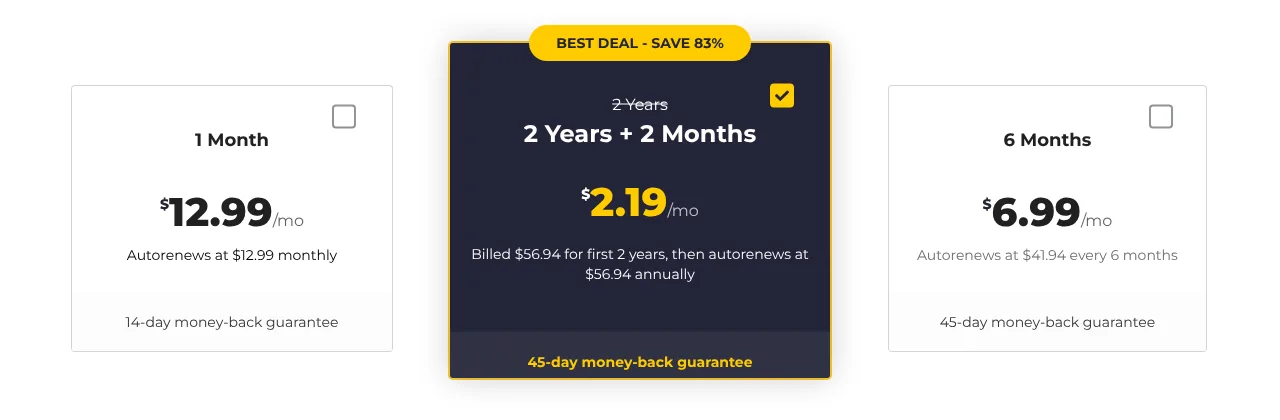
Here are CyberGhost’s subscription plans (as of 30 October 2026):
- 1 month: $12.99
- 6 months: $6.99 per month, $41.94 every 6 months
- 2 years (plus 2 extra months): $2.19 per month, $56.94 for the first 26 months, then $56.94 per year
The 45-day money-back guarantee applies to the 6-month and 2-year plans (14 days on the monthly plan) when you buy directly from CyberGhost. On Windows and macOS, you can also try CyberGhost for free for 24 hours without a payment method.
CyberGhost: A User-Friendly Choice for Netflix
To summarize, CyberGhost is an excellent choice for those seeking a user-friendly VPN to watch Netflix.
Its dedicated streaming servers, large network, and long money-back guarantee make it a worthy contender among the top VPN services. The downsides are the limit of 7 devices and the many virtual locations.
The Ranking Process: How We Chose the Best Netflix VPNs
After conducting experiments with various VPNs, our team narrowed down the best options for Netflix streaming based on several key factors:
- Unblocking capabilities: The VPNs on our list have a track record of getting past Netflix’s geo-restrictions and providing access to different regional libraries.
- Speed: Fast streaming speeds are essential for a buffer-free experience. We tested the speeds of VPNs to make sure they met the necessary criteria.
- Security and privacy: A reliable VPN should offer strong encryption and privacy features to protect users while streaming.
- Server network: A large server network with a global presence increases the likelihood of successfully unblocking Netflix content from different regions.
- Ease of use: We prioritized VPNs with user-friendly interfaces and apps, making it easy for users to connect to the desired servers.
- Customer support: Responsive customer support is essential for troubleshooting any issues that may arise while using the VPN with Netflix.
- Price and value: We compared the first-term price, the renewal price, the number of devices, and the refund terms.
The order of the five VPNs follows their total scores in our reviews.
Why Netflix Prevents VPN Use: Delving into Licensing Agreements and Compliance
Netflix’s primary reason for implementing VPN restrictions is to adhere to the licensing agreements it has in place with content creators and distributors.
These agreements often stipulate which shows and movies can be made available in certain regions, depending on a variety of factors such as the target audience, local regulations, and revenue-sharing arrangements.
When I investigated the matter, I found that by blocking VPNs, Netflix aims to prevent users from circumventing these regional restrictions and accessing content not licensed for their specific region.
By doing so, Netflix ensures that it stays compliant with its contractual obligations to content creators and distributors.
Another aspect to consider is the competition between streaming services. Content providers may sign exclusive deals with different platforms in various regions.
To respect these arrangements, Netflix needs to maintain control over the geographical distribution of its content. Blocking VPNs helps it achieve this goal.
Netflix’s help center also states that VPNs aren’t supported for watching live events on Netflix or on its ad-supported plans.
In summary, the main reason behind Netflix’s VPN restrictions is to uphold the licensing agreements it has with content creators and distributors.
Do Free VPNs Work with Netflix? Weighing the Pros and Cons
When I trialed various free VPNs, I discovered that they generally don’t work well with Netflix.
The primary reason is that free VPNs lack the advanced unblocking capabilities found in premium VPN services.
Netflix has become increasingly adept at detecting and blocking VPN connections, and free VPNs often fail to bypass these restrictions.
Furthermore, free VPNs typically have limited server networks, which can result in slow streaming speeds and frequent buffering.
This is particularly problematic when watching high-quality content, as you may find the viewing experience frustrating and not up to par with your expectations.
Another important consideration is privacy and security. My findings show that free VPNs often provide weak security features, and some have even been found to sell users’ data to third parties for additional revenue.
This puts your privacy and personal information at risk, which is something you should avoid, especially when streaming content online.
Moreover, free VPNs often impose data caps or bandwidth limits, or even interrupt your streaming experience with ads.
These factors can detract from an enjoyable Netflix viewing experience and leave you wishing for a more reliable solution.
Based on my firsthand experience, it’s better to invest in a reliable, paid VPN service to ensure a secure, smooth, and uninterrupted Netflix streaming experience.
By opting for a premium VPN, you’ll benefit from advanced unblocking capabilities, faster streaming speeds, and robust security features that keep your privacy intact.
In the long run, it’s a worthwhile investment for a top-notch Netflix viewing experience – and with long-term plans from about $2 to $3.50 a month for the first term, it doesn’t have to be expensive.
VPNs That Do Not Work with Netflix: Beware of Ineffective Services
As I mentioned earlier, not all VPNs can successfully bypass Netflix’s geo-restrictions.
Some VPNs struggle to stay ahead of the streaming giant’s efforts to block VPN connections, and their users may face issues when trying to access Netflix content from different regions.
Here are a few VPNs that have been reported to have problems unblocking Netflix:
- Hola VPN: This free VPN service gained notoriety for its security and privacy issues, and it has proven to be largely ineffective in unblocking Netflix. Additionally, its peer-to-peer (P2P) model has raised concerns among users, as it shares your bandwidth with other users.
- TunnelBear: While TunnelBear is a reputable VPN service with strong security features, it has been inconsistent in unblocking Netflix. Some users have reported success in accessing Netflix, while others have encountered issues.
- PureVPN: Although PureVPN has a large server network, it has faced difficulties in unblocking Netflix consistently. Users have reported mixed results when trying to access different Netflix libraries.
- VyprVPN: While VyprVPN offers strong security features and a user-friendly interface, it has had mixed results when it comes to unblocking Netflix. Some users have reported success, while others have experienced difficulties accessing different Netflix libraries.
- IPVanish: IPVanish is a popular VPN service with a solid reputation, but its ability to unblock Netflix has been inconsistent. Users have reported varied experiences, with some managing to access Netflix content and others encountering issues.
- Hotspot Shield: Hotspot Shield is known for its fast speeds and easy-to-use interface, but it has struggled to bypass Netflix’s geo-restrictions consistently. Users have reported intermittent success in accessing Netflix content from different regions.
- CactusVPN: CactusVPN is a smaller VPN service with a limited server network, and users have reported challenges when trying to access Netflix content from different regions. Its inconsistency in unblocking Netflix makes it a less desirable option for streaming enthusiasts.
Please note that the effectiveness of these VPNs with Netflix can change over time as both Netflix and the VPN providers continually adapt their techniques. We have not tested these services with Netflix for this update.
Exploring Netflix's Global Content Libraries with a VPN
Our team has been testing numerous Netflix VPNs for years, and only a select group consistently excels, making it to our top recommendations.
These top-tier VPNs have repeatedly unblocked a wide range of Netflix regions, proving their reliability.
One of the prime benefits of using a VPN that works with Netflix is the expansive access it provides to a huge library of content.
Alongside your Netflix account, the best Netflix VPN can unblock a broad spectrum of content from every corner of the globe.
Take NordVPN, for instance, one of the best Netflix VPNs. Its server network in 150 countries gives you a wide choice of Netflix regional libraries, including the sought-after American Netflix.
The streaming possibilities become virtually boundless, especially when you consider that your VPN can also unblock other streaming platforms like Amazon Prime Video, Disney+, or BBC iPlayer.
For VPN users eager to switch Netflix regions effortlessly, investing in a reliable VPN is a must.
It allows you to bypass the Netflix VPN ban, mask your IP address, and stream fast enough to enjoy movies and TV shows in HD quality.
And for those who like streaming on Apple TV, ExpressVPN, Surfshark, and PIA offer native Apple TV apps.
Let your binge-watching know no borders with the power of an effective VPN that unblocks Netflix and other popular streaming sites.
How to Stream Netflix Libraries with a VPN While Abroad
Frequent travelers and those working overseas often encounter the frustrating Netflix block. This obstacle can be easily overcome with a reliable Netflix VPN and an internet connection fast enough for streaming.
To watch Netflix libraries with your VPN when you’re abroad, follow these simple steps:
Step 1: Select a High-Quality Netflix VPN
Firstly, you need to pick a Netflix VPN that works smoothly with the streaming service. Here are the options we recommend:
- ExpressVPN
- NordVPN
- Surfshark
- Private Internet Access
- CyberGhost
These VPNs have a track record of getting past the Netflix block.
Step 2: Install the VPN Application on Your Streaming Devices
After selecting your VPN for streaming Netflix, find and install its app on your streaming device(s). For instance, ExpressVPN offers apps for computers, phones and tablets, Apple TV, Amazon Fire TV and Fire Stick, Android TV, and routers.
Step 3: Establish a VPN Connection to a Suitable Server
Once the VPN app is installed on your device, launch it and connect to a VPN server location where Netflix is available – for example, a US server for US Netflix. To ensure optimal performance, connect to the nearest server location possible.
Remember: consult your VPN provider for advice on which servers work best for Netflix. CyberGhost and PIA, for example, have servers optimized for streaming.
Step 4: Begin Streaming Netflix from Abroad
Now, all that’s left to do is log in to your existing Netflix account and start streaming as you normally would. From Netflix’s perspective, you’re just another user connecting from the country your VPN server is located in. Happy streaming!
How to Stream American Netflix from Different Countries
People living or working abroad often seek ways to watch Netflix from their home country. This includes both expats and foreign nationals.
However, one regional Netflix library seems to surpass others in terms of desirability: American Netflix.
Why is there such a high demand to access American Netflix using a VPN?
The reason is simple: American Netflix has one of the largest catalogs of all Netflix regions, and many shows and movies on it are not available in other countries.
A VPN remains one of the best privacy tools to circumvent geo-blocks and access websites and other content from across the world.
Whether you’re an expat residing in Europe, Asia, or South America, or simply an American traveling and working overseas, you can enjoy the best of what American Netflix has to offer, no matter where you’re located.
To watch American Netflix from abroad, follow the steps outlined in this guide. Any of our recommended Netflix VPNs can give you access to American Netflix.
Just pick one of our suggested VPNs, then connect to a VPN server location in the US.
Do you need a US Netflix account to watch American Netflix?
The answer is no.
You can access American Netflix from anywhere in the world, even if you purchased your Netflix subscription in another country, like France or Japan.
All you need is a US IP address, which you can get by connecting to a US VPN server. This will unblock American Netflix, no matter which Netflix region you originally subscribed to.
Keep in mind that, according to Netflix, VPNs aren’t supported on its ad-supported plans, so you need a plan without ads.
Understanding Why Netflix Blocks or Bans VPN Users
Netflix announced its crackdown on VPNs and proxies in January 2016 and, in the months that followed, took a series of steps to block VPN and smart DNS services.
Within a year, a substantial number of VPNs that previously worked with Netflix found themselves unable to access the service.
Netflix’s relentless efforts to block VPNs, and thereby prevent paying customers from accessing content, may seem odd. After all, why should customers who have already paid for a service be restricted from using it?
The answer lies in the pressure from major copyright holders, who license their content separately for each country or region. This lets them sell the rights to the same movie or show several times, to different platforms in different markets.
This trend aligns with the growing internet restrictions we are witnessing, with gatekeepers increasingly blocking access to content, media, websites, and so forth.
Fortunately, a few VPN services continue to invest significant resources into unblocking Netflix.
These providers, often considered the best Netflix VPNs, are dedicated to ensuring customers can bypass these restrictions.
On the other hand, many others have completely thrown in the towel. Netflix’s crackdown on password sharing outside the household shows the same push for control over who watches what, and where.
However, it’s important to carefully select your VPN provider. While a free VPN may sound appealing, free services often do not have the resources to circumvent Netflix’s measures.
Instead, opt for a Netflix VPN with a money-back guarantee of at least 30 days (CyberGhost offers 45 days on its longer plans), so you can test its capabilities.
A VPN that works in the US, UK, Canada, Australia, and New Zealand is ideal for unblocking a vast array of Netflix content.
By using a VPN, you can continue to enjoy your favorite shows, regardless of your location.
Picking the Fastest VPN for Netflix Streaming
We have not run new speed tests for this update, so we don’t name a single fastest VPN for Netflix this year.
NordVPN advertises itself as the fastest VPN and cites tests it commissioned that confirmed speeds of more than 800 Mbps; treat commissioned tests as an indication rather than a guarantee. In our older tests on a connection of about 90 Mbps, ExpressVPN still reached about 83 Mbps on a US server, and Surfshark about 43 Mbps.
For Netflix, that is plenty: even 4K streaming needs about 15 Mbps. To get the best speeds from any VPN, connect to a nearby server and use a fast protocol. All five of our recommended VPNs support WireGuard (NordVPN as part of its NordLynx protocol), and ExpressVPN also has its own Lightway protocol.
We factored in VPN speed as a critical consideration when compiling the list of the best VPN services for Netflix. Let’s delve deeper into why speed is so vital.
What Internet Speed Do You Need to Stream Netflix with a VPN?
Netflix recommends these internet speeds (according to its help center, October 2026):
- 3 Mbps or higher = HD quality (720p)
- 5 Mbps or higher = Full HD quality (1080p)
- 15 Mbps or higher = 4K Ultra HD quality
A VPN always costs some speed, so your connection should have some headroom above these figures.
To optimize speed and ensure reliability, it is advisable to connect to the closest possible VPN server.
For instance, if you are in the UK aiming to stream American Netflix, a VPN server in New York would be a better choice than one in Los Angeles.
This reduces latency and should enhance overall performance.
The effectiveness of this can vary depending on your VPN provider, and it may be useful to experiment with different server locations.
If you ever encounter speed issues with your VPN, you can always consult with your VPN’s support department or opt for a faster VPN service.
Conclusion
Any of the five VPNs in this guide is a strong choice for Netflix: ExpressVPN for its apps on almost every device, NordVPN for its huge server network, Surfshark and PIA for unlimited devices at a low price (PIA also keeps its price at renewal), and CyberGhost for its dedicated streaming servers and 45-day money-back guarantee.
Before you subscribe, check the renewal price, and use the money-back guarantee to test the VPN with your own Netflix account.
For improved speed and reliability, it’s recommended to connect to the nearest VPN server possible. For example, if you’re in the UK and want to stream American Netflix, a VPN server in New York is a better choice than one in Los Angeles. This minimizes latency and boosts overall performance.
If you encounter speed issues with your VPN, you can seek assistance from your VPN’s support team or consider switching to a faster VPN service.
Frequently Asked Questions
Some people found answers to these questions helpful
Can I get in trouble for using a VPN with Netflix?
Netflix's help center doesn't mention any penalties for using a VPN. Instead, Netflix focuses on blocking the VPN connections it detects. If your VPN is detected, you may see the error message "You seem to be using a VPN or proxy". You can often resolve this by switching to another server or trying a different VPN. Note that Netflix doesn't support VPNs on its ad-supported plans or for live events.
Will my streaming quality be affected when using a VPN?
The quality of your streaming experience while using a VPN depends on the VPN service you choose and on your own internet connection. Netflix recommends 5 Mbps for Full HD and 15 Mbps for 4K. High-quality VPNs, like the ones we recommend, are fast enough for that on a good connection, especially if you connect to a nearby server.
Can I use a VPN on multiple devices to watch Netflix?
Yes, all the VPNs we recommend let you use them on several devices at the same time. Surfshark and PIA allow unlimited devices, NordVPN 10, ExpressVPN 10 to 14 (depending on the plan), and CyberGhost 7. This means you can stream Netflix on your smartphone, tablet, computer, or TV.
How do I know if a VPN will work with my Netflix account?
The best way to find out whether a VPN will work with your Netflix account is to test it yourself within the money-back period or to check recent reviews and user feedback. VPNs that work with Netflix, like the ones we recommend, have a track record of bypassing geo-restrictions and providing a smooth streaming experience.
Can I use a VPN to access other streaming services?
Absolutely! Many of the VPNs recommended for Netflix also work well with other streaming services, such as Hulu, Amazon Prime Video, and BBC iPlayer. Be sure to check the VPN's compatibility with specific streaming platforms before subscribing.