Review
 Surfshark Review

Score Breakdown:
Price from: $2.49/mo
Available on:


9.8
total score
Things To Like
Things Not To Like
Surfshark Plans (2-year prices, November 2026)
Starter
$2.49 per month
- Unlimited devices
- VPN + ad blocker + Alternative ID
- $67.23 for 27 months, then $79/year
One
$2.49 per month
- Unlimited devices
- + antivirus, data-leak alerts, scam protection
- $67.23 for 27 months, then $99/year
One+
$3.99 per month
- Unlimited devices
- + Incogni data removal, identity-theft coverage (US)
- $107.73 for 27 months, then $139/year
Surfshark was fast at every location I tested, even in Sydney, and Netflix played in all five countries I tried, each time on the first try.
It launched in 2018 and is run by Surfshark B.V. in Amsterdam, the Netherlands, with offices in Lithuania, Poland and Germany. Since 2022, it has shared a holding company with Nord Security, the maker of NordVPN; the two VPNs are still run separately. One subscription covers as many devices as you own.
Updated 24 November 2026: my own speed, protocol, leak, Netflix and support tests with the Mac app, new screenshots, current prices and server numbers, the details of the September 2026 security incident, and new scores with the reasons for each. Surfshark was running its Black Friday offer at the time of this update.
Summary
Surfshark is fast. In my tests from Romania, it kept 87–90% of my download speed at every location, from Frankfurt to Sydney; each one landed between 545 and 560 Mbps. Uploads fell further, to about half of my line in Europe and a quarter in the US. Netflix played on ordinary servers in Germany, the US, the UK, Australia and France, every time on the first try.
Is Surfshark safe? Deloitte has checked its no-logs policy twice, most recently in June 2025. Its servers run from RAM only, and my own leak test was clean. In September 2026, an intruder got into an internal test server that a configuration mistake had left open to the internet; Surfshark says no user data was affected and published the details within ten days. The Privacy section has the rest.
Surfshark is sold in three tiers. Starter is the VPN with the CleanWeb ad blocker and Alternative ID (masked email addresses and personal details for sign-ups). One adds antivirus, data-leak alerts (Alert), private search and scam protection. One+ adds data removal by Incogni and, for US residents, identity-theft coverage.
Prices start at $2.49 a month on a 2-year plan, and Starter renews at $79 a year, so three years cost about $3.75 a month. The monthly plan is expensive at $18.95. All plans come with a 30-day money-back guarantee.
If streaming is your main use, see also our guide to the best VPNs for Netflix.
What’s new at Surfshark since our first review in 2019:
- Three plans (Starter, One, One+) instead of one VPN plan with paid extras.
- More than 4,500 servers in 100 countries (was 1,700 servers in 63 countries), all RAM-only and upgraded to 10 Gbps.
- New protocols: WireGuard (2020) and Surfshark’s own Dausos (2026, on macOS, and in a beta on Windows); post-quantum encryption for WireGuard.
- Headquarters moved from the British Virgin Islands to the Netherlands (2021); merger with Nord Security under one holding company (2022).
- No-logs policy checked by Deloitte in 2023 and 2025; quarterly transparency reports.
- New tools such as Rotating IP, Dynamic MultiHop, Everlink and FastTrack; Whitelister is now called Bypasser.
- Redesigned apps (September 2026), with Surfshark’s other tools in a sidebar.
Key facts:
- 4,500+ servers in 100 countries (142 locations)
- Unlimited simultaneous devices
- No-logs policy verified by Deloitte (2023, 2025)
- RAM-only servers
- WireGuard, OpenVPN, IKEv2 and Dausos (macOS; Windows in beta)
- CleanWeb ad blocker in every plan
- Bypasser split tunneling, Dynamic MultiHop, Rotating IP
- 24/7 live chat with human agents
- Dedicated IP as a paid add-on
- 30-day money-back guarantee
Click here to see the current Surfshark plans.
Features
The screenshots in this review show the Mac app (version 4.31.0) in November 2026.
Bypasser (split tunneling)
Bypasser – called Whitelister when we first reviewed Surfshark – is Surfshark’s split-tunneling feature. It lets apps and websites you choose bypass the VPN tunnel while the rest of your traffic stays encrypted. That is useful for local banking apps or services that need your real IP address, and it saves VPN bandwidth for traffic that doesn’t need protection.
Bypasser is available on Windows, macOS, Android and iOS. Split tunneling on iOS is rare among VPNs. Reverse Bypasser does the opposite: only the apps and websites you pick go through the VPN (on Android; on Windows for apps only). The browser extensions for Chrome, Firefox and Edge offer split tunneling for websites.
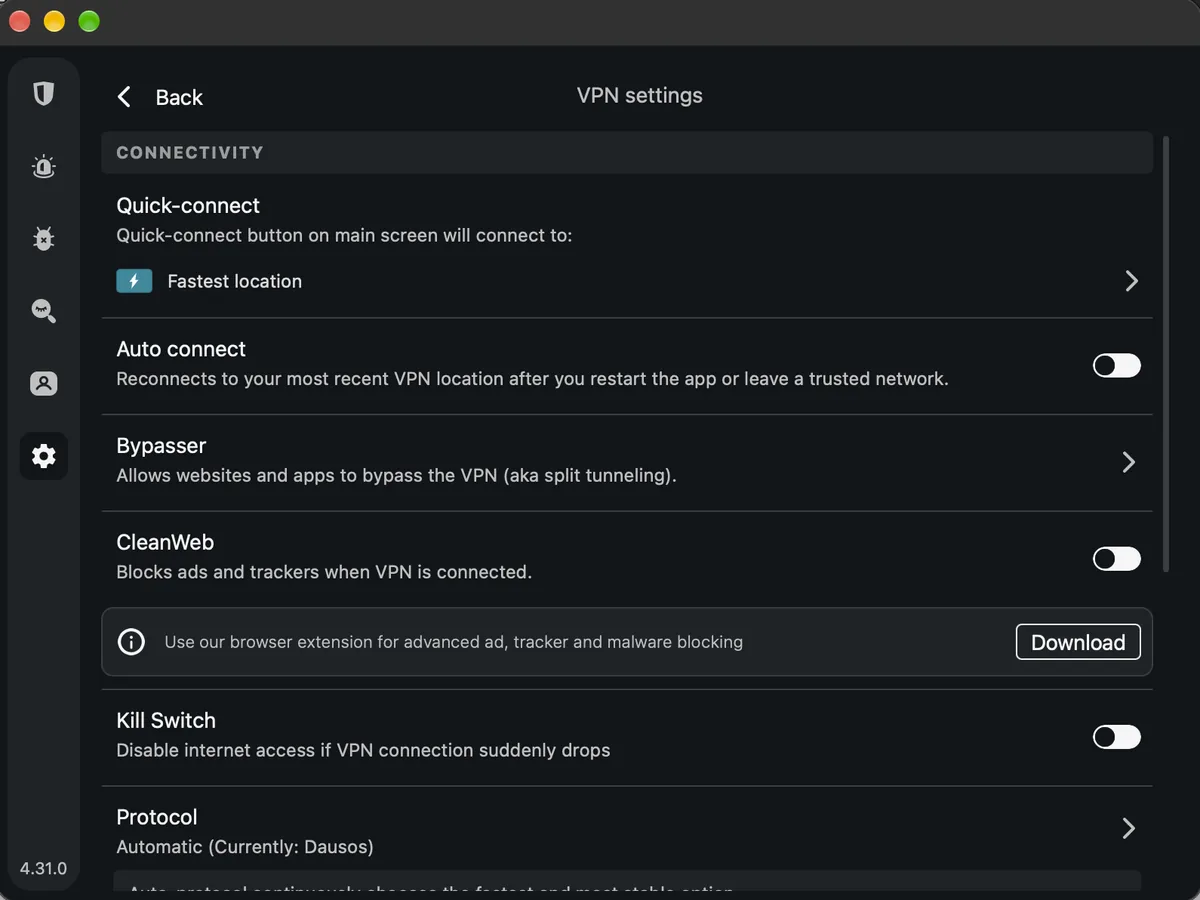
Kill Switch
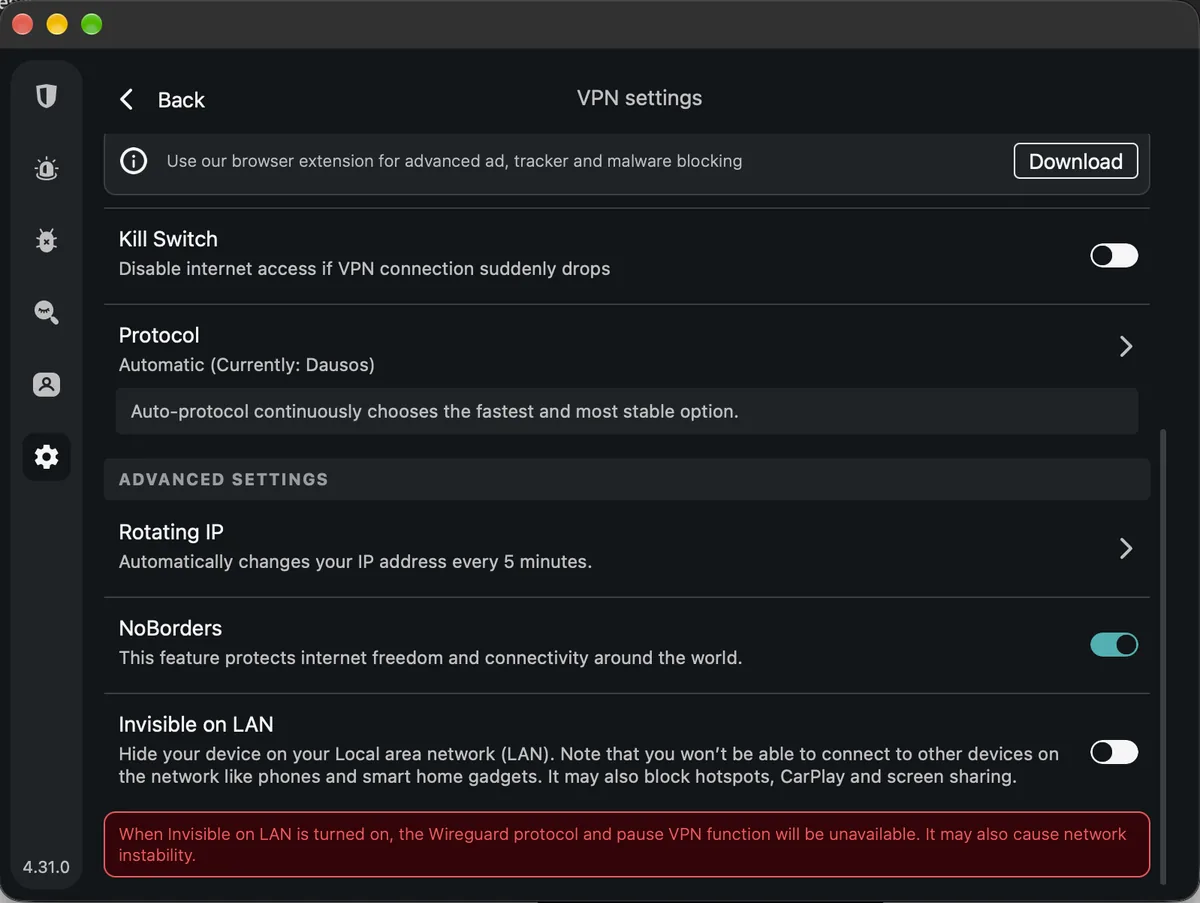
If the VPN connection suddenly drops, the kill switch cuts your internet access so that no data leaves your device unprotected. Surfshark’s VPN kill switch is off by default. In the Mac app, you turn it on under Settings, then VPN settings, and the first time, macOS asks you to install a small helper tool for it.
Dynamic MultiHop (double VPN)
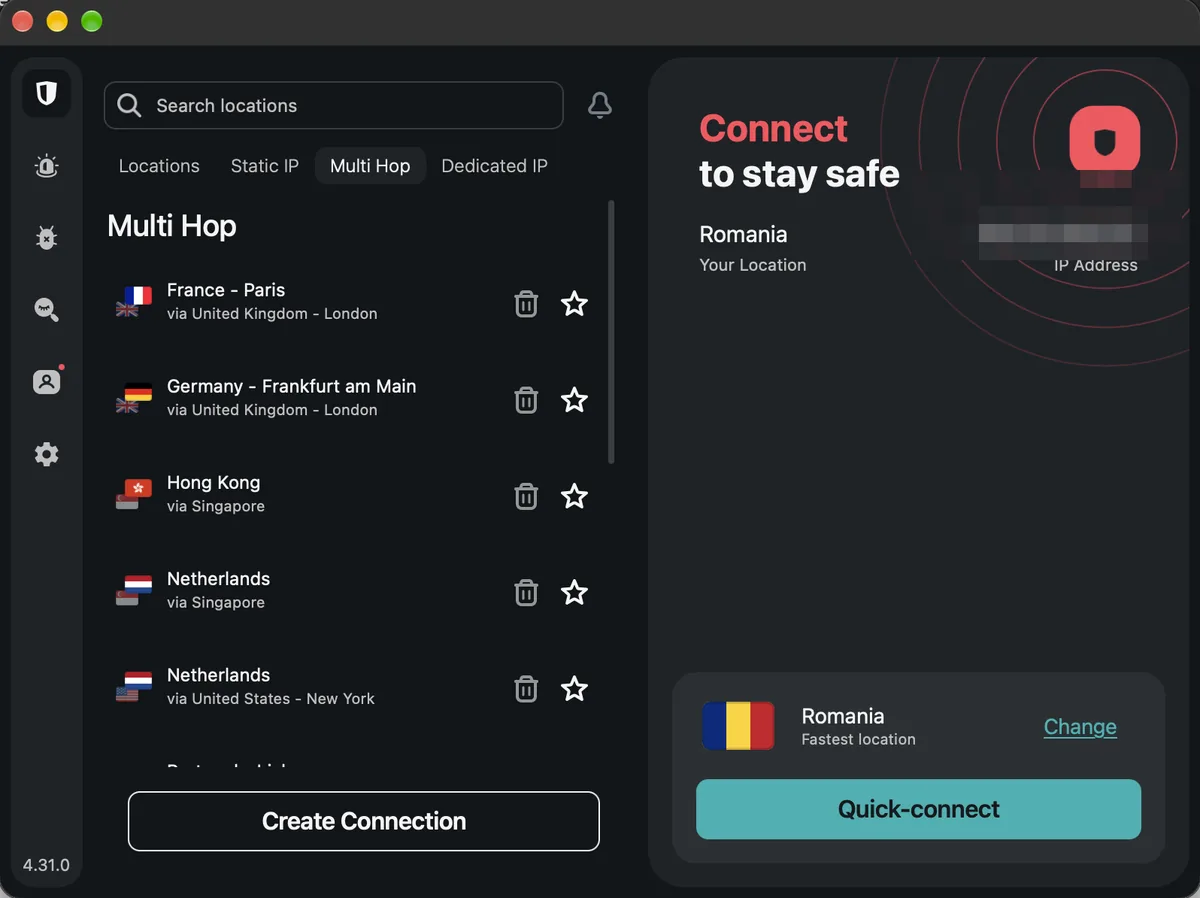
MultiHop sends your traffic through two VPN servers instead of one. Since 2023, Dynamic MultiHop lets you choose the entry and exit servers yourself. The extra hop adds privacy, which can matter to journalists or activists, but it also slows the connection down, so it is a poor choice for streaming or large downloads. For torrenting, Surfshark has P2P servers instead.
Unlimited devices
Most VPNs limit how many devices you can connect at the same time: NordVPN allows 10, ExpressVPN 10 to 14 depending on the plan. Surfshark has no limit, so one subscription can cover a whole household at no extra charge. (During the free trial, the limit is 3 devices.)
CleanWeb (ad and malware blocker)
CleanWeb blocks ads and trackers while the VPN is connected, which also saves mobile data. It is part of every plan, including Starter, but it is off by default; you turn it on in the VPN settings. For fuller blocking, including malicious sites, the Mac app points you to Surfshark’s browser extension, which also hides cookie pop-ups.
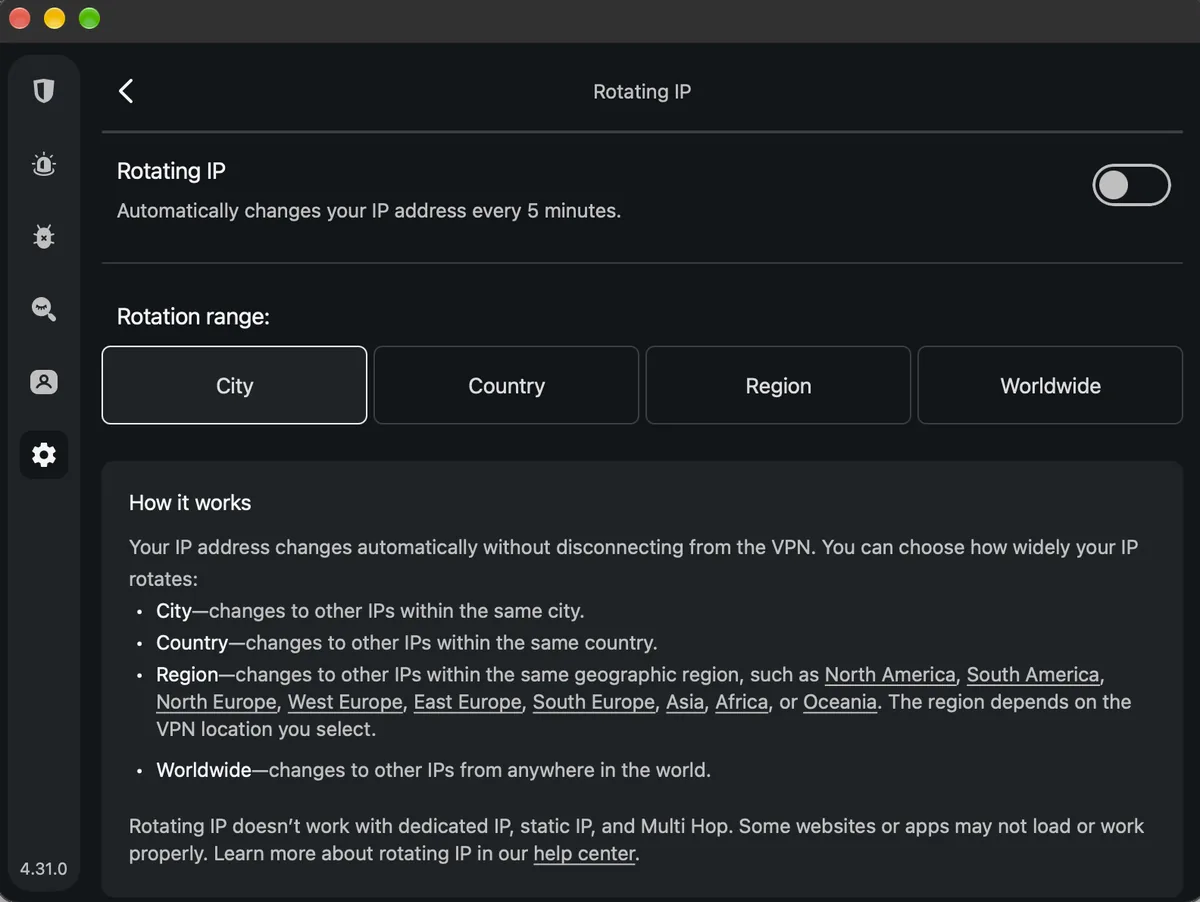
Rotating IP, Everlink and FastTrack
Surfshark’s Nexus technology connects you to a network of servers rather than to a single one. Rotating IP uses it to change your public IP address every 5 minutes without dropping the connection, which makes tracking harder. You choose whether the new address stays in the same city or country, the same region or comes from anywhere in the world. Everlink (2025) restores dropped connections automatically and reroutes traffic during server maintenance. FastTrack (2025, macOS only) routes your traffic over faster network paths. Surfshark says it is up to 70% faster at the locations marked with the FastTrack icon.
 Pricing
10.0
Surfshark offers three subscription plans – Starter, One and One+. All three include the same VPN with all servers, unlimited devices and the CleanWeb ad blocker; the higher tiers add security and identity tools. Each plan can be bought for 1 month, 1 year or 2 years.
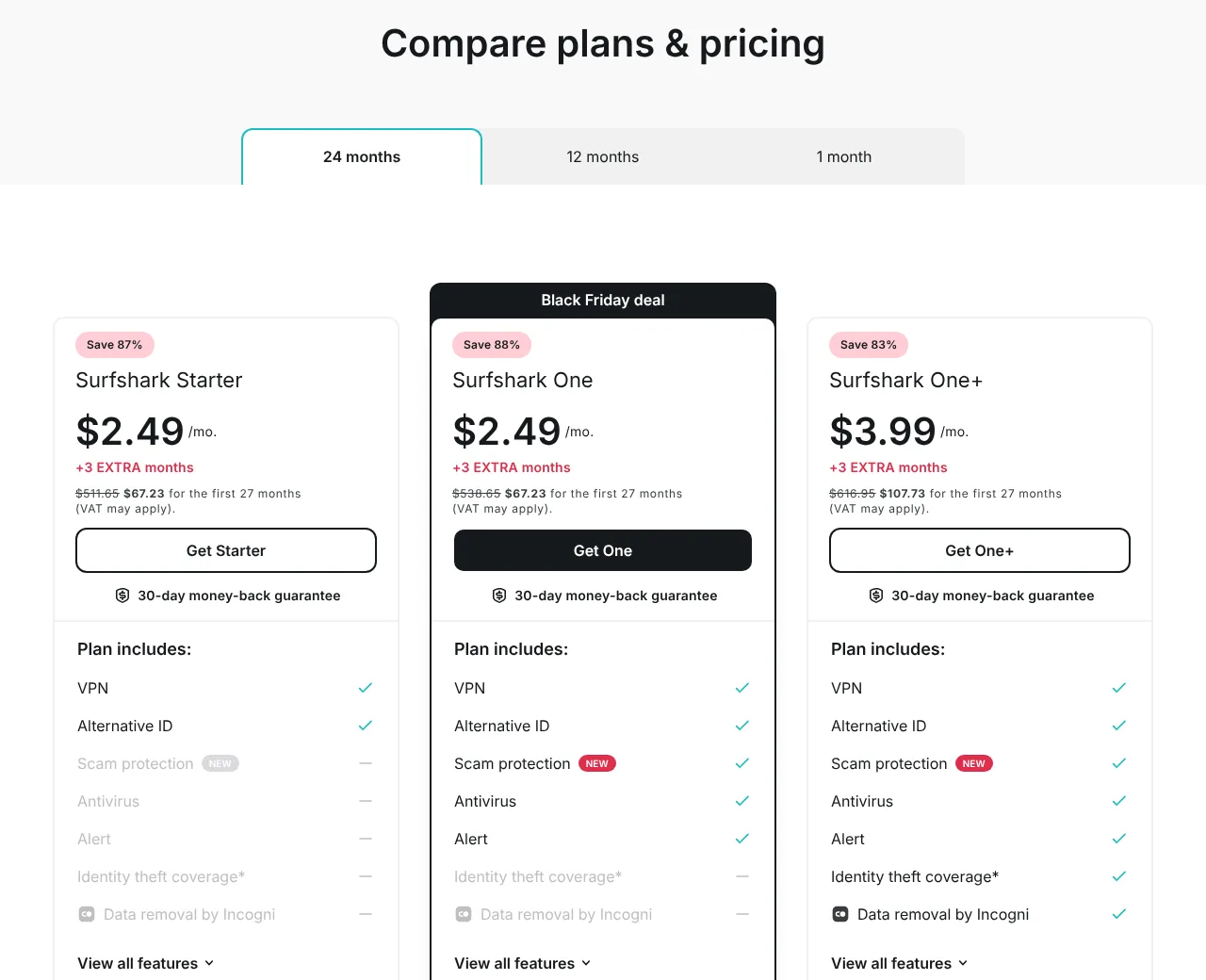
Prices (as of 24 November 2026)
| Plan length | Starter | One | One+ |
|---|---|---|---|
| 1 month | $18.95 | $19.95 | $22.85 |
| 1 year + 3 months | $2.99/mo ($44.85 for 15 months) |
$2.99/mo ($44.85) |
$6.99/mo ($104.85) |
| 2 years + 3 months | $2.49/mo ($67.23 for 27 months) |
$2.49/mo ($67.23) |
$3.99/mo ($107.73) |
| Renewal price | $79/year | $99/year | $139/year |
Prices are in US dollars, without sales tax or VAT. The 3 extra months are part of Surfshark’s Black Friday offer at the time of writing. Surfshark changes its offers often and, according to its terms, also tests different prices with different visitors: on 30 October, some page loads showed $2.19 a month for the 2-year Starter plan, while four loads on 24 November all showed the prices above. The price at checkout may therefore differ.
Good to know:
- Renewal: the discounted price only applies to the first term. After that, the plans renew automatically every year at the price in the table (a 2-year plan renews for one year), according to Surfshark’s renewal price list. On Starter, that means $79 a year after a first term that cost about $30 a year.
- Cheapest option: the 2-year plans. At the time of writing, the 2-year One plan costs the same as Starter, so it is the better deal, but it renews at $99 instead of $79 a year. The 1-month plans are expensive and mainly make sense for a short trip.
- Money-back guarantee: 30 days, for your first purchase only, if you bought on Surfshark’s website or through Google Play. It does not apply after a renewal or to some add-ons.
- Free trial: new users can try Surfshark for free for 7 days on up to 3 devices with a 1-year or 2-year plan. You have to enter payment details (card, PayPal or Apple Pay), and the plan is charged automatically after the trial unless you cancel.
- Add-ons: Dedicated IP (an IP address only you use) and Alternative Number (a virtual phone number) cost extra on every plan and are bought in your Surfshark account. Their renewal prices are $45 and $27.48 a year.
- Discounts: students (through Student Beans) and recent graduates can get extra discounts.
What each plan includes
| Feature | Starter | One | One+ |
|---|---|---|---|
| VPN, all servers and protocols, unlimited devices | ✓ | ✓ | ✓ |
| CleanWeb ad blocker, cookie pop-up blocker | ✓ | ✓ | ✓ |
| Bypasser, Rotating IP, Dynamic MultiHop | ✓ | ✓ | ✓ |
| Alternative ID (masked email, generated personal details) | ✓ | ✓ | ✓ |
| Scam protection (scam texts, email scam checker, web content blocker) | – | ✓ | ✓ |
| Antivirus (real-time protection, scheduled scans, webcam protection) | – | ✓ | ✓ |
| Alert (leak alerts for email, credit card and ID) | – | ✓ | ✓ |
| Identity-theft coverage up to $1M (US residents, except New York State) | – | – | ✓ |
| Incogni data removal (US, UK, EU, Swiss and Canadian residents) | – | – | ✓ |
| Dedicated IP, Alternative Number | Paid add-on | Paid add-on | Paid add-on |
Which plan makes sense?
- Starter if you only need the VPN. It has the same servers, speeds, ad blocker and VPN features as the other plans.
- One if you also want antivirus, data-leak alerts and scam protection. On the 2-year plan, it currently costs the same as Starter for the first 27 months, then $20 more per year.
- One+ mainly if you live in the US, UK, EU, Switzerland or Canada and want your personal data removed from data brokers (Incogni). The identity-theft coverage is only for US residents.
Payment methods: credit and debit cards, PayPal, Google Pay, Apple Pay and cryptocurrencies such as Bitcoin, Ethereum and Litecoin (through CoinGate; not on mobile devices). Other methods vary by region.
Click here to see the current Surfshark plans.
Why 10 out of 10
The first term is cheap, $2.49 a month on the 2-year Starter plan, and the renewal is moderate at $79 a year. Over three years, that comes to about $3.75 a month, less than ExpressVPN (about $4.59) or NordVPN (about $5.64). Add unlimited devices and a 30-day money-back guarantee, and I found nothing to take half a point off for. The $18.95 monthly plan is expensive, but few people buy it, so it doesn’t count here, just as it doesn’t for the others.
 Locations
9.5
On 24 November 2026, Surfshark’s server list showed 142 locations in 100 countries, and Surfshark says it runs more than 4,500 servers. The US has servers in 24 cities, Australia in 5, the UK in 4, France and Canada in 3 each, and Germany in 2. At the time of our first review in 2019, Surfshark had about 1,700 servers in 63 countries.
46 of the 100 countries have only virtual locations: the server stands in another country, but you get an IP address of the country you chose. Surfshark labels them “Virtual location” in the app, so you know where your traffic really goes. For a website, you’re still in the country you picked. The extra distance shows up in your speed.
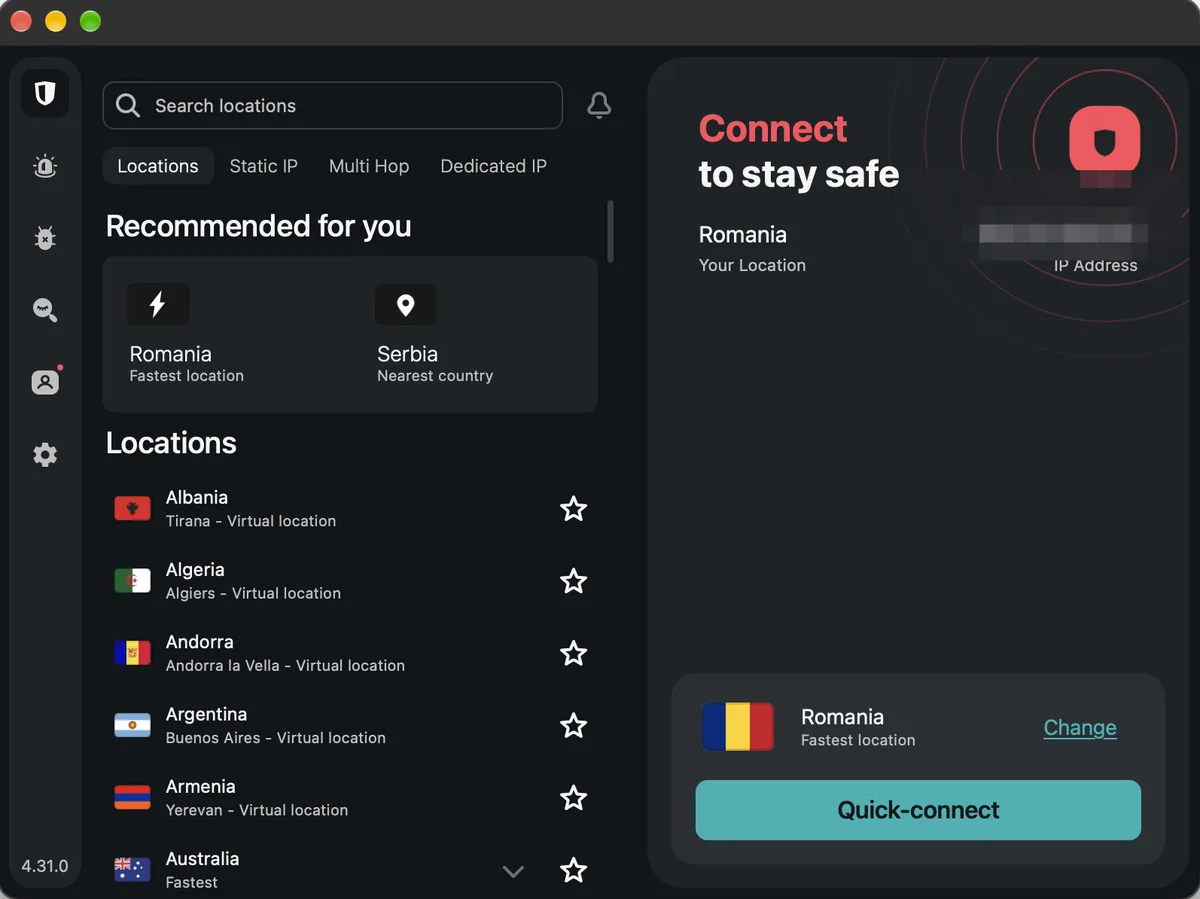
India is one of them. After India’s 2022 rule requiring VPN providers to store user data for five years, Surfshark closed its physical servers there, and Delhi and Mumbai are now virtual locations. Russia isn’t on the list at all.
The 100 countries include most of Europe and the Americas, a good choice in Asia and the Pacific (among them Japan, South Korea, Taiwan, Hong Kong, Singapore, Vietnam, Australia and New Zealand) and a number of countries in Africa and the Middle East, such as South Africa, Nigeria, Egypt, Morocco, Israel, the United Arab Emirates and Saudi Arabia.
Infrastructure:
- All servers run from RAM only (since 2020), so nothing is stored on them permanently; a reboot wipes everything.
- All servers have 10 Gbps ports (the upgrade was completed in 2024); in 2025, Surfshark added 100 Gbps servers in Amsterdam.
Server types:
- P2P servers for torrenting
- Static IP servers: you get the same IP address every time (shared with other users), in 6 countries
- MultiHop server pairs (double VPN)
- Obfuscated servers and the NoBorders mode for networks that block or restrict VPNs
- Dedicated IP (paid add-on): an IP address only you use, in about 20 locations
Streaming: Netflix
On the night of 24 November 2026, I tried Netflix with Surfshark’s default settings on ordinary servers in Germany (Frankfurt), the US (New York), the UK (London), Australia (Sydney) and France (Paris). It played on the first try in all five. I didn’t change a setting, switch servers or clear a cache.
Netflix blocks screenshots of what it plays, so my proof is phone photos of my laptop screen, here for Germany and the US.
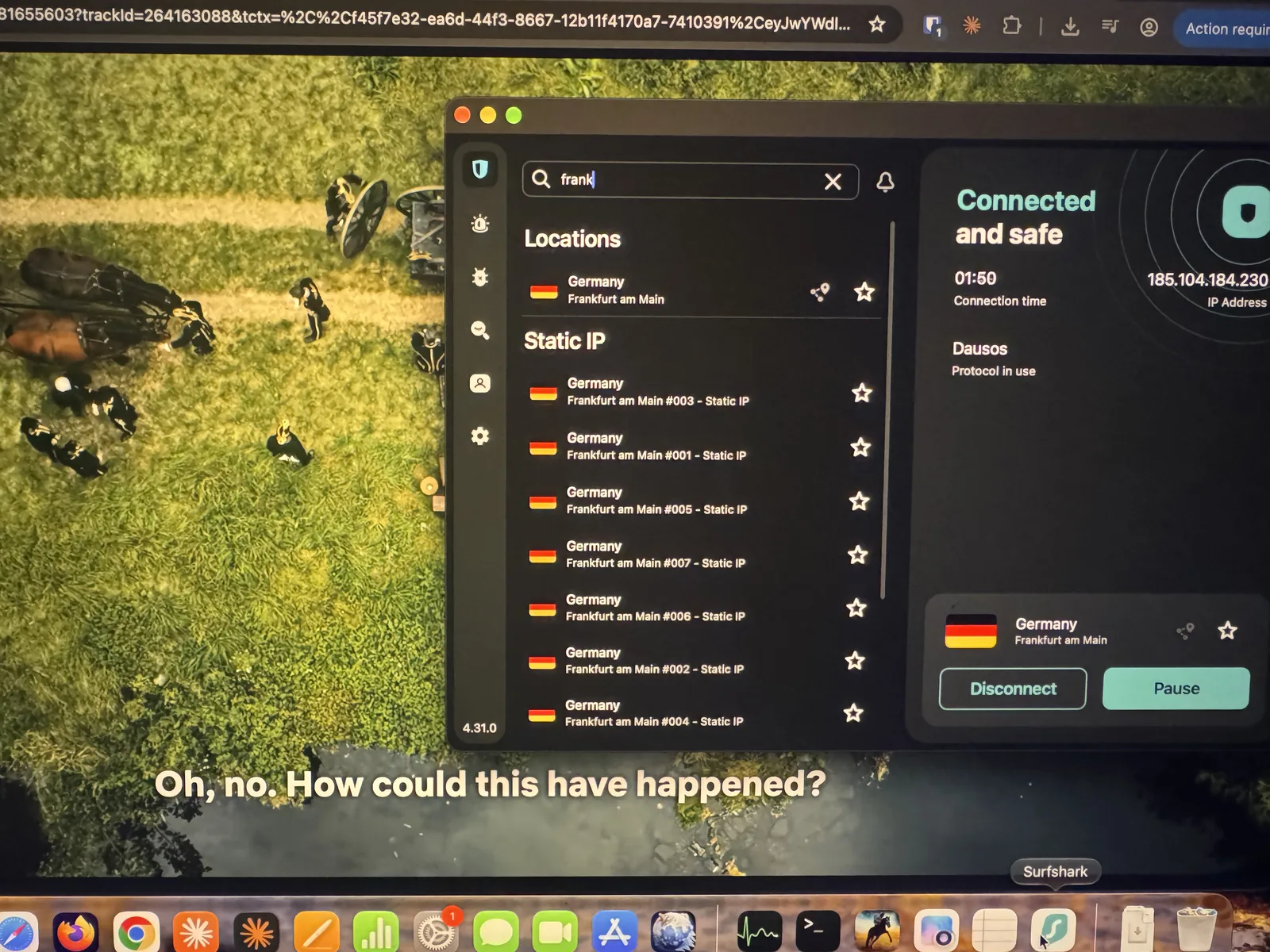
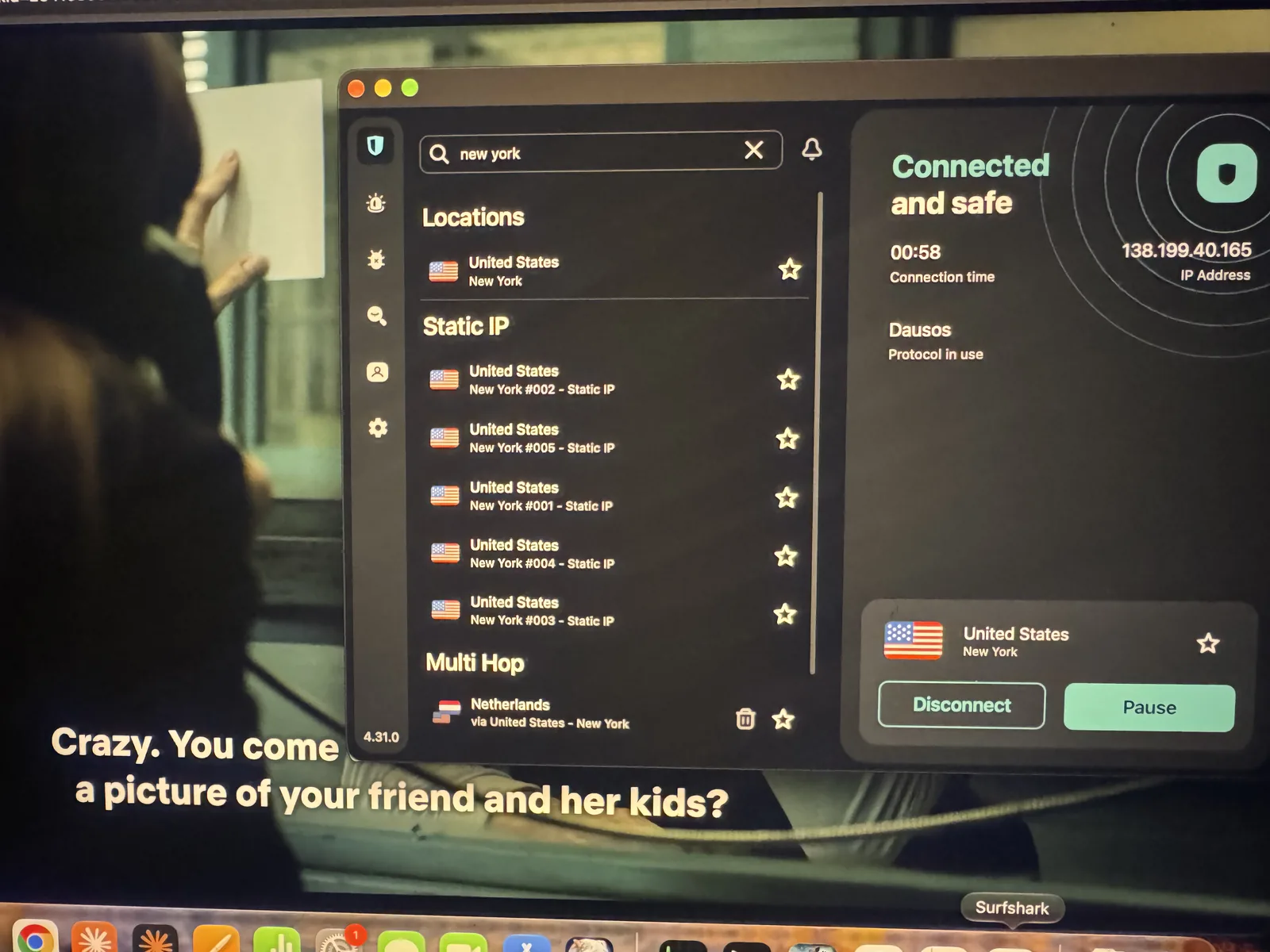
One night of tests is a snapshot, not a promise: streaming services change their VPN blocking without warning.
Why 9.5 out of 10
Servers in 100 countries, with the virtual ones clearly labelled, and Netflix worked in all five countries I tried, on the first try. Half a point goes because others cover more: NordVPN and Proton VPN list servers in about 150 countries. Streaming cost nothing, so the score would be the same without it.
 Speed
9.5
I tested Surfshark’s Mac app (version 4.31.0) in the early hours of 24 November 2026, with the same setup I used for ExpressVPN, NordVPN and Mullvad: a 2021 MacBook Pro (M1 Max) on 5 GHz Wi-Fi, and a home line sold as 850 Mbps down and 500 Mbps up. Each result is the median of three Speedtest.net runs. My speed without the VPN is the median of six runs, three before the VPN tests and three after them.
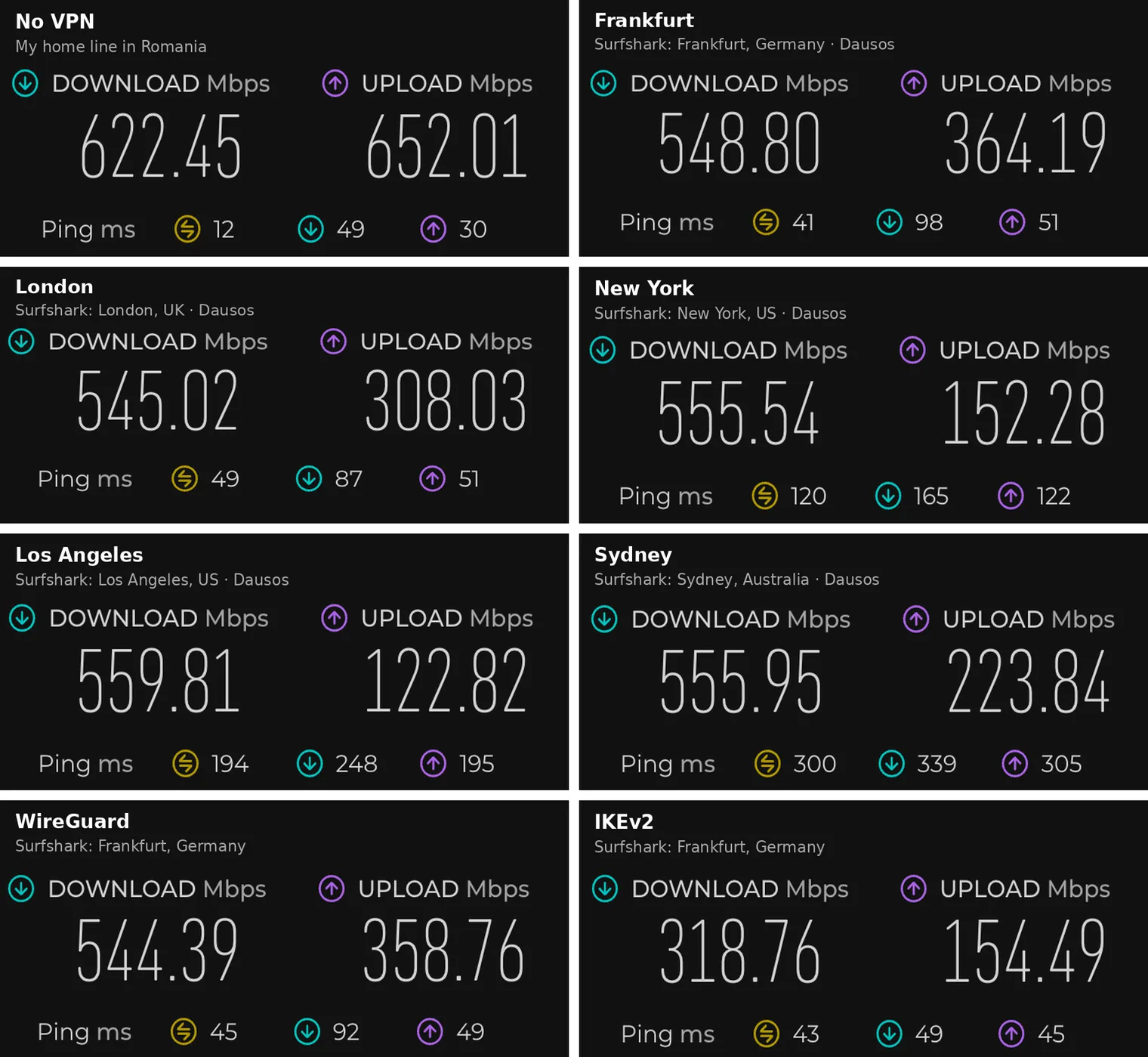
Downloads were remarkably even. Every location landed between 545 and 560 Mbps, 87–90% of my line, whether the server was in Frankfurt, 42 ms away, or in Sydney, 301 ms away. I expected Sydney to be the slow one. It wasn’t.
Uploads dropped more: to about half of my line in Frankfurt and London, a third in Sydney and about a quarter in New York and Los Angeles (170–174 Mbps). That’s still plenty for video calls, but a large upload to a US server takes noticeably longer.
I tested the four VPNs at different times of day, so I compare the share of my line each one kept rather than raw numbers. On nearby servers, NordVPN and ExpressVPN kept a little more of my download speed (93–105%). In Sydney, Surfshark kept far more: 89%, against 73% for both of them. Its uploads to the US were the lowest of the three, though; the lowest I saw with ExpressVPN was 29%, with NordVPN 34%. To Sydney, Surfshark’s ping was 301 ms, 28 ms above ExpressVPN’s and well below Mullvad‘s 423 ms.
Protocols
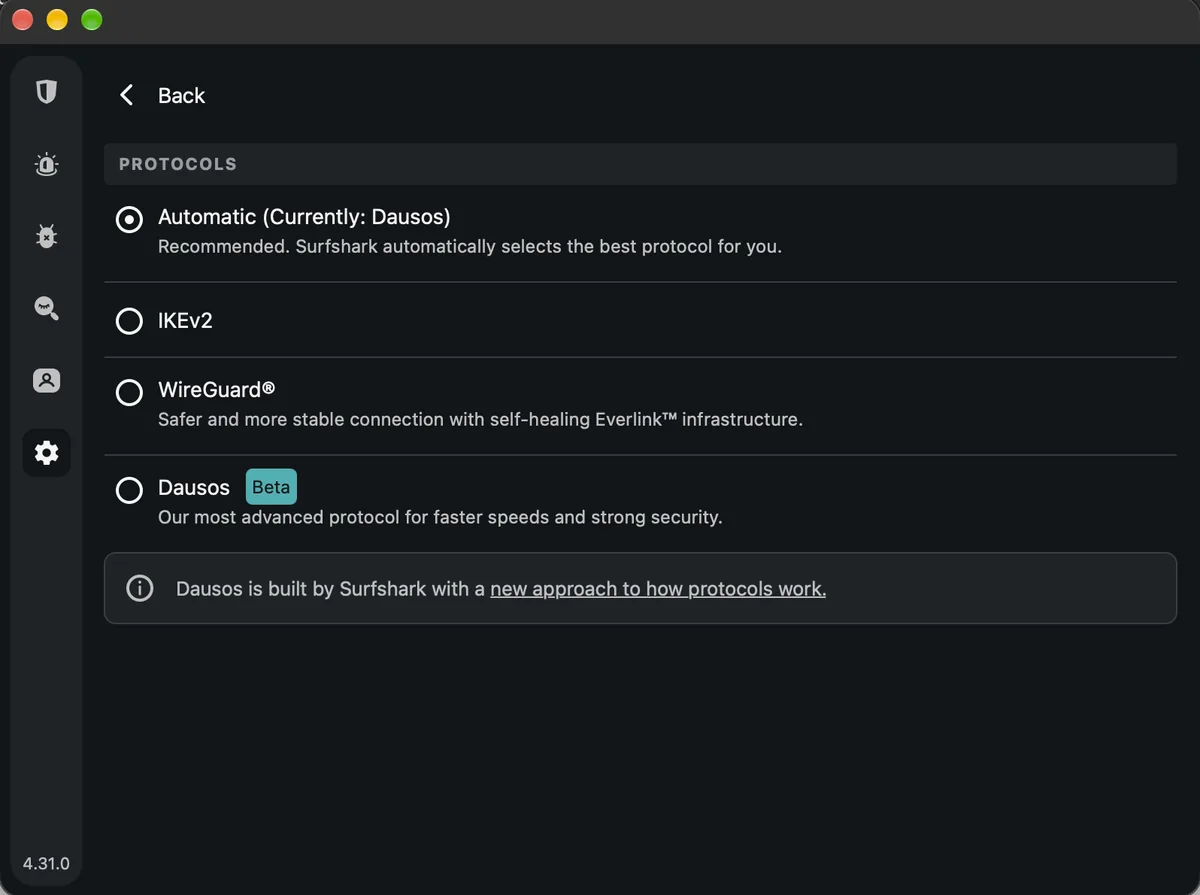
The Mac app’s default protocol is Automatic, and on my Mac it picked Dausos, Surfshark’s own protocol, every time, even though the app still labels Dausos as Beta. Every location test above used it. To compare, I ran the same test in Frankfurt with WireGuard and IKEv2.
Dausos and WireGuard were practically level. Surfshark says Dausos is up to 30% faster than standard protocols; on my line, it matched WireGuard, which is already the fast one. IKEv2 lost almost half of the download speed and three quarters of the upload. Pick it only if the other two won’t connect on your network.
Why 9.5 out of 10
Downloads were fast and remarkably even, 87–90% of my line at every location, Sydney included, with no weak server. Half a point goes for uploads, which fell to about a quarter of my line on the US servers and to half in Europe. ExpressVPN and NordVPN lost the same half point for the same weakness.
 Privacy
10.0
Jurisdiction and ownership
When we first reviewed Surfshark, it was registered in the British Virgin Islands. On 1 October 2021, it moved its headquarters to the Netherlands; the service is now run by Surfshark B.V. in Amsterdam. Dutch law does not require VPN providers to log or retain user data, and as an EU company Surfshark is bound by the GDPR. Keep in mind that the Netherlands takes part in the “Nine Eyes” intelligence-sharing alliance.
Surfshark was founded by Vytautas Kaziukonis, who is now chairman of the board; Dovydas Godelis became CEO in March 2026. In 2022, Surfshark and Nord Security, the company behind NordVPN, merged under one holding company; both say they continue to operate independently. Besides its own data-removal service Incogni, Surfshark has bought Ironwall (2024) and Optery (2026), which run as separate services.
No-logs policy
According to its privacy policy (updated 12 October 2026), Surfshark does not collect the IP addresses you visit, your browsing history, session information, connection timestamps, used bandwidth or network traffic. While you are connected, the VPN server temporarily keeps your user ID and/or IP address and connection timestamps to make the connection work; Surfshark says these are deleted automatically within 15 minutes after your session ends. Like other providers, Surfshark does store account and payment data, and it uses diagnostics and crash reports to maintain its apps.
Audits and transparency
- No-logs: Deloitte checked Surfshark’s no-logs policy in 2023 and again in June 2025 (an ISAE 3000 assurance report covering standard, static and multiport VPN servers; Surfshark users can read it in their account).
- Security: Cure53 audited the browser extensions (2018), the server infrastructure (2021) and, later, the Dausos protocol. In 2025, SecuRing tested the apps and the server infrastructure; the results, published in January 2026, showed no critical vulnerabilities. The Android app holds a MASA certificate (Mobile App Security Assessment).
- Transparency report: Surfshark has replaced its warrant canary with a quarterly transparency report. For July–September 2026, it lists 23 inquiries from government institutions, 309,186 DMCA requests and no warrants, national security letters or gag orders, and says none of them led to the disclosure of data about users’ online activity.
- Surfshark runs a bug bounty program and is a founding member of the VPN Trust Initiative.
My leak test
Connected to Frankfurt over WireGuard on 24 November 2026, I ran ipleak.net and the extended test on dnsleaktest.com. Both showed only Surfshark’s address in Frankfurt: the IPv4 address, the WebRTC address and the one DNS server, which answered all 140 queries on ipleak.net. That DNS server was the VPN server itself. The IPv6 test couldn’t reach anything, so no IPv6 address leaked either. My real IP address and my internet provider didn’t show up anywhere.
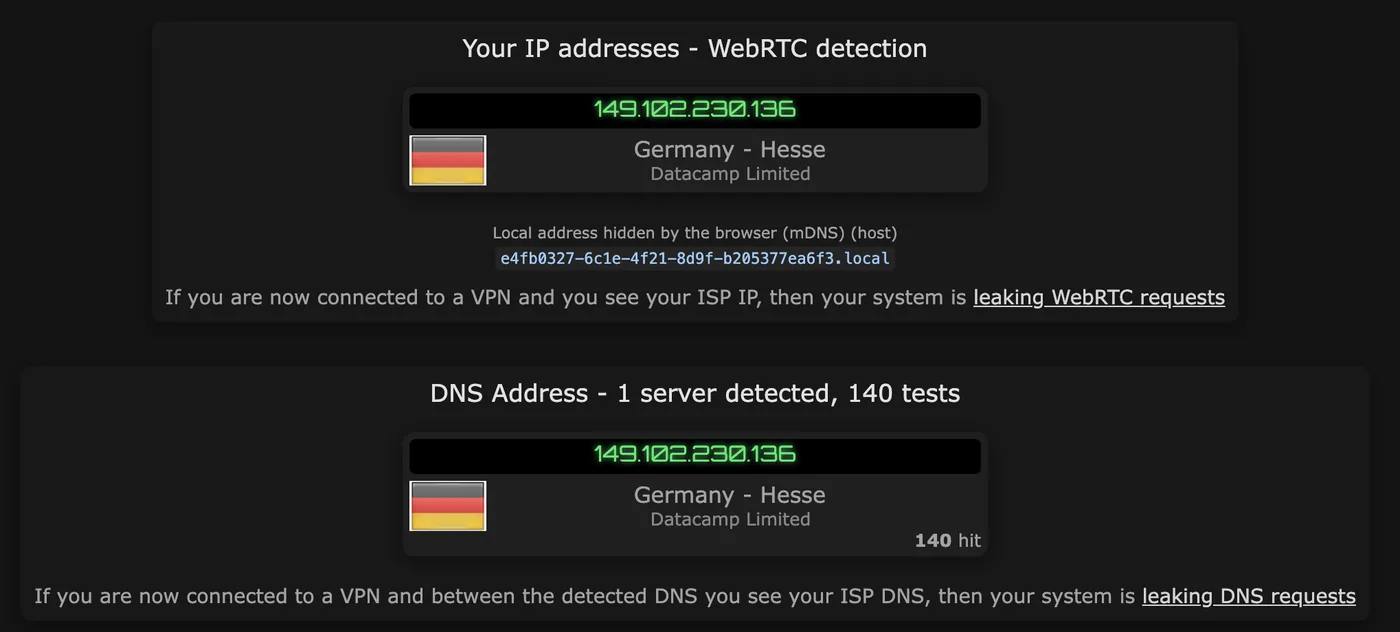
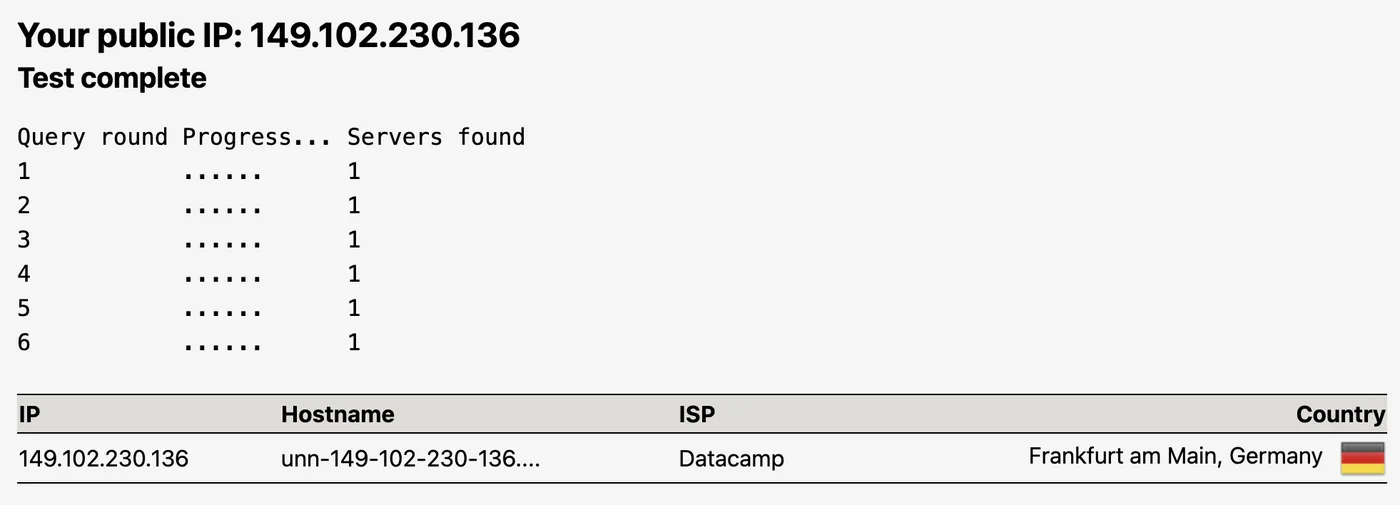
You can run the same check yourself: note your IP address on one of these sites without the VPN, then connect and run the test again. If you still see your own IP address or your provider’s DNS servers, contact Surfshark support.
Security incident in 2026
On 31 August 2026, Surfshark’s monitoring flagged unusual activity on an internal test server that a configuration mistake had left reachable from the internet. Surfshark confirmed the break-in and contained it on 2 September, finished the cleanup on 5 September and published an incident report on 9 September.
The intruder got to parts of system binaries, internal configurations and code history that held some build-related credentials; Surfshark says all of them have been rotated or revoked. The same party also reached an isolated proxy server used for content accessibility, which, according to Surfshark, had no access to user identities, IP addresses, encryption keys or browsing traffic. Surfshark says no user data and no VPN service were affected, and it has announced an additional independent security audit.
Credentials left in code history are a mistake a security company shouldn’t make. Still, Surfshark caught the intrusion itself and told its users within ten days, with dates and details. That’s how it should be done.
Encryption and protocols
Surfshark encrypts your traffic with AES-256-GCM (ChaCha20 with WireGuard) and offers these protocols:
- WireGuard: fast and modern. Since January 2026, its key exchange is post-quantum protected by default in the macOS, Android and Linux apps; since October 2026, a fully post-quantum version (which also protects the authentication step) is available on macOS and iOS, with more platforms planned.
- OpenVPN (UDP and TCP): well-established and compatible with most routers.
- IKEv2: stable when you switch networks, which makes it popular on phones. It is no longer available in the Windows app.
- Dausos: Surfshark’s own protocol, launched in April 2026 and audited by Cure53. It gives each user a separate tunnel, uses AEGIS-256X2 encryption and post-quantum cryptography, and Surfshark says it is up to 30% faster than standard protocols. It is in the macOS app, where Automatic picked it in my tests, and since November 2026 in a beta of the Windows app.
Shadowsocks, which our original review mentioned for use in China, is no longer among the protocols Surfshark lists. For restrictive networks, Surfshark now relies on obfuscated servers and its NoBorders mode.
The Mac app offers Automatic, Dausos, WireGuard and IKEv2. OpenVPN isn’t in it; Surfshark’s other apps and its manual setup guides still have it.
Why 10 out of 10
Deloitte checked the no-logs policy in June 2025, the servers run from RAM only, outside firms test the apps and servers, and my leak test was clean. The September 2026 incident doesn’t cost a point. It hit a test server and a proxy, not user data, and Surfshark disclosed it on its own within ten days. NordVPN lost half a point for its 2018 breach because it kept quiet about it for six months after finding out.
 Support
10.0
Surfshark offers customer support around the clock by live chat and email; there is no phone support. Its Help Center has setup guides for every platform, troubleshooting articles and FAQs, and you can submit a request there if you’d rather not chat.
In the app, the Get help page in the settings has a Report a bug form and a Get instant help link to Surfshark’s website, with the live chat and the ticket form.
My chat test
I opened the live chat on Surfshark’s website at 4:01 in the morning on 24 November 2026. It asks for your name and email address, and then Sharkbot, an AI assistant, answers.
I asked for a human agent straight away. The bot wanted me to describe my problem first, so I asked it two questions. Are all servers RAM-only? It confirmed they are, which matches what Surfshark publishes. Does Surfshark work in Russia? It may be difficult to use there and can’t be guaranteed, and because of sanctions, Surfshark can’t take payments from Russia, so crypto is usually the only way to pay. Short and to the point.
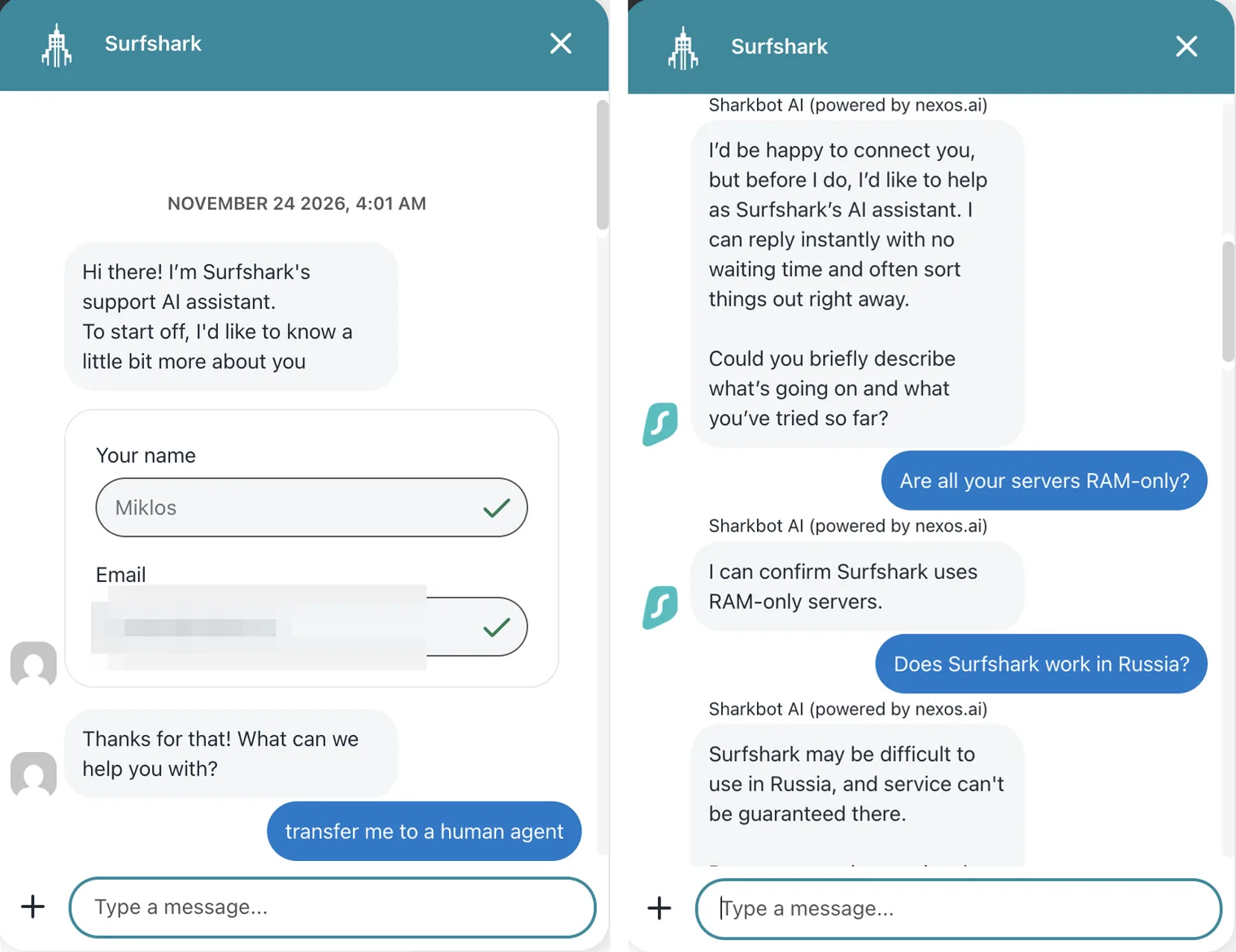
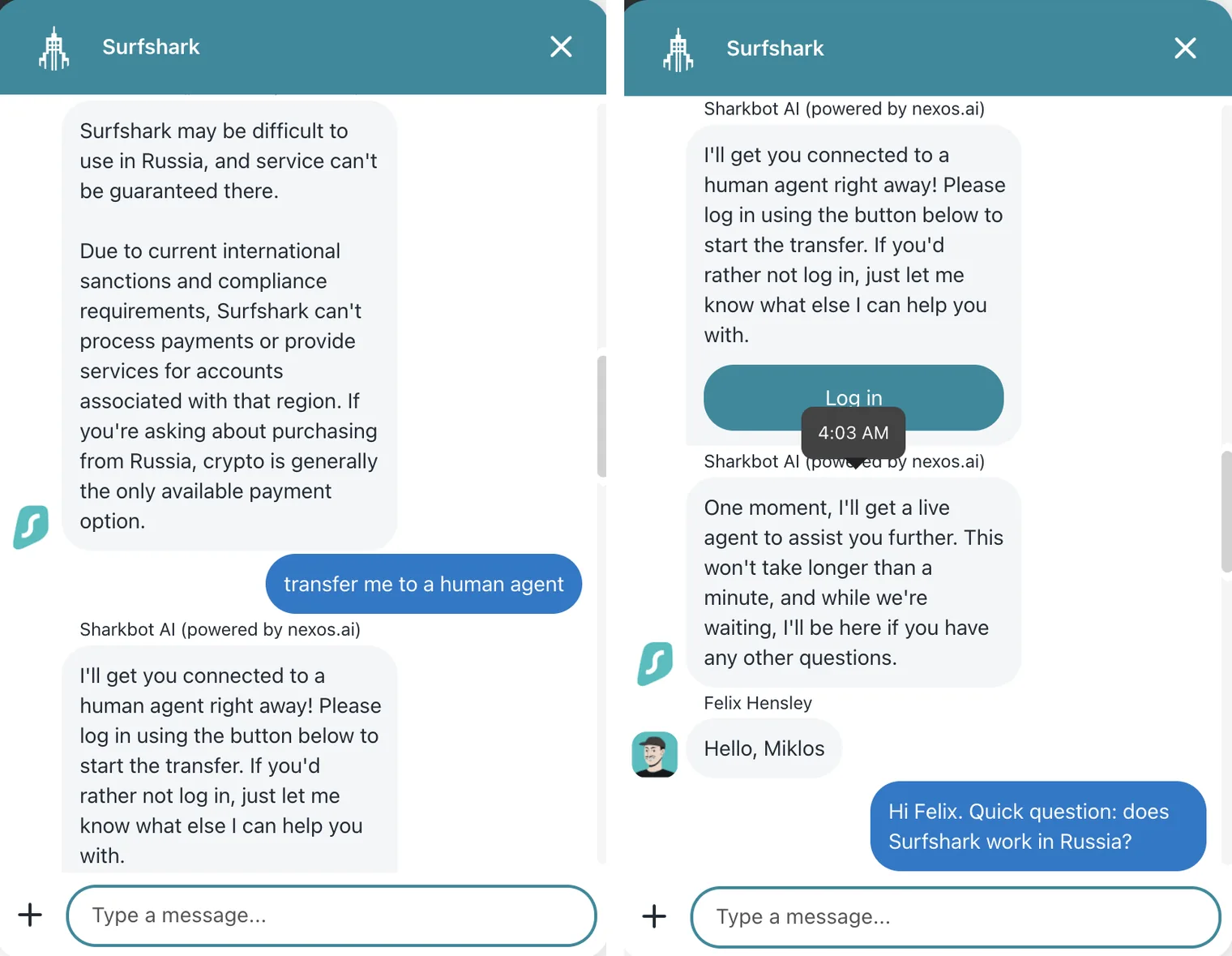
It took a few more requests before the bot gave in. It first suggested I log in to my account for the transfer, then said a live agent would be with me within a minute. He was: the agent joined less than a minute after my last request.
I asked him the Russia question too. His first reply was a ready-made template, but unlike the one I got from NordVPN, this one was detailed and answered the question: some users in Russia have service disruptions, and the only step Surfshark can suggest is a manual WireGuard connection, with links to the setup guide and the special location files you need for it. Then he wrote a message of his own: the app might not work, a manual connection should, and he can’t give guarantees. That matches Surfshark’s help article for countries with network restrictions.
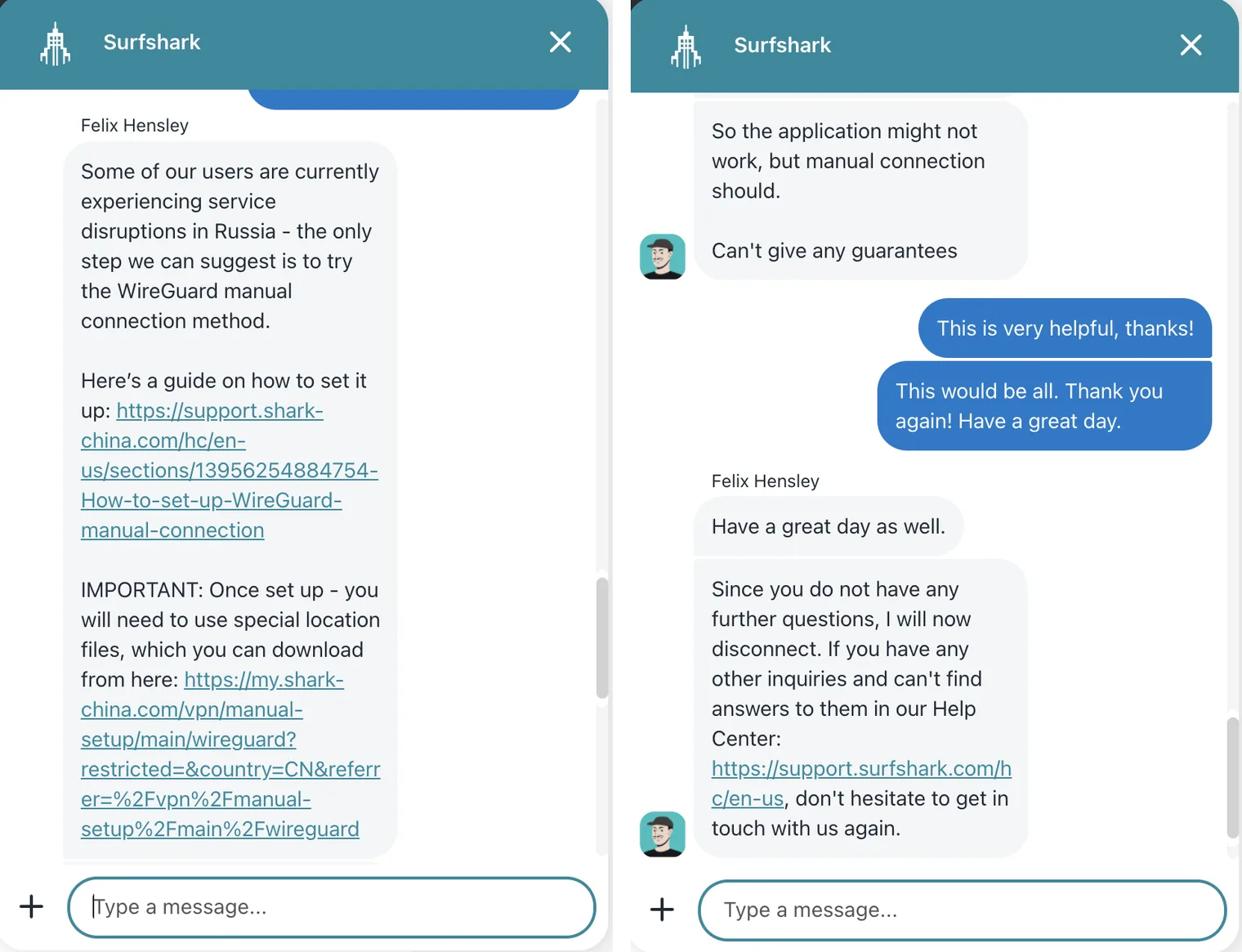
So the bot makes you work for a human, but its own answers were already useful, and a person arrived within a minute in the middle of the night. A template is fine by me when it answers the question.
Why 10 out of 10
24/7 live chat with real people. The agent joined less than a minute after my last request, at four in the morning, and answered my question plainly, first in a detailed template, then in his own words. Having to ask the bot several times for a human costs nothing, as it didn’t at ExpressVPN or NordVPN.
 Ease of Use
9.5
Surfshark has apps for Windows (including ARM-based PCs), macOS, Linux (with a graphical app since 2022), Android, iOS, Apple TV, Android TV and Amazon Fire TV, plus browser extensions for Chrome, Firefox and Edge. There is no app for routers. You set up a router by hand with Surfshark’s OpenVPN or WireGuard guides, and many routers, including most ISP-provided ones, can’t run it without other firmware. Game consoles and smart TVs without an app go through such a router or a shared connection from a computer. There is no limit on how many devices you use at the same time.
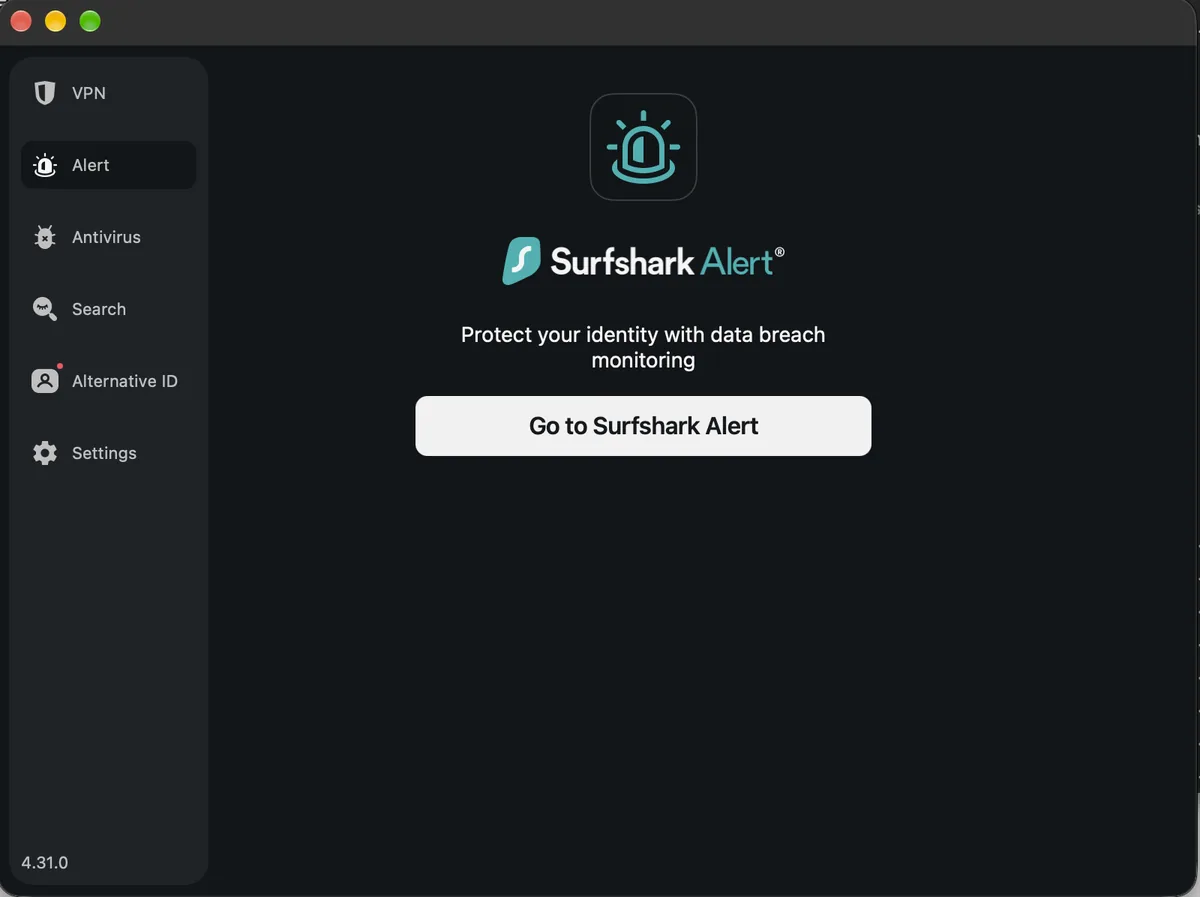
The Mac app has all you need, and things are easy to find. It has the same layout as ExpressVPN‘s Mac app, with a menu bar on the left side (VPN, Alert, Antivirus, Search, Alternative ID and Settings), so I found every setting quickly. To connect, you pick a location from the list or press Quick-connect, and Automatic picks the protocol for you.
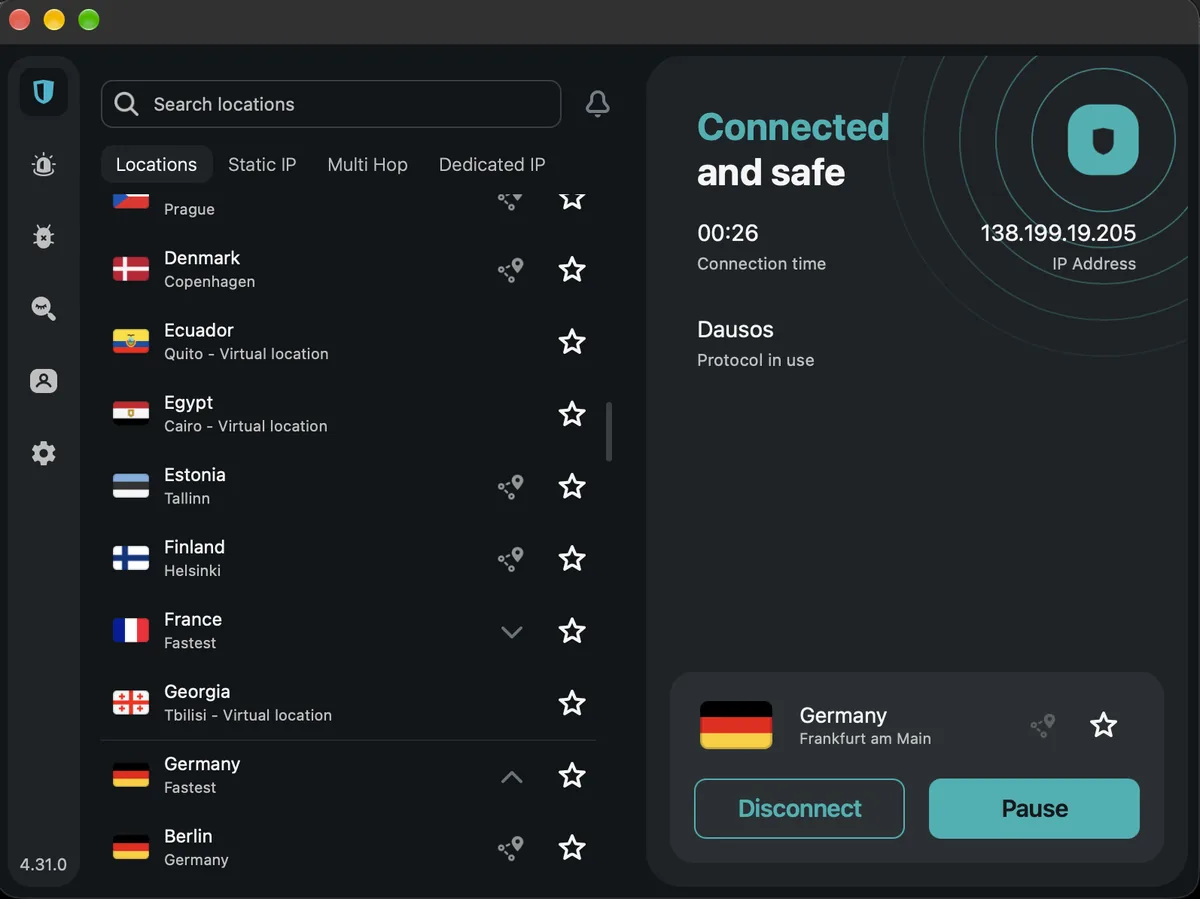
Two things are worth changing after you install it. The kill switch and CleanWeb are both off by default, and each is one switch away in the VPN settings.
Features at a glance:
- Bypasser (split tunneling) on Windows, macOS, Android and iOS; Reverse Bypasser on Android and (apps only) Windows
- Kill switch (off by default), auto-connect and Pause VPN (for 5 minutes, 30 minutes or 2 hours)
- CleanWeb ad and malware blocker; cookie pop-up blocker in the browser extensions
- Dynamic MultiHop, Rotating IP, Static IP and (paid) Dedicated IP
- NoBorders (on by default in my Mac app) and obfuscated servers for restrictive networks
- Invisible on LAN (Mac): hides your device from others on the local network, such as public Wi-Fi
- GPS override on Android, which makes your phone’s GPS location match the VPN server
- Alternative ID: masked email addresses and generated personal details for sign-ups
Some newer features have arrived on macOS first and are not yet available on every platform, among them FastTrack, the fully post-quantum version of WireGuard and the Dausos protocol (on Windows only in a beta so far).
Getting Started
Subscribing is simple:
- Choose a plan and a plan length on Surfshark’s pricing page (the 2-year plans are the cheapest).
- Enter your email address to create an account.
- Choose a payment method and pay – or start the 7-day free trial on a 1-year or 2-year plan.
- Download the app for your device, sign in and connect.
Add-ons such as Dedicated IP and Alternative Number can be bought later in your Surfshark account.
Try Surfshark with the 7-day free trial.
Why 9.5 out of 10
Apps for almost every device, including a graphical Linux app, Apple TV, Android TV and Fire TV, and a Mac app where I found every setting quickly. Half a point goes because there’s no router app: you set up a router by hand, the same deduction Mullvad and NordVPN got.
Final Thoughts
Surfshark was fast at every location I tested, Sydney included, Netflix played in five countries on the first try, my leak test was clean, and a person answered the chat within a minute at four in the morning. One subscription covers every device you own, and the price after the first term stays moderate.
It loses half a point in three places. Uploads drop to about a quarter of your line on faraway servers. NordVPN and Proton VPN have servers in more countries. And there’s no router app.
Overall, that’s 9.8 out of 10, the average of the six scores above.
A good choice if you want a fast VPN for a household full of devices, for streaming, travel and public Wi-Fi, at a price that doesn’t jump much at renewal.
Look elsewhere if you often upload large files to faraway servers, or need a server in a country Surfshark doesn’t cover.