Best VPNs of 2026: Reviews & Recommendations [Updated October 2026]

In this article, I aim to perform a complete analysis of the VPN industry and offer you my ranking of the best VPNs in the world, as well as the principles behind our research.
Updated October 2026: prices, plans, features, and the ranking now follow our updated reviews of ExpressVPN, Surfshark, Private Internet Access, and CyberGhost. We have not repeated the speed tests for this update.
Five of our staff members signed up with 25 of the most well-known and recommended VPNs. After using them for about a week, we narrowed the list down to just 10.
Then, we used those 10 for a full month and created our current top list of the 4 VPNs below.
We tested for the following criteria: speed, privacy, features, usability, server and location availability, online reviews, reputation, unblocking capabilities, customer support, and pricing.
These are the VPNs we currently recommend:

9.8 total score
Fast, audited VPN with its own post-quantum Lightway protocol and servers in 113 countries.
- Ad, tracker and malware blocking in every plan
- 30-day money-back guarantee
- 10 to 14 devices at the same time, depending on the plan

9.5 total score
Fast, feature-rich VPN from the Netherlands with a no-logs policy verified by Deloitte.
- Unlimited devices
- Ad blocker in every plan
- Low first-term and renewal prices

9.5 total score
Private Internet Access (PIA) is a low-cost, open-source VPN with a no-logs policy audited by Deloitte and tested in court.
- 180 locations in 113 countries
- Unlimited devices
- Prices stay the same at renewal

9.1 total score
Low-cost VPN from Romania with servers in 100 countries and a no-logs policy audited by Deloitte.
- 45-day money-back guarantee
- NoSpy servers in Romania
- Streaming, gaming and torrenting servers
ExpressVPN
Price from: $2.99/mo
Available on:


pros
Cons
- Its own Lightway protocol is fast and uses post-quantum encryption by default
- One of the longest lists of independent audits in the VPN industry
- Servers in 113 countries and all 50 U.S. states, and apps for almost every device
Flaws but not dealbreakers:
- Renewal prices are much higher than the first term
- The free trial is short (3 days) and only available in the iOS and Android apps
As an avid VPN user, I’m always on the hunt for the best service, and after trying out several options, I can confidently say that ExpressVPN has become my go-to choice.
Its reliability in terms of privacy, security, and speed is truly remarkable.
During my time using ExpressVPN, I’ve been consistently impressed by its unblocking capabilities and compatibility with a wide range of devices.
However, its plans renew at a much higher price after the first term, which might be a drawback for some.
Here’s a breakdown of ExpressVPN’s standout features:
- Servers in 113 countries, including all 50 U.S. states
- Registered in the privacy-friendly British Virgin Islands
- The fast Lightway protocol with post-quantum encryption
- RAM-only servers with 10 Gbps connections
- A no-logs policy checked in independent audits
- Ad, tracker and malware blocking in every plan
- A kill switch (Network Lock) and split tunneling
- Up to 10, 12 or 14 simultaneous connections, depending on the plan
- A 30-day money-back guarantee for new customers
Plans and Pricing
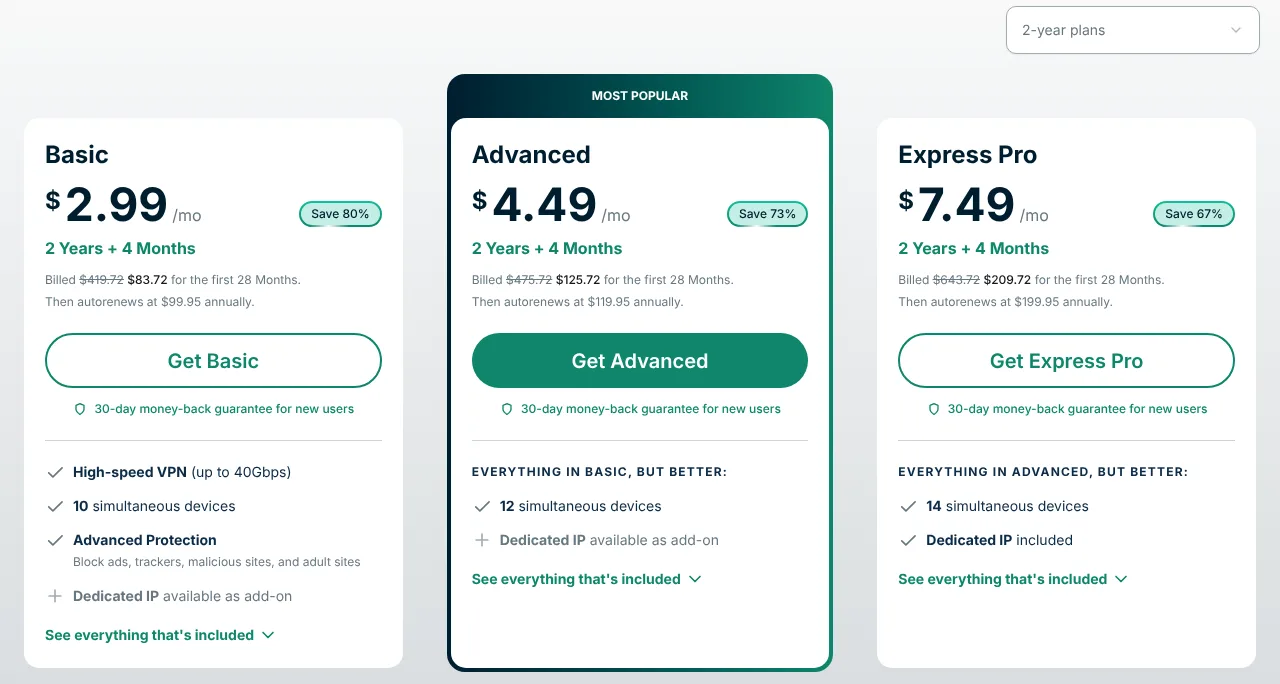
Since 2026, ExpressVPN has offered three plans – Basic, Advanced and Pro. All three include the full VPN; Advanced and Pro add more devices and extra tools, such as the ExpressKeys password manager and, for U.S. users, Identity Defender identity-theft protection.
Here are the prices of the Basic plan (as of 30 October 2026):
- The 1-month plan costs $14.99.
- The 12-month plan (plus 3 free months) costs $4.99 per month, totaling $74.85 for 15 months.
- The 2-year plan (plus 4 free months) costs $2.99 per month, totaling $83.72 for 28 months.
On the 2-year plan, Advanced costs $4.49 and Pro $7.49 per month. After the first term, the plans renew at $99.95 (Basic), $119.95 (Advanced) or $199.95 (Pro) per year.
The 2-year Basic plan offers the best value for money, but keep in mind that the renewal price is much higher than the first term.
The 30-day money-back guarantee applies to new customers who subscribe on ExpressVPN’s website. The iOS and Android apps also offer a 3-day free trial.
ExpressVPN accepts credit and debit cards, PayPal, Apple Pay and Google Pay. The order page shows all the payment methods available in your country.
In conclusion, my personal experience with ExpressVPN has been nothing short of stellar. Despite the higher renewal prices, the exceptional security, privacy, and speed make it a top choice for anyone in need of a reliable VPN service.
Speed
Note (October 2026): the speed tests below are older and were not repeated for this update. Since then, ExpressVPN has upgraded its servers to 10 Gbps, added post-quantum encryption to Lightway and, in the Windows app, introduced Lightway Turbo, which sends traffic over several paths at once.
ExpressVPN servers are optimized to deliver lightning speeds coupled with unlimited bandwidth. This VPN service also uses the Lightway protocol for turbocharged speeds.
The Lightway protocol is engineered to offer a reliable VPN experience with faster speeds and more security.
I performed a few speed tests on ExpressVPN’s fastest servers, starting from the following benchmark:
- Ping – 5ms
- Download speed – 89.36 Mbps
- Upload speed – 92.81 Mbps
US server:
- Ping – 173ms
- Download speed – 82.72 Mbps
- Upload speed – 38.06 Mbps
UK server:
- Ping – 52ms
- Download speed – 73.95 Mbps
- Upload speed – 80.56 Mbps
In my personal experience, these speeds are suitable for data-intensive tasks. Thus, you can use ExpressVPN for streaming, P2P file sharing, gaming, and even video conferencing without lag or buffering.
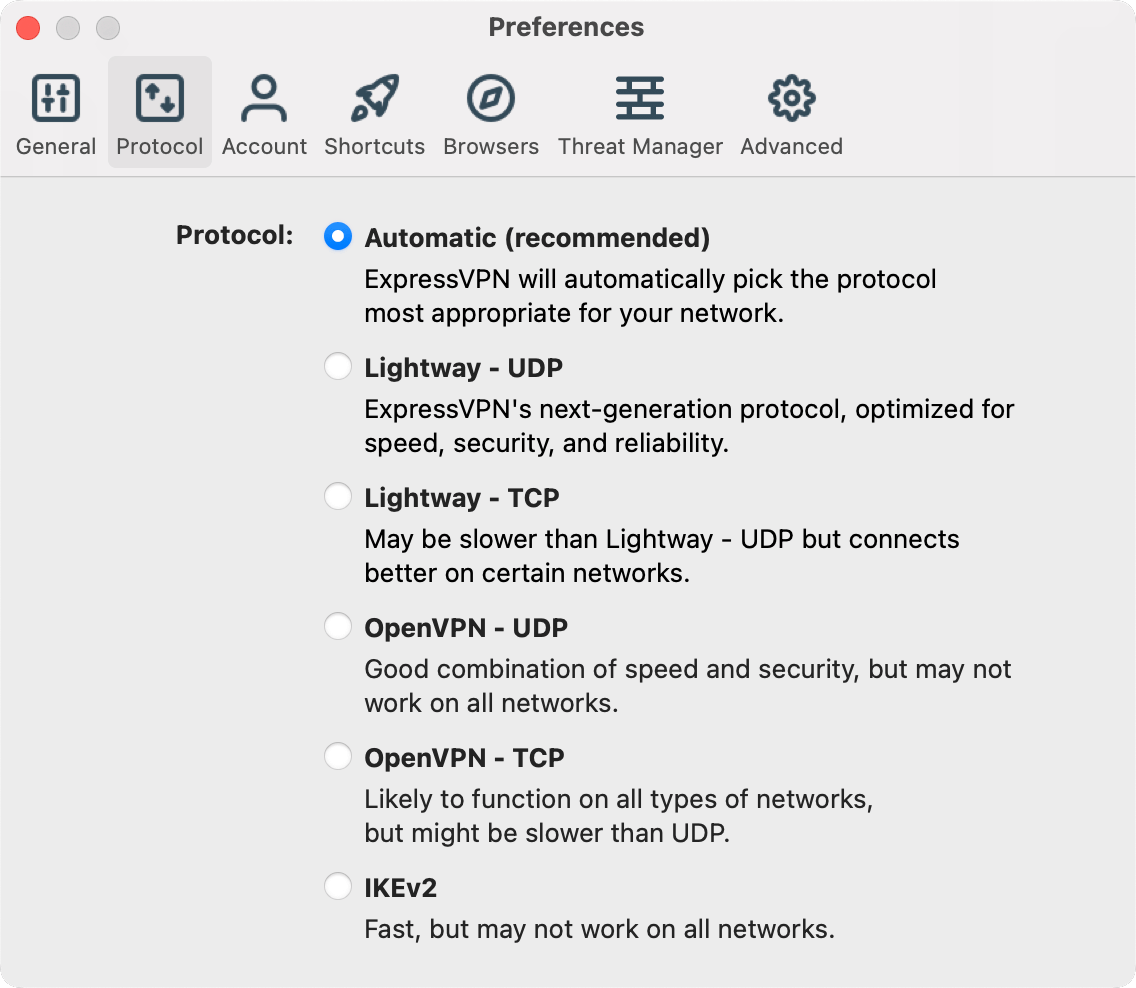
The app screenshots on this page show an older version of ExpressVPN.
Server Locations
ExpressVPN has 214 server locations in 113 countries, including all 50 U.S. states. It no longer publishes a total number of servers; they run on 10 Gbps connections, with 40 Gbps servers in selected locations.
For a few countries, the servers are virtual: they are physically located elsewhere – the India locations, for example, are hosted in Singapore and the UK. ExpressVPN discloses this on its server list.
In my earlier tests, ExpressVPN unblocked social media such as X (Twitter), Facebook, Instagram, and Telegram, as well as streaming services such as Netflix, Hulu, Disney+, BBC iPlayer, Prime Video, HBO, ITV, Spotify, YouTube, and ESPN. We have not repeated these tests for this update, and results change often.
ExpressVPN is one of the fastest and best VPNs for Netflix around.
Read more about these in our guides on how to find a DAZN VPN and how to use a YouTube TV VPN without triggering the proxy error.
ExpressVPN can also bypass internet censorship: when it detects that a network blocks VPNs, it disguises its connections automatically.
However, stringent censorship, such as the Great Firewall of China, is a cat-and-mouse game.
Privacy and Logging
ExpressVPN doesn’t log your online activities or connections.
This is achieved through:
British Virgin Islands (BVI) jurisdiction: ExpressVPN is run by Express VPN International Ltd, registered in the BVI. This is a privacy-friendly jurisdiction since the BVI doesn’t have mandatory data retention laws. Since 2021, ExpressVPN has belonged to Kape Technologies, which also owns CyberGhost and Private Internet Access.
No activity or connection logs: ExpressVPN doesn’t log your browsing history, traffic, DNS queries, original or assigned IP address, connection timestamps, or session lengths. This also ensures it has nothing to give if compelled.
However, it keeps your account and payment data and aggregated usage data: the days (not the times) you connected, the server location you chose, and the total amount of data you transferred.
This information is necessary for troubleshooting, customer support, and maintaining the VPN service.
Independent audits: ExpressVPN’s Trust Center lists 28 independent audits from 2018 to 2026, including KPMG’s checks of its no-logs and privacy policies. In 2017, Turkish investigators seized an ExpressVPN server and found no logs that could identify the user. ExpressVPN also publishes a transparency report every six months.
TrustedServer technology: ExpressVPN uses RAM-only servers. Each time a server reboots, all data on it is wiped.
Security and Encryption
ExpressVPN uses strong encryption and security protocols to protect online traffic and connections.
ExpressVPN uses the following security features:
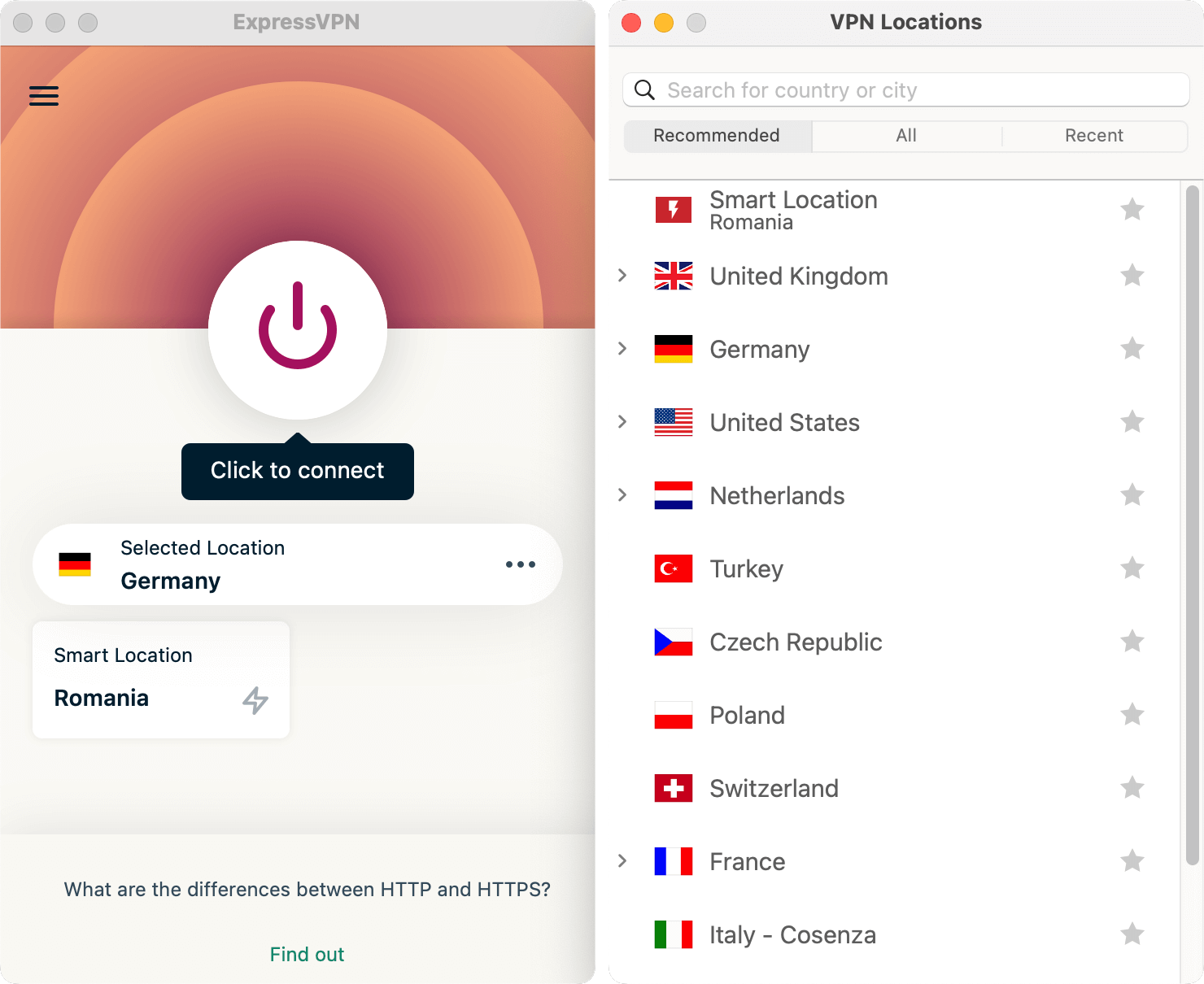
Encryption and protocols: ExpressVPN encrypts all traffic with AES-256. Its own Lightway protocol, the default, uses post-quantum key exchange; WireGuard (also with post-quantum protection) and OpenVPN are available too. Older protocols such as L2TP/IPsec are no longer offered.
Private DNS: ExpressVPN runs its own private DNS on every server, so your DNS requests aren’t sent to your internet provider.
Network Lock: ExpressVPN offers a kill switch that keeps your privacy and security safe if your VPN connection temporarily drops or disconnects.
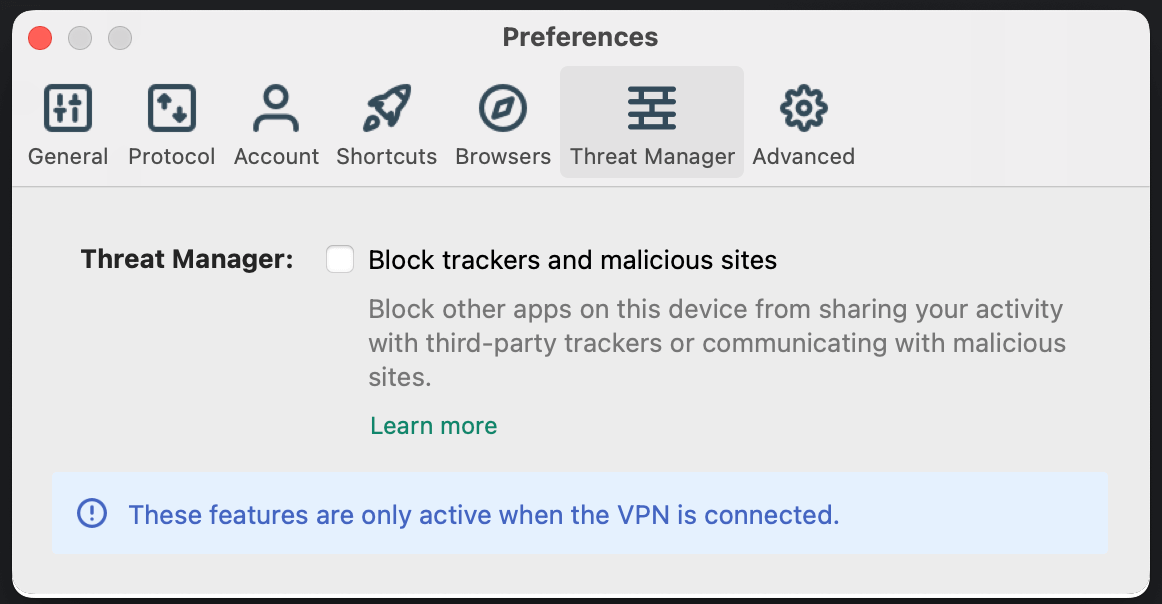
Advanced Protection: Included in every plan, Threat Manager, the ad blocker, and parental controls block trackers, malicious sites, ads, and adult content. Each part can be switched on or off in the app.
Ease of Use and Compatibility
ExpressVPN apps are easy to use, and they sport a user-friendly interface: one large connect button, a “Smart Location” that picks a fast server for you, and a searchable list of locations. In 2025, ExpressVPN redesigned its iOS and Android apps and released a Linux app with a graphical interface.
Split tunneling is available on Windows, macOS, Linux, and Android, and by website on iOS.
Depending on the plan, you can use ExpressVPN on 10 (Basic), 12 (Advanced), or 14 (Pro) devices at the same time.
You can use ExpressVPN on the following devices and platforms:
Computers, tablets, and phones – Windows, macOS, Linux, iPhone and iPad, Android, and browser extensions for Chrome, Firefox, and Edge.
TVs – Apple TV, Amazon Fire TV and Fire Stick, and Android TV.
Routers – ExpressVPN offers an app for supported routers, as well as its own Aircove and Fortify routers.
A router counts as one device and protects every device connected to it. For game consoles and smart TVs without VPN support, you can also use MediaStreamer (smart DNS).
MediaStreamer is faster than the VPN service. But you’ll lack the protection that comes with VPN encryption. You’ll also miss other VPN app features.
Customer Support
ExpressVPN offers excellent customer support through the following:
- A 24/7 live chat
- Support center
- Email ticket system
The live chat offers instant results, while the ticket system can take hours to a day. The support staff can help you with all your issues, including technical ones.
The support center comprises setup guides for every platform, troubleshooting articles, and FAQs. You can also use its search bar instead of browsing through all the articles.
Conclusion
ExpressVPN offers an excellent all-round VPN service that you can use for all your online activities. You get speed, privacy, and security.
The new Basic plan makes it much cheaper to get started, but the plans renew at a much higher price after the first term.
The VPN has strong unblocking abilities and is compatible with almost every device and platform.
Surfshark
Price from: $2.49/mo
Available on:

pros
Cons
Coming in second place is Surfshark VPN. Surfshark launched in 2018 and is run by Surfshark B.V. in Amsterdam, the Netherlands. In a short span, this VPN gained massive popularity.
Its popularity is mainly due to its fast servers, its long list of features, and unlimited simultaneous connections on a single subscription.
Also, this VPN has features and functionalities that enhance your privacy and security.
Feature Highlights
- 4,500+ servers in 100 countries
- Based in the Netherlands
- RAM-only servers with 10 Gbps ports
- CleanWeb ad and malware blocker in every plan
- Split tunneling (Bypasser), even on iOS
- Dynamic MultiHop and Rotating IP
- No-logs policy verified by Deloitte
- WireGuard protocol with post-quantum encryption
- Unlimited simultaneous connections
- 30-day money-back guarantee
Plans and Pricing
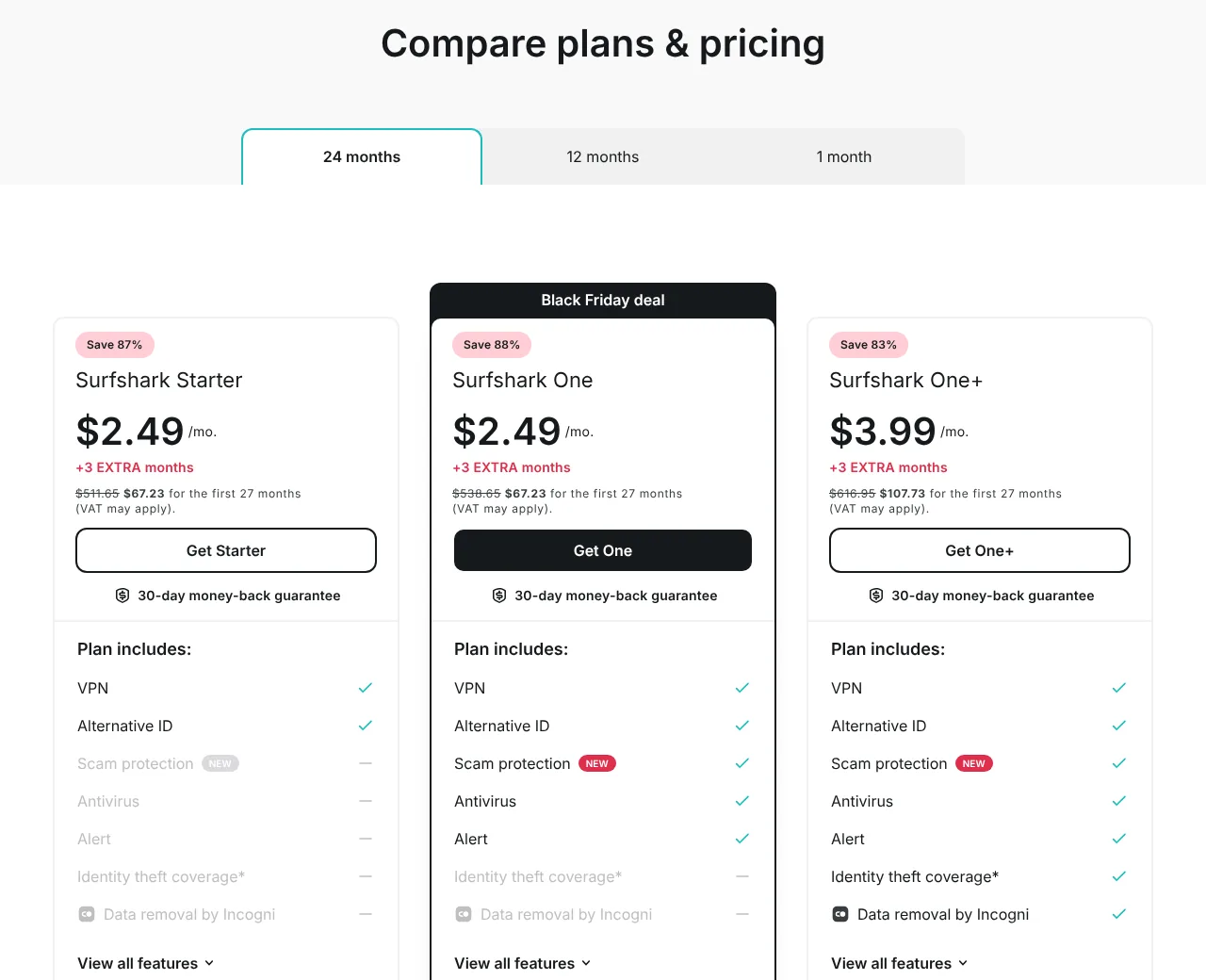
Surfshark offers three plans – Starter, One, and One+. All three include the same VPN with all servers, unlimited devices, and the CleanWeb ad blocker. One adds antivirus, data-leak alerts, and scam protection; One+ adds data removal by Incogni and, for US residents, identity-theft coverage.
Here are the prices of the Starter plan (as of 30 October 2026):
- The monthly plan costs $18.95
- The 1-year plan (plus 3 extra months) costs $2.99 per month. This totals $44.85 for the first 15 months
- The 2-year plan (plus 3 extra months) costs $2.49 per month. This totals $67.23 for the first 27 months
The 3 extra months are part of Surfshark’s Black Friday offer at the time of writing. After the first term, Starter renews at $79 per year (One: $99, One+: $119). At the time of writing, the 2-year One plan costs the same as Starter, so it is the better deal.
It is advisable to avoid the expensive monthly plan and choose the heavily discounted long-term plans for better value.
New users can try Surfshark for free for 7 days on up to 3 devices with a 1-year or 2-year plan. You have to enter payment details, and the plan is charged automatically after the trial unless you cancel. The 30-day money-back guarantee applies to your first purchase.
You can make your subscription payments through credit and debit cards, PayPal, Google Pay, Apple Pay, and cryptocurrencies such as Bitcoin, Ethereum, and Litecoin.
Speed
Note (October 2026): the speed tests below are older and were not repeated for this update. Since then, Surfshark has upgraded all its servers to 10 Gbps ports and launched its own Dausos protocol (so far only on macOS), which it says is up to 30% faster than standard protocols.
Surfshark is among the fastest VPNs in the industry. Its servers are optimized to handle heavy loads with minimal fluctuations.
All servers have 10 Gbps ports, and in 2025, Surfshark added 100 Gbps servers in Amsterdam.
Benchmark:
- Ping – 18ms
- Download speed – 91.26 Mbps
- Upload speed – 93.51 Mbps
Amsterdam server:
- Ping – 31ms
- Download speed – 68.70 Mbps
- Upload speed – 40.60 Mbps
German server:
- Ping – 42ms
- Download speed – 76.03 Mbps
- Upload speed – 79.91 Mbps
US server:
- Ping – 124ms
- Download speed – 42.62 Mbps
- Upload speed – 10.02 Mbps
These speeds are fast enough for heavy online tasks. Thus, you can torrent, game online, and stream without buffering or lagging issues.
You also get to avoid ISP throttling and enjoy low-latency connections. You can also use the WireGuard protocol to boost your speeds.
Server Locations
Surfshark’s server network comprises more than 4,500 servers in 100 countries and over 130 locations. This is a significant improvement over the smaller network it used to have.
Most servers are in Europe and the Americas, but the network also covers much of Asia and the Pacific and a number of countries in Africa and the Middle East.
Some locations are virtual: the server stands in another country, but you get an IP address of the country you chose.
Surfshark is popular for streaming services such as Netflix, Prime Video, BBC iPlayer, Hulu, Disney+, DAZN, HBO, and Hotstar. We have not re-tested streaming for this update, and results change often.
Due to its high speeds and many servers, Surfshark is a good choice as a Fubo TV VPN and as an ESPN VPN.
Besides unblocking streaming sites, Surfshark can bypass other online restrictions. For networks that block or restrict VPNs, it offers obfuscated servers and its NoBorders mode.
Privacy and Logging
Surfshark takes several measures to keep your digital life private. They include:
Strict no-logs policy: Surfshark doesn’t collect the IP addresses you visit, your browsing history, session information, connection timestamps, used bandwidth, or network traffic.
While you are connected, the VPN server temporarily keeps your user ID and IP address to make the connection work; Surfshark says these are deleted within 15 minutes after your session ends.
Audits and transparency: Deloitte checked Surfshark’s no-logs policy in 2023 and again in 2025. Surfshark has also replaced its warrant canary with a quarterly transparency report.
Netherlands jurisdiction: Surfshark moved its headquarters from the British Virgin Islands to the Netherlands on 1 October 2021. Dutch law doesn’t require VPN providers to log or retain user data, and as an EU company, Surfshark is bound by the GDPR. Keep in mind that the Netherlands takes part in the Nine Eyes intelligence-sharing alliance.
Ownership: Since 2022, Surfshark has shared a holding company with Nord Security, the maker of NordVPN; both brands say they operate independently.
RAM-only servers: Surfshark uses a diskless-server infrastructure. RAM-only servers host only the data necessary to keep the VPN running.
RAM-only servers improve privacy and back up the no-logs policy. Each time a server is turned off, data is completely wiped. Hence, no information is stored regarding your online activities.
In September 2026, Surfshark disclosed that, because of a configuration error, one of its internal test servers had been reachable from the internet. According to Surfshark, the server held no user data, and its production systems and apps were not affected.
Security and Encryption
Surfshark protects all your online activities using advanced security features and practices, which include:
Industry-leading encryption: Surfshark uses AES-256-GCM encryption (ChaCha20 with WireGuard) to safeguard your data and connections. Protocols include WireGuard (with post-quantum key exchange in several apps), OpenVPN, and IKEv2, as well as Surfshark’s own Dausos protocol, so far only on macOS.
Obfuscation: Surfshark’s obfuscated servers and NoBorders mode conceal your VPN traffic and make it harder for filters and blockers, such as your ISP and online censors, to detect.
CleanWeb: This feature lets you surf the internet without ads, trackers, malware, and phishing attempts. It is included in every plan.
Kill Switch: This fallback functionality cuts off the internet when the VPN connection temporarily drops. Thus, your data and online connection will always remain secure.
Dynamic MultiHop: Surfshark can send your traffic through two VPN servers instead of one, and you choose both. This adds privacy and an extra layer of protection, but it also slows the connection down.
Rotating IP: This feature changes your IP address every few minutes without dropping the connection, which makes tracking harder.
Ease of Use and Compatibility
Surfshark’s native VPN apps are simple and intuitive and sport a user-friendly interface. You can tweak the settings easily and quickly. Surfshark redesigned its apps in September 2026.
The native apps are compatible with Windows (including ARM-based PCs), macOS, Linux, Android, iOS, Apple TV, Android TV, and Amazon Fire TV. There are also browser extensions for Chrome, Firefox, and Edge.
Surfshark allows you to connect as many devices as you like on a single subscription.
You can also set up Surfshark manually on routers, game consoles, and smart TVs without an app.
Customer Support
Surfshark offers top-notch customer support through:
- 24/7 live chat
- Help center
The live chat has fast response times, and the support staff are informative and offer quick solutions.
However, before you use the live chat, try the help center. It has everything there is to know about the service.
The help center has setup guides for every platform, troubleshooting articles, and FAQs, including a section on billing issues.
You can also get help by sending your problem via email. This method takes longer to get a response, usually hours to a full day.
Conclusion
Surfshark has grown from a newcomer into one of the most complete VPN services. It keeps no logs – as verified by Deloitte – and offers strong security and privacy.
The VPN servers offer fast speeds, and you can use them for streaming, torrenting, and online gaming.
Notable features include unlimited devices, the CleanWeb ad blocker in every plan, split tunneling even on iOS, Dynamic MultiHop, and obfuscated servers, as well as a 7-day free trial and a 30-day money-back guarantee.
Private Internet Access (PIA) VPN
Price from: $2.03/mo
Available on:
pros
Cons
In third place is Private Internet Access (PIA) VPN. This VPN service is all about privacy, with low prices that stay the same at renewal.
PIA has servers in 180 locations in 113 countries, including all 50 US states, and one subscription covers an unlimited number of devices.
This VPN service also offers 100% open-source VPN apps. Even though PIA VPN advocates privacy, it is based in the US.
Feature Highlights
- 180 locations in 113 countries, including all 50 US states
- Based in the US
- 100% open-source VPN apps
- WireGuard and OpenVPN protocols
- No-logs policy audited by Deloitte and tested in court
- RAM-only servers on a 10 Gbps network
- Port forwarding and dedicated IP address (paid add-on)
- 35 streaming-optimized locations
- Unlimited simultaneous connections
- 30-day money-back guarantee for new users
Plans and Pricing
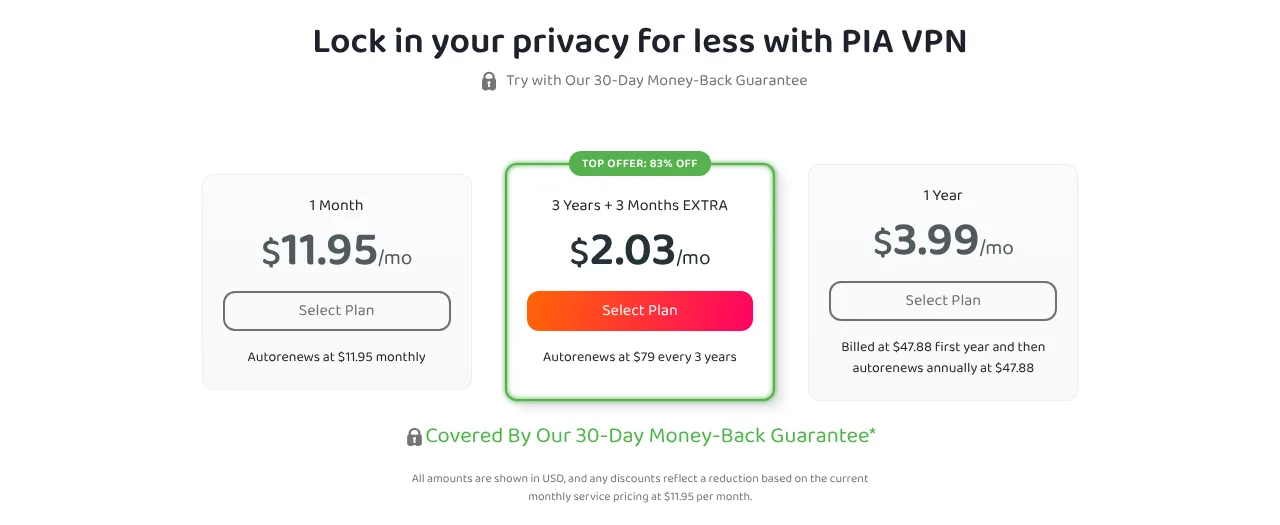
PIA VPN offers pocket-friendly prices, and unlike most rivals, it renews at the price of the first term. The monthly plan is expensive, so it is advisable to go for a long-term plan; it won’t break the bank.
Here are the subscription plans (as of 30 October 2026):
- The monthly plan costs $11.95 per month
- The 1-year plan costs $3.99 per month. This totals $47.88 per year
- The 3-year plan costs $2.03 per month. This totals $79 for 39 months, as you get 3 extra months for free, and it renews at $79 every 3 years
Every plan includes unlimited devices, all servers, the MACE ad blocker, port forwarding, and split tunneling. Private Internet Access subscriptions also come with Identity Guard, which alerts you if your email address shows up in a known data breach.
You can include add-ons, such as a Dedicated IP address and an antivirus for Windows PCs, for a small price.
You can pay by credit or debit card, PayPal, Apple Pay, Google Pay, or Amazon Pay. According to PIA’s help center, one-time payments with cryptocurrencies, US gift cards, and iDEAL are also possible.
The 30-day money-back guarantee applies to new users who buy directly from PIA. The iOS app’s App Store listing also advertises a 7-day free trial.
Speed
Private Internet Access runs its servers on a 10 Gbps network with unlimited bandwidth. Since October 2026, WireGuard has been the default protocol in all its apps, and according to PIA, new drivers in the Windows app make both WireGuard and OpenVPN connections faster.
We have not measured PIA’s speeds ourselves. Independent results are mixed: TechRadar reported a notable drop in PIA’s speeds in July 2026, before the October update.
For the best speeds, use WireGuard and connect to a nearby location. You can also use port forwarding (on most locations outside the US) to improve your torrenting and online gaming experience.
Server Locations
Private Internet Access has servers in 180 locations in 113 countries, including all 50 US states.
Many of these locations are virtual: the server is in another country, but you get an IP address of the country you chose. In about 60 of the 113 countries, PIA has only virtual locations; it marks them on its server page and in its apps.
All servers run in RAM only, so nothing is stored on hard drives.
Streaming servers: PIA has 35 streaming-optimized locations, which it says it monitors and tests against streaming services such as Netflix. We have not re-tested streaming for this update, and results change often.
Read more in our guides on how to use a Sling TV VPN and how to watch ITV in the USA.
Torrenting: PIA allows P2P traffic on every server, and port forwarding works on most locations outside the US.
Dedicated IP: For an extra fee, PIA gives you a unique IP address that only you use. Dedicated IPs are available in 10 countries: Australia, Belgium, Canada, Germany, Japan, Singapore, Sweden, Switzerland, the UK, and the US.
Besides streaming, you can use PIA to bypass online restrictions. On networks that block VPNs, its obfuscation and multi-hop features can help.
Privacy and Logging
As a privacy advocate, PIA VPN undertakes various privacy-focused measures to ensure your data is safe. They include:
No-logs policy: PIA VPN doesn’t collect or store your browsing history, IP addresses, connection timestamps, DNS queries, connected content, or bandwidth logs.
However, it keeps your email address and payment details and, if you live in the US, your state and ZIP code for tax purposes.
Proven in court and audited: In two US criminal cases, in 2016 and 2018, PIA was asked for user data and had no logs to hand over. Deloitte has also audited its no-logs setup three times – in 2022, 2024, and 2025 – and PIA publishes quarterly transparency reports.
US jurisdiction: PIA VPN is based in the US, unlike most VPNs. The US is a member of the Five Eyes intelligence alliance, and its authorities can demand data and issue gag orders.
Nonetheless, the US has no mandatory data retention law for VPN providers, so PIA can operate without logs.
This does not matter much if you use a VPN to unblock content online.
However, this service may not be for you if you use a VPN to hide your activity from state actors.
Ownership: Since 2019, PIA has belonged to Kape Technologies, which also owns ExpressVPN and CyberGhost.
Open-source apps and RAM-only servers: PIA’s apps are 100% open source, so anyone can inspect the code, and all servers run in RAM only.
Security and Encryption
PIA uses strong encryption to secure your data. You can be sure that your data and connections won’t be susceptible to attacks.
Protocols and encryption: PIA offers WireGuard (the default, with ChaCha20 encryption) and OpenVPN (with AES-128-GCM or AES-256-GCM). On macOS and Linux, it also offers AmneziaWG, a variant of WireGuard that makes VPN traffic harder to detect. PIA doesn’t offer post-quantum encryption yet.
Advanced Kill Switch: PIA VPN apps sport a built-in kill switch that blocks all internet traffic whenever the VPN isn’t connected – even if you disconnect it yourself.
Multi-hop and obfuscation: In the desktop apps, PIA can route your traffic through an extra proxy server before the VPN server, and it can disguise your VPN traffic as regular web traffic.
Leak protection: Leaks can severely compromise your privacy and security. By default, PIA sends your DNS requests through the VPN tunnel to its own DNS servers.
MACE: This is PIA VPN’s name for its DNS-based ad blocker. When activated, it blocks ads, trackers, and malicious websites. MACE is available in the desktop apps and on Android; on iOS, PIA offers a Safari content blocker instead.
Ease of Use and Compatibility
Private Internet Access apps are open source with an intuitive interface. The apps look alike on all platforms: a large connect button and a location list.
They are also easy to use, even for beginners, while advanced users can change the protocol, encryption, port, DNS, split tunneling, and more.
The apps are compatible with Windows, macOS, Linux (a full graphical app), Android (including Android TV), iOS and iPadOS, and Apple TV. Browser extensions for Chrome and Firefox protect only your browser traffic, and you can set PIA up on compatible routers.
The iOS app is simpler because of Apple’s restrictions: it has no split tunneling and no MACE.
Customer Support
Private Internet Access VPN offers 24/7 customer support through:
- Help center
- Live chat
- Email ticket system
Support is available in English, French, German, and Romanian. The help center has setup guides for every app and for routers, troubleshooting articles, and billing FAQs, with a search bar.
For faster results, use the live chat. The email system can be slow, and it is advisable to use it only for technical issues.
Conclusion
Private Internet Access is an excellent privacy-centric VPN service. Its no-logs policy has been tested in court and audited by Deloitte, its apps are open source, and one subscription covers an unlimited number of devices.
It is also one of the cheapest big VPNs, and its prices stay the same at renewal. Its subscriptions carry a 30-day money-back guarantee for new users.
CyberGhost
Price from: $2.19/mo
Available on:
pros
Cons
In fourth place is CyberGhost, a fully-fledged VPN founded in 2011 and run from Bucharest, Romania. You can use it to safeguard your online activities and connections over the internet.
This one-click privacy solution is suitable for streaming, torrenting, and unblocking many online restrictions.
CyberGhost also provides good value for your money on its 2-year plan, and its 45-day money-back guarantee is longer than most.
In my opinion, CyberGhost is an excellent option for people on a tight budget.
Feature Highlights
- About 9,600 servers in 100 countries
- Romanian jurisdiction
- No-logs policy audited by Deloitte
- WireGuard protocol
- RAM-only servers
- Allows P2P traffic
- Streaming and gaming servers
- NoSpy servers in Romania
- Up to 7 simultaneous connections
- 45-day money-back guarantee (14 days on the monthly plan)
Plans and Pricing
CyberGhost offers affordable pricing plans for its VPN service. Like most VPNs, the monthly plan is expensive compared to long-term plans.
The subscription plans (as of 30 October 2026) include the following:
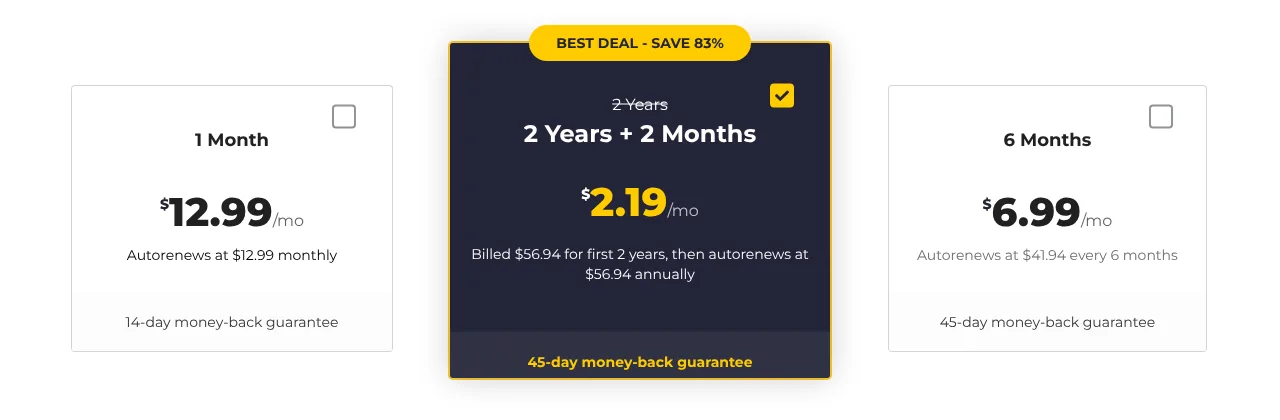
- The monthly plan costs $12.99 per month.
- The 6-month plan costs $6.99 per month. This totals $41.94 every 6 months.
- The 2-year plan costs $2.19 per month and includes 2 extra months for free. This totals $56.94 for the first 26 months; after that, it renews at $56.94 per year (about $4.75 per month).
The 6-month and 2-year plans also include the NoSpy servers. A Dedicated IP address costs extra.
The 45-day money-back guarantee applies to the 6-month and 2-year plans (14 days on the monthly plan) when you buy directly from CyberGhost. On Windows and macOS, you can also try CyberGhost for free for 24 hours without a payment method.
You can pay by credit or debit card, PayPal, Apple Pay, Google Pay, or Amazon Pay. CyberGhost doesn’t accept cryptocurrencies at the time of writing.
Speed
CyberGhost says its server network runs on 10 Gbps infrastructure with unlimited bandwidth and that it is still replacing older 1 Gbps servers, starting with its most-used locations. Its servers are optimized for torrenting, gaming, and streaming.
We have not measured CyberGhost’s speeds ourselves. Recent third-party tests point to good but not top-tier speeds: Engadget, for example, measured an average speed drop of about 25% with WireGuard in January 2026.
For the best speeds, use the WireGuard protocol and a nearby location – the “Best Location” option picks one for you.
Server Locations
CyberGhost has an extensive network of about 9,600 servers in 125 locations in 100 countries. This geographical coverage ensures you can access content from almost anywhere.
However, CyberGhost marks 56 of its 100 countries as virtual: the server is in another country, but you get an IP address of the country you chose.
Streaming servers: CyberGhost offers servers optimized for specific streaming services, such as Netflix and BBC iPlayer. We have not re-tested streaming for this update, and results change often.
CyberGhost can also be an option if you need a beIN Sports VPN or if you would like to access BBC iPlayer in Australia.
Torrenting servers: These allow you to download or share P2P content safely and privately. CyberGhost doesn’t offer port forwarding.
Dedicated IP address: CyberGhost offers you an IP address not shared with anyone else, in about 20 locations. You must pay for the add-on to get this IP address.
Most CyberGhost servers allow you to bypass online restrictions. This is useful for unblocking sites restricted in various places, such as social media.
However, CyberGhost doesn’t advertise an obfuscation mode, so it may not get past stringent censorship.
Privacy and Logging
CyberGhost is committed to protecting your digital identity. Here is how the VPN service protects your privacy:
No-logs policy: CyberGhost doesn’t store connection logs – no logs tied to your IP address, connection timestamp, or session duration.
It does keep your email address and payment details. According to its privacy policy, the apps also send device data and connection events, such as your country and app version, and the website and apps use third-party analytics tools.
Audits and transparency: Deloitte has audited CyberGhost’s no-logs setup three times – in 2022, 2024, and 2025 – and CyberGhost publishes quarterly transparency reports.
Romanian jurisdiction: CyberGhost S.R.L. is registered in Romania, an EU member state that is not a member of the 5/9/14 Eyes alliances.
Ownership: Since 2017, CyberGhost has belonged to Kape Technologies, which also owns ExpressVPN and Private Internet Access.
NoSpy servers: CyberGhost runs 44 NoSpy servers in Bucharest, which it says it operates itself, without third parties. They are included with the 6-month and 2-year plans. All CyberGhost servers run in RAM only.
Security and Encryption
Privacy and security go hand in hand, and CyberGhost implements strong security to complement your online privacy. This is done through:
Strong encryption: CyberGhost uses AES-256 and ChaCha20 encryption with perfect forward secrecy. It doesn’t offer post-quantum encryption yet.
CyberGhost also offers secure and fast protocols: WireGuard on all its apps, and OpenVPN or IKEv2, depending on the device.
Leak protection: The apps protect you against DNS leaks, and on Windows, you can turn off IPv6 while connected.
Automatic kill switch: A temporary drop in your VPN connection can compromise your security and privacy.
If the connection drops, the kill switch blocks the internet connection and thus keeps your security and privacy intact.
Content Blocker: This feature blocks known ad, tracker, and malware domains.
Ease of Use and Compatibility
CyberGhost offers native VPN apps and is compatible with the following:
Desktops and mobiles: Windows, macOS, Linux (command line only), Android, and iOS.
TVs: Android TV and Amazon Fire TV. There’s no Apple TV app.
Browsers: Free proxy extensions for Chrome and Firefox, which only cover browser traffic.
Smart TVs and consoles without an app: CyberGhost’s Smart DNS or a router with CyberGhost set up.
The native apps are easy to use and feature an intuitive interface, with a “Best Location” option and server lists for streaming, torrenting, and (on Windows) gaming. The Windows app has the most settings; split tunneling by app is only available on Android.
Customer Support
CyberGhost offers fast, 24/7 customer support. You can reach customer support through:
- Support center
- Live chat
You can get assistance in English, German, French, and Romanian.
The support center has setup guides for all apps and for routers, troubleshooting articles, and billing FAQs.
You can use the live chat for quick results or the email ticket system to talk with an agent.
Conclusion
CyberGhost is a good-value VPN service for privacy, streaming, and torrenting, with a large server network, a no-logs policy audited by Deloitte, and a 45-day money-back guarantee.
Its easy-to-use apps make the service suitable for both novice and advanced users. The downsides are the limit of 7 devices, the many virtual locations, and app-based split tunneling only on Android.
Review and Ranking Criteria
A VPN is a jack of all trades. You can use it for privacy and security, bypassing restrictions and censorship, unblocking streaming sites, avoiding ISP throttling, and much more.
Whatever you need a VPN for, you must ensure it meets some minimum requirements. To save you the hassle, we reviewed the VPNs in the industry and ranked them accordingly.
But how did we come up with the ranking? This section provides detailed insights, principles, and key points regarding our evaluation and ranking criteria.
Each VPN’s total score is the average of the six scores in our review of it: Pricing, Locations, Speed, Privacy, Support, and Ease of Use.
Speed and Performance
In this area, we test for speeds suitable for heavy VPN use. Usually, this includes streaming, torrenting, online gaming, and other speed- or bandwidth-intensive tasks.
We look at the ping, upload, and download speeds. The VPN should offer unlimited bandwidth.
To keep the results comparable, we test all VPN speeds with the same parameters. We also consider our current internet speed, the closest servers, and the furthest servers.
Once all is done, we assign the score based on the results. For instance, 40 Mbps (enough for heavy HD streaming without buffering) is the limit for our minimum score.
Server Locations
Ranking on server locations is based on the following:
- The number of servers
- Geographical coverage (ideally, server locations in most countries worldwide)
- Whether the locations are physical or virtual
We also look at server optimizations and specialized servers. These are useful for torrenting, unblocking various streaming sites, and bypassing other restrictions and censorship.
Privacy and Security
This is the primary purpose of a VPN. Here we evaluate vital points such as logging policies, jurisdiction, encryption and protocols, and other features for privacy and security.
For a VPN provider to get a 10/10 score, it should have the following:
- A strict no-logs policy, verified by independent audits
- A privacy-friendly jurisdiction with no mandatory data retention laws, ideally outside the 5/9/14 Eyes alliances
- Strong encryption, such as AES-256 or ChaCha20
- Secure and fast protocols: OpenVPN, WireGuard, IKEv2/IPsec, or an equivalent proprietary protocol
- Privacy- and security-enhancing features: a kill switch, leak protection, an ad blocker, and private DNS
We also consider unique aspects like RAM-only servers, double VPN, obfuscation, and post-quantum encryption.
Ease of Use
This is partly a matter of preference; however, to get a good score, the VPN service should be easy to use, from signing up to setting up the apps.
We also consider the following:
- A user-friendly interface, streamlined across all platforms
- Efficient usability and functionality, such as navigation and tweaking settings
- Supported platforms
- Unique app features
Customer Support
The best VPN providers offer reliable round-the-clock customer support. For ranking, we evaluate the customer support options available.
Usually, these include a help center, live chat, and email. The help center should offer helpful content, such as FAQs, tutorials, and guides, and have a search bar.
We also examine availability, response times, and how well the support staff handle an issue.
The live chat should be instant and, even better, available 24/7.
For email, the ideal response time is a few hours to a full day.
Pricing
An excellent VPN service comes at a price but shouldn’t break the bank. The main question we evaluate is whether the provider is worth the money.
Other supporting aspects for ranking include:
- The price of the first term and the renewal price
- The discounts accompanying the subscription plans
- Refund policy and the money-back guarantee
- Free trials
- Simultaneous connections on a single subscription
- Payment methods
Also, some VPNs are expensive but offer an excellent service, while others are cheap but offer a poor service – or vice versa.
Some VPNs also charge more than others in the same class (in terms of value).
Wrap Up
Everyone has different needs for a VPN and may prefer a different provider. At times, a VPN provider may not meet all your expectations.
Nonetheless, using our review and ranking criteria, we came up with the best VPNs you can use in any situation.
Our team initially signed up for 25 highly regarded and widely recommended VPNs. After about a week, we narrowed the focus to the top 10.
Over the course of a month, we rigorously tested these 10 VPNs, allowing us to create a ranking of the top 4 VPNs based on our evaluations. In October 2026, we updated prices, features, and scores based on our latest reviews.
Our evaluation criteria included speed, privacy, feature set, user interface, server availability and locations, online feedback, reputation, ability to overcome restrictions, customer support, and value for money.
ExpressVPN emerged as the top choice, notable for its speed, privacy, security, and ability to unblock content, followed by Surfshark, Private Internet Access, and CyberGhost. It’s important to note that while ExpressVPN is now much cheaper for the first term, its plans renew at a considerably higher price.
4 Comments
James Gard
April 16, 2025 4:21 am
If Nord is as good as you says it is here
https://www.privacyaffairs.com/reviews/nordvpn/
why is it not included in this list?
Me
May 30, 2024 10:42 pm
Did you test Bitdefender vpn? It’s rank?
Victor
February 19, 2024 12:30 pm
Please i don’t have access to my Netflix… can someone assist?
Karl
December 15, 2023 9:43 am
Is Nord still respected?